This thread has been locked.

If you have a related question, please click the "Ask a related question" button in the top right corner. The newly created question will be automatically linked to this question.

Cannot import project


Hi,

When I try to import CC1350STLK project I get the following error:

      Error importing project. Device-id "Cortex M.CC1310F128" is not recognized!

My CCS version is:

   Code Composer Studio

   Version: 6.2.0.00050

Thx for the help

  • Hello,

    A common cause for that error is that the correct device support is not installed. One thing to check is if you can create a new project for that target.

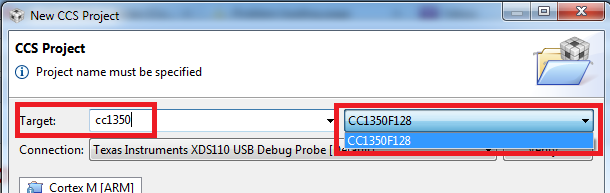
    Can you try creating a new project (Project -> New CCS Project) and see if you can select CC1350F128 in Target list:

    If you can create a new project for CC1350F128 successfully, they you should have proper device support installed and the issue if related to something else.

    Please let me know.

    Thanks

    ki

  • ki,

    I am having a similar issue with MSP432 launchpad. I am able to build a new project as you described. What other steps should I look at taking? Thanks in advance! 

  • Thomas,
    What version of CCS are you using and are you importing an MSPWare example? And and if so, which version and what project?

    Thanks
    ki
  • I'm using CCS v6.2 and yes I'm trying to import an MSP432 Ware example. The example I was looking to import was one of the adc14 driver library examples (version 3.5 I think). The weird thing is that I can import the register level examples, but not the driver library ones. 

  • I tried those versions and did not have an issue. What is the exact error message you get?
  • The message I receive when I try to import the example project is: "Error importing project. Device-id "Cortex M.MSP432P401R" is not recognized!". I'm not sure why this is occurring or what I have installed incorrectly. Thanks again for the assistance!