This thread has been locked.

If you have a related question, please click the "Ask a related question" button in the top right corner. The newly created question will be automatically linked to this question.

CCS/TMS320F28335: CCSv6 Linker

Part Number: TMS320F28335

Tool/software: Code Composer Studio

Hallo,

while importing my CCSv3-Project to CCSv6 I get strange warnings, which are:

warning #10252-D: Symbol "C$$EXIT" (pulled from "C:\ti\ccsv6\tools\compiler\c2000_15.12.3.LTS\lib\rts2800_fpu32.lib<exit.obj>") defined in 2 places:
   C:\ti\ccsv6\tools\compiler\c2000_15.12.3.LTS\lib\rts2800_fpu32.lib<exit.obj>
   C:/ti/ccsv6/tools/compiler/c2000_15.12.3.LTS/lib/rts2800_fpu32.lib<exit.obj>

But the warning shows exact the same path, but only different in / and \ ????

Any idea?

br Ralf

  • Ralf Koester said:
    while importing my CCSv3-Project to CCSv6 I get strange warnings,

    Do you mean at build time, not import time?

    It is odd that the two paths that are listed are the same location. Is the project perhaps specifying this library path in two different places (such as in the GUI linker options and in the linker command file)?

  • Hallo Aartig,

    yes of course at build time, as you can see at the output with the warning no. #10252-D..... in my post.

    I set the option --supress warnings, not to see this, and I do not no why,

    this morning I removed the option --supress warnings and the warnings disappered.

    Strange!

    In my cmf-files I have not specified a linker path;

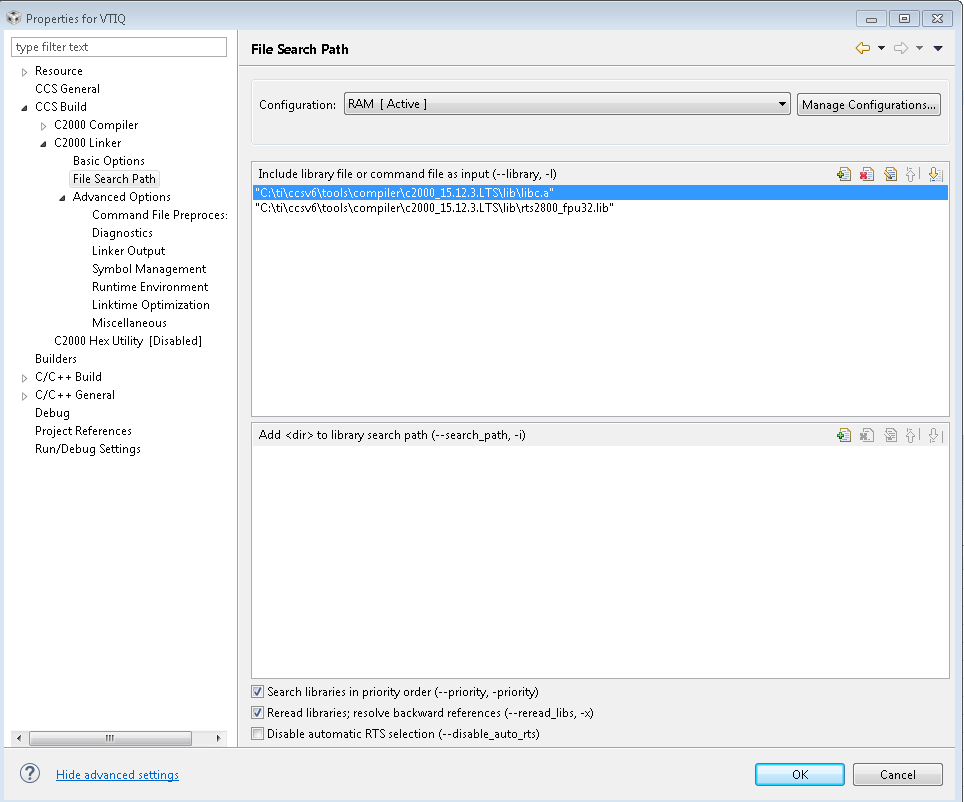
    Only in the "properties" of the CCSv6 project: see attached file!

    The CMD-File I attached also, with the extension txt instead of cmd!

    /*
    // TI File $Revision: /main/9 $
    // Checkin $Date: August 28, 2007   11:23:31 $
    //###########################################################################
    //
    // FILE:    28335_RAM_lnk.cmd
    //
    // TITLE:   Linker Command File For 28335 examples that run out of RAM
    //
    //          This ONLY includes all SARAM blocks on the 28335 device.
    //          This does not include flash or OTP. 
    //
    //          Keep in mind that L0 and L1 are protected by the code
    //          security module.
    //
    //          What this means is in most cases you will want to move to 
    //          another memory map file which has more memory defined.  
    //
    //###########################################################################
    // $TI Release: DSP2833x Header Files V1.03 $
    // $Release Date: December 3, 2007 $
    //###########################################################################
    */
    
    /* ======================================================
    // For Code Composer Studio V2.2 and later
    // ---------------------------------------
    // In addition to this memory linker command file, 
    // add the header linker command file directly to the project. 
    // The header linker command file is required to link the
    // peripheral structures to the proper locations within 
    // the memory map.
    //
    // The header linker files are found in <base>\DSP2833x_Headers\cmd
    //   
    // For BIOS applications add:      DSP2833x_Headers_BIOS.cmd
    // For nonBIOS applications add:   DSP2833x_Headers_nonBIOS.cmd    
    ========================================================= */
    
    /* ======================================================
    // For Code Composer Studio prior to V2.2
    // --------------------------------------
    // 1) Use one of the following -l statements to include the 
    // header linker command file in the project. The header linker
    // file is required to link the peripheral structures to the proper 
    // locations within the memory map                                    */
    
    /* Uncomment this line to include file only for non-BIOS applications */
    /* -l DSP2833x_Headers_nonBIOS.cmd */
    
    /* Uncomment this line to include file only for BIOS applications */
    /* -l DSP2833x_Headers_BIOS.cmd */
    
    /* 2) In your project add the path to <base>\DSP2833x_headers\cmd to the
       library search path under project->build options, linker tab, 
       library search path (-i).
    /*========================================================= */
    
    /* Define the memory block start/length for the F28335  
       PAGE 0 will be used to organize program sections
       PAGE 1 will be used to organize data sections
    
       Notes: 
             Memory blocks on F28335 are uniform (ie same
             physical memory) in both PAGE 0 and PAGE 1.  
             That is the same memory region should not be
             defined for both PAGE 0 and PAGE 1.
             Doing so will result in corruption of program 
             and/or data. 
             
             L0/L1/L2 and L3 memory blocks are mirrored - that is
             they can be accessed in high memory or low memory.
             For simplicity only one instance is used in this
             linker file. 
             
             Contiguous SARAM memory blocks can be combined 
             if required to create a larger memory block. 
    */
    
    
    MEMORY
    {
    PAGE 0 :
       /* BEGIN is used for the "boot to SARAM" bootloader mode      */
       /* BOOT_RSVD is used by the boot ROM for stack.               */
       /* This section is only reserved to keep the BOOT ROM from    */
       /* corrupting this area during the debug process              */
       
       BEGIN      : origin = 0x000000, length = 0x000002     /* Boot to M0 will go here                      */
       BOOT_RSVD  : origin = 0x000002, length = 0x00004E     /* Part of M0, BOOT rom will use this for stack */               
       RAMM0      : origin = 0x000050, length = 0x0003B0
    
       RAML0      : origin = 0x008000, length = 0x004000    
    //   RAML1      : origin = 0x009000, length = 0x003000    
    //   RAML1      : origin = 0x009000, length = 0x001000    
    //   RAML2      : origin = 0x00B000, length = 0x001000
    //   RAML3      : origin = 0x00C000, length = 0x001000
       ZONE7A     : origin = 0x200000, length = 0x00FC00    /* XINTF zone 7 - program space */ 
       CSM_RSVD   : origin = 0x33FF80, length = 0x000076     /* Part of FLASHA.  Program with all 0x0000 when CSM is in use. */
       CSM_PWL    : origin = 0x33FFF8, length = 0x000008     /* Part of FLASHA.  CSM password locations in FLASHA            */
       ADC_CAL    : origin = 0x380080, length = 0x000009
       RESET      : origin = 0x3FFFC0, length = 0x000002
       IQTABLES   : origin = 0x3FE000, length = 0x000b50
       IQTABLES2  : origin = 0x3FEB50, length = 0x00008c
       FPUTABLES  : origin = 0x3FEBDC, length = 0x0006A0
       BOOTROM    : origin = 0x3FF27C, length = 0x000D44               
     
    /*	07.10.2011, mehrere SARAM Blocks werden zu einem Bereich kombiniert.
    	Siehe hierzu auch "TMS320C28x Assembly Language Tools v6.0 User's Guide
    	SPRU513D 7.5.4.7 S.197!
    */
    PAGE 1 : 
       RAMM1      : origin = 0x000400, length = 0x000400     /* on-chip RAM block M1 */
       RAML4      : origin = 0x00C000, length = 0x000200    
       RAML5      : origin = 0x00C200, length = 0x003e00
    //   RAML6      : origin = 0x00E000, length = 0x001000    
    //   RAML7      : origin = 0x00F000, length = 0x001000
       ZONE7B     : origin = 0x20FC00, length = 0x000400     /* XINTF zone 7 - data space */
    }
    
     
    SECTIONS
    {
       /* Setup for "boot to SARAM" mode: 
          The codestart section (found in DSP28_CodeStartBranch.asm)
          re-directs execution to the start of user code.
          07.10.2011, .text wird auf drei Bereiche verteilt  */
       codestart        : > BEGIN,     PAGE = 0
       ramfuncs         : > RAML4,     PAGE = 1
       .text: { *(.text) } >> RAMM0 | RAML0,	PAGE = 0
       //.text            : > RAML0      PAGE = 0
       .cinit           : > RAML0,     PAGE = 0
       .pinit           : > RAML0,     PAGE = 0
       .switch          : > RAML0,     PAGE = 0
       
       .stack           : > RAMM1,     PAGE = 1
       .ebss            : > RAML5,     PAGE = 1
    //	.ebss: { *(.ebss) } >> RAML4 | RAML5 | RAML6 | RAML7,	PAGE = 1
       .econst          : > RAMM0,     PAGE = 0
       .esysmem         : > RAML5,     PAGE = 1
    
       IQmath           : > RAML0,     PAGE = 0
       IQmathTables     : > IQTABLES,  PAGE = 0, TYPE = NOLOAD 
       IQmathTables2    : > IQTABLES2, PAGE = 0, TYPE = NOLOAD 
       FPUmathTables    : > FPUTABLES, PAGE = 0, TYPE = NOLOAD
       FASTRAML0		:> RAML0,		PAGE = 0
       DMARAML4         : > RAML4,     PAGE = 1
       //DMARAML5         : > RAML5,     PAGE = 1
       //DMARAML6         : > RAML6,     PAGE = 1
       //DMARAML7         : > RAML7,     PAGE = 1
       
       ZONE7DATA        : > ZONE7B,    PAGE = 1  
    
       .reset           : > RESET,     PAGE = 0, TYPE = DSECT /* not used                    */
       csm_rsvd         : > CSM_RSVD   PAGE = 0, TYPE = DSECT /* not used for SARAM examples */
       csmpasswds       : > CSM_PWL    PAGE = 0, TYPE = DSECT /* not used for SARAM examples */
       
       /* Allocate ADC_cal function (pre-programmed by factory into TI reserved memory) */
       .adc_cal     : load = ADC_CAL,   PAGE = 0, TYPE = NOLOAD
         
    }
    
    SECTIONS
    {
    	Net_terminals:	> RAML4,PAGE = 1
    	Controller:		> RAML4,PAGE = 1
    	IBx_addr: 		> RAML4,PAGE = 1
    	Buck1Loop:		> RAML4,PAGE = 1
    	Buck2Loop:		> RAML4,PAGE = 1
    	DataLogTST: 	> RAML4,PAGE = 1
    	GraphData: 		> RAML4,PAGE = 1
    }
    
    
    /*
    //===========================================================================
    // End of file.
    //===========================================================================
    */
    

  • Ralf Koester said:

    I set the option --supress warnings, not to see this, and I do not no why,

    this morning I removed the option --supress warnings and the warnings disappered.

    I'm not quite sure what happened there, but good to know that the warning no longer appears. I will go ahead mark this thread as answered.

    Also, just FYI, in your Project Properties, you do not need to specify both libraries libc.a and rts2800_fpu32.lib (it doesn't hurt to have both but is not necessary).
    libc.a will automatically pull in the appropriate rts library based on the project compile options.