This thread has been locked.

If you have a related question, please click the "Ask a related question" button in the top right corner. The newly created question will be automatically linked to this question.

Linux/TM4C123GH6PM: CCSv6, Linux Ubuntu 15.10 and TivaC launchpad. Unable to start Debug session. No XDS emulators were found.

Part Number: TM4C123GH6PM
Other Parts Discussed in Thread: EK-TM4C123GXL

Tool/software: Linux

Hi all,

In the last days I'm facing with a boring situation on my CCSv6.2.0.00050 installed on an Ubuntu 15.10 laptop.

I'm using the TivaC launchpad and, while in the last week i could use my ccs with no problem, now I have an unusual problem with the debugger, because I can't launch anymore debugger session.

I program using assembly only language: TI v15.12.3.LTS but, while the compiler goes without any problem, the debugger doesn't.

I tried almost anything, switched to CCSv7, bought another launchpad, used another USB cable, reinstalled all the Operating system, but whenever I go and whatever I do, the result is ever the same:

"Error connecting to the target" prompt as soon as I launch the debugger.

Searching on internet and on my system, I found an applet inside my installation directory, under: <install dir>/ccsv6/ccs_base/common/uscif/xds100serial, which says to me: "No XDS100 emulators were found on the system" but I don't understood: if I'm using the launchpad, my emulators shouldn't be the "Stellaris In circuit Debugger"? Is normal in my case that this application don't found the xds100 emulators?

Following this forum thread:

seems, that "Steven Hansen" got a very similar problem to mine, but finally he get back to a Windows system, but I can't, so I havo absolutely to fix the problem.


I also found some strange issues on my USB ports, and attached to this message a full report of my usb ports, and seems that the Stellaris emulator, trigger a serial link that is called, in my system: "ttyACM0", is this correct? Because in the forum post that I linked just before, seems that It has to be a "ttyUSB0" instead, so which must be the correct setup of CCS under linux to get a debugger up and running?


I also tried to manually unbind the launchpad from the "cdc_acm" usb driver, to manually bind it in "ftdi_sio" driver, or "usbserial" one, but it failed, because the binding to the new driver fails.

Please help me!

Please point me towards some new check to perform, or some other way, beacause now I don'tknow how could I do, to fix my debugger.

Thanks

monitor will print the received events for:
UDEV - the event which udev sends out after rule processing
KERNEL - the kernel uevent

KERNEL[176.022315] add      /devices/pci0000:00/0000:00:1a.1/usb4/4-2 (usb)
ACTION=add
BUSNUM=004
DEVNAME=/dev/bus/usb/004/003
DEVNUM=003
DEVPATH=/devices/pci0000:00/0000:00:1a.1/usb4/4-2
DEVTYPE=usb_device
MAJOR=189
MINOR=386
PRODUCT=1cbe/fd/100
SEQNUM=2456
SUBSYSTEM=usb
TYPE=239/2/1

KERNEL[176.023510] add      /devices/pci0000:00/0000:00:1a.1/usb4/4-2/4-2:1.0 (usb)
ACTION=add
DEVPATH=/devices/pci0000:00/0000:00:1a.1/usb4/4-2/4-2:1.0
DEVTYPE=usb_interface
INTERFACE=2/2/1
MODALIAS=usb:v1CBEp00FDd0100dcEFdsc02dp01ic02isc02ip01in00
PRODUCT=1cbe/fd/100
SEQNUM=2457
SUBSYSTEM=usb
TYPE=239/2/1

KERNEL[176.026303] add      /devices/pci0000:00/0000:00:1a.1/usb4/4-2/4-2:1.0/tty/ttyACM0 (tty)
ACTION=add
DEVNAME=/dev/ttyACM0
DEVPATH=/devices/pci0000:00/0000:00:1a.1/usb4/4-2/4-2:1.0/tty/ttyACM0
MAJOR=166
MINOR=0
SEQNUM=2458
SUBSYSTEM=tty

KERNEL[176.026644] add      /devices/pci0000:00/0000:00:1a.1/usb4/4-2/4-2:1.1 (usb)
ACTION=add
DEVPATH=/devices/pci0000:00/0000:00:1a.1/usb4/4-2/4-2:1.1
DEVTYPE=usb_interface
DRIVER=cdc_acm
INTERFACE=10/0/0
MODALIAS=usb:v1CBEp00FDd0100dcEFdsc02dp01ic0Aisc00ip00in01
PRODUCT=1cbe/fd/100
SEQNUM=2459
SUBSYSTEM=usb
TYPE=239/2/1

KERNEL[176.027077] add      /devices/pci0000:00/0000:00:1a.1/usb4/4-2/4-2:1.2 (usb)
ACTION=add
DEVPATH=/devices/pci0000:00/0000:00:1a.1/usb4/4-2/4-2:1.2
DEVTYPE=usb_interface
INTERFACE=255/0/0
MODALIAS=usb:v1CBEp00FDd0100dcEFdsc02dp01icFFisc00ip00in02
PRODUCT=1cbe/fd/100
SEQNUM=2460
SUBSYSTEM=usb
TYPE=239/2/1

KERNEL[176.027444] add      /devices/pci0000:00/0000:00:1a.1/usb4/4-2/4-2:1.3 (usb)
ACTION=add
DEVPATH=/devices/pci0000:00/0000:00:1a.1/usb4/4-2/4-2:1.3
DEVTYPE=usb_interface
INTERFACE=254/1/1
MODALIAS=usb:v1CBEp00FDd0100dcEFdsc02dp01icFEisc01ip01in03
PRODUCT=1cbe/fd/100
SEQNUM=2461
SUBSYSTEM=usb
TYPE=239/2/1

UDEV  [176.034435] add      /devices/pci0000:00/0000:00:1a.1/usb4/4-2 (usb)
ACTION=add
BUSNUM=004
DEVNAME=/dev/bus/usb/004/003
DEVNUM=003
DEVPATH=/devices/pci0000:00/0000:00:1a.1/usb4/4-2
DEVTYPE=usb_device
DRIVER=usb
ID_BUS=usb
ID_MM_DEVICE_IGNORE=1
ID_MODEL=In-Circuit_Debug_Interface
ID_MODEL_ENC=In-Circuit\x20Debug\x20Interface
ID_MODEL_FROM_DATABASE=In-Circuit Debug Interface
ID_MODEL_ID=00fd
ID_REVISION=0100
ID_SERIAL=Texas_Instruments_In-Circuit_Debug_Interface_0E208121
ID_SERIAL_SHORT=0E208121
ID_USB_INTERFACES=:020201:0a0000:ff0000:fe0101:
ID_VENDOR=Texas_Instruments
ID_VENDOR_ENC=Texas\x20Instruments
ID_VENDOR_FROM_DATABASE=Luminary Micro Inc.
ID_VENDOR_ID=1cbe
MAJOR=189
MINOR=386
PRODUCT=1cbe/fd/100
SEQNUM=2456
SUBSYSTEM=usb
TYPE=239/2/1
USEC_INITIALIZED=176033739

UDEV  [176.051914] add      /devices/pci0000:00/0000:00:1a.1/usb4/4-2/4-2:1.0 (usb)
ACTION=add
DEVPATH=/devices/pci0000:00/0000:00:1a.1/usb4/4-2/4-2:1.0
DEVTYPE=usb_interface
DRIVER=cdc_acm
ID_MODEL_FROM_DATABASE=In-Circuit Debug Interface
ID_USB_CLASS_FROM_DATABASE=Miscellaneous Device
ID_USB_PROTOCOL_FROM_DATABASE=Interface Association
ID_VENDOR_FROM_DATABASE=Luminary Micro Inc.
INTERFACE=2/2/1
MODALIAS=usb:v1CBEp00FDd0100dcEFdsc02dp01ic02isc02ip01in00
PRODUCT=1cbe/fd/100
SEQNUM=2457
SUBSYSTEM=usb
TYPE=239/2/1
USEC_INITIALIZED=176043482

UDEV  [176.053569] add      /devices/pci0000:00/0000:00:1a.1/usb4/4-2/4-2:1.1 (usb)
ACTION=add
DEVPATH=/devices/pci0000:00/0000:00:1a.1/usb4/4-2/4-2:1.1
DEVTYPE=usb_interface
DRIVER=cdc_acm
ID_MODEL_FROM_DATABASE=In-Circuit Debug Interface
ID_USB_CLASS_FROM_DATABASE=Miscellaneous Device
ID_USB_PROTOCOL_FROM_DATABASE=Interface Association
ID_VENDOR_FROM_DATABASE=Luminary Micro Inc.
INTERFACE=10/0/0
MODALIAS=usb:v1CBEp00FDd0100dcEFdsc02dp01ic0Aisc00ip00in01
PRODUCT=1cbe/fd/100
SEQNUM=2459
SUBSYSTEM=usb
TYPE=239/2/1
USEC_INITIALIZED=176045669

UDEV  [176.053745] add      /devices/pci0000:00/0000:00:1a.1/usb4/4-2/4-2:1.2 (usb)
ACTION=add
DEVPATH=/devices/pci0000:00/0000:00:1a.1/usb4/4-2/4-2:1.2
DEVTYPE=usb_interface
ID_MODEL_FROM_DATABASE=In-Circuit Debug Interface
ID_USB_CLASS_FROM_DATABASE=Miscellaneous Device
ID_USB_PROTOCOL_FROM_DATABASE=Interface Association
ID_VENDOR_FROM_DATABASE=Luminary Micro Inc.
INTERFACE=255/0/0
MODALIAS=usb:v1CBEp00FDd0100dcEFdsc02dp01icFFisc00ip00in02
PRODUCT=1cbe/fd/100
SEQNUM=2460
SUBSYSTEM=usb
TYPE=239/2/1
USEC_INITIALIZED=176047657

UDEV  [176.053906] add      /devices/pci0000:00/0000:00:1a.1/usb4/4-2/4-2:1.3 (usb)
ACTION=add
DEVPATH=/devices/pci0000:00/0000:00:1a.1/usb4/4-2/4-2:1.3
DEVTYPE=usb_interface
ID_MODEL_FROM_DATABASE=In-Circuit Debug Interface
ID_USB_CLASS_FROM_DATABASE=Miscellaneous Device
ID_USB_PROTOCOL_FROM_DATABASE=Interface Association
ID_VENDOR_FROM_DATABASE=Luminary Micro Inc.
INTERFACE=254/1/1
MODALIAS=usb:v1CBEp00FDd0100dcEFdsc02dp01icFEisc01ip01in03
PRODUCT=1cbe/fd/100
SEQNUM=2461
SUBSYSTEM=usb
TYPE=239/2/1
USEC_INITIALIZED=176049292

UDEV  [176.059616] add      /devices/pci0000:00/0000:00:1a.1/usb4/4-2/4-2:1.0/tty/ttyACM0 (tty)
ACTION=add
DEVLINKS=/dev/serial/by-id/pci-Texas_Instruments_In-Circuit_Debug_Interface_0E208121-if00 /dev/serial/by-path/pci-0000:00:1a.1-usb-0:2:1.0
DEVNAME=/dev/ttyACM0
DEVPATH=/devices/pci0000:00/0000:00:1a.1/usb4/4-2/4-2:1.0/tty/ttyACM0
ID_BUS=pci
ID_MM_CANDIDATE=1
ID_MODEL=In-Circuit_Debug_Interface
ID_MODEL_ENC=In-Circuit\x20Debug\x20Interface
ID_MODEL_FROM_DATABASE=In-Circuit Debug Interface
ID_MODEL_ID=0x2938
ID_PATH=pci-0000:00:1a.1-usb-0:2:1.0
ID_PATH_TAG=pci-0000_00_1a_1-usb-0_2_1_0
ID_PCI_CLASS_FROM_DATABASE=Serial bus controller
ID_PCI_INTERFACE_FROM_DATABASE=UHCI
ID_PCI_SUBCLASS_FROM_DATABASE=USB controller
ID_REVISION=0100
ID_SERIAL=Texas_Instruments_In-Circuit_Debug_Interface_0E208121
ID_SERIAL_SHORT=0E208121
ID_TYPE=generic
ID_USB_CLASS_FROM_DATABASE=Miscellaneous Device
ID_USB_DRIVER=cdc_acm
ID_USB_INTERFACES=:020201:0a0000:ff0000:fe0101:
ID_USB_INTERFACE_NUM=00
ID_USB_PROTOCOL_FROM_DATABASE=Interface Association
ID_VENDOR=Texas_Instruments
ID_VENDOR_ENC=Texas\x20Instruments
ID_VENDOR_FROM_DATABASE=Luminary Micro Inc.
ID_VENDOR_ID=0x8086
MAJOR=166
MINOR=0
SEQNUM=2458
SUBSYSTEM=tty
TAGS=:systemd:
USEC_INITIALIZED=176055574

  • Hi,

    Moving this to the device forum:
    e2e.ti.com/.../908

    Try asking about this in the CCS forum (e2e.ti.com/.../81 as well. Folks there should be better familiar with CCS configurations.
  • Leonardo Chiodi said:
    I'm using the TivaC launchpad and, while in the last week i could use my ccs with no problem, now I have an unusual problem with the debugger, because I can't launch anymore debugger session.

    As you have said the TivaC launchpads contain a "Stellaris In-Circuit Debug Interface". When the failure to launch the debugger session occurs, does the target configuration (..ccxml) file still specify a Connection of  "Stellaris In-Circuit Debug Interface", or a different debug interface?

    A Stellaris In-Circuit Debug Interface and XDS100v2 enumerate differently on the USB interface, and so the xds100serial utility won't detect any Stellaris In-Circuit Debug Interface which is connected.

  • "As you have said the TivaC launchpads contain a "Stellaris In-Circuit Debug Interface". When the failure to launch the debugger session occurs, does the target configuration (..ccxml) file still specify a Connection of "Stellaris In-Circuit Debug Interface", or a different debug interface?"

    Every time I try to execute a debug session, before I check the target configuration file, and connection configuration file.
    My connection configuration file is located in: /../ccsv6/ccs_base/common/trgetdb/connections/Stellaris_ICDI_Connection.xml
    and the target configuration is locate inside my workspace, so I'm pretty sure that, when the IDE tries to trigger the debugger, the connection and the target configuration are in their place.

    Thank you for the info about the XDS emulator, so the xds100serial applet for me is useless at the moment, but is correct that the Stellaris expose a ttyACM0 interface?

    Now I just bought an XDS100v2 debugger but it will arrive maybe next month, so now I have to continue to fix this problem.

    Are there any other chek I can perform to setup the debugger?

    In the target configuration file, I also tried to setup the "Alternate communication" pointing to the /dev/ttyACM0 device, but it fails.

    Any help will be really appreciated.

    Thanks
  • I'm not sure if the problem is in the IDE or in my OS.
    I tried also to manually unbind the usb port from the "cdc_acm" driver, but in this case, i got the same error, and I'm not able to re-bind the device (the TivaC launchpad) to a second usb driver, so I'm forced to bind only in the cdc_acm usb driver.
  • Leonardo Chiodi said:
    Thank you for the info about the XDS emulator, so the xds100serial applet for me is useless at the moment, but is correct that the Stellaris expose a ttyACM0 interface?

    The Virtual Serial Port  of the Stellaris In-Circuit Debug Interface does expose a ttyACM0 interface. The ttyACM0 interface is used to communicate with the UART0 on the target TivaC device, rather than being used for JTAG debugging.

    As for the device drivers used, the following is the output from usb-devices on a CentOS 6 system for a TivaC launchpad which was being successfully debugged by CCS 6.1.3:

    T:  Bus=03 Lev=02 Prnt=02 Port=02 Cnt=01 Dev#=  7 Spd=12  MxCh= 0
    D:  Ver= 1.10 Cls=ef(misc ) Sub=02 Prot=01 MxPS=64 #Cfgs=  1
    P:  Vendor=1cbe ProdID=00fd Rev=01.00
    S:  Manufacturer=Texas Instruments
    S:  Product=In-Circuit Debug Interface
    S:  SerialNumber=0E20135F
    C:  #Ifs= 4 Cfg#= 1 Atr=80 MxPwr=250mA
    I:  If#= 0 Alt= 0 #EPs= 1 Cls=02(commc) Sub=02 Prot=01 Driver=cdc_acm
    I:  If#= 1 Alt= 0 #EPs= 2 Cls=0a(data ) Sub=00 Prot=00 Driver=cdc_acm
    I:  If#= 2 Alt= 0 #EPs= 2 Cls=ff(vend.) Sub=00 Prot=00 Driver=usbfs
    I:  If#= 3 Alt= 0 #EPs= 0 Cls=fe(app. ) Sub=01 Prot=01 Driver=(none)

  • Leonardo,

    As Chester mentioned, the "Stellaris In-Circuit Debug Interface" and the XDS family of JTAG debuggers are entirely different.

    This is what I see on a working configuration using a TM4C123 Launchpad on my Ubuntu 16.04/64:

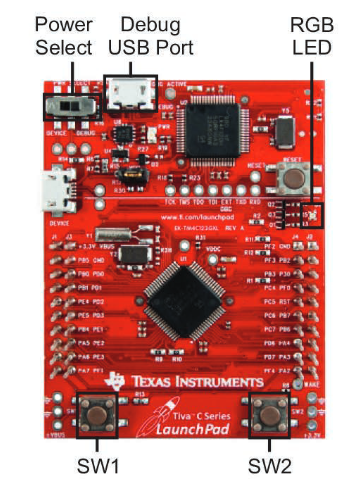
    One detail that is easily missed on these Launchpads is the switch near the upper micro USB connector - in order for it to work it must be set to "Debug" instead of "Device", as shown in the Quick Start guide: (I have done this myself a number of times)

    Hope this helps,

    Rafael

  • Thanks all of you.
    All of my configurations and setup appears to be full compliant (and this is frustrating).
    At the moment, the only mismatch between mine setup and the one that Chester posted above, is that my USB driver is different only in its interface number two.
    In the image posted by Chester, his interface number two is binded to te "usbfs" usb driver, but mine is not.
    My interface number two (that really is the third one) is binded to... nothing.
    Could it be the reason why my debugger is not running?
    I'm trying to manually bind just the interface number two to the usbfs driver, using this:
    lwn.net/.../
    and similar tutorial on the net, but I'm still failing, my system prompt "No such device" error.
    May a manual binding in the stellaris interface be faulting? Maybe there is a more trivial or official way to get this binding correct?
    I'm thinking that the problem is the usb driver, and this bind because, the IDE, and the configuration file seem the same with yours.

    Thank you so much.
  • Leonardo Chiodi said:
    My interface number two (that really is the third one) is binded to... nothing.

    Have you tried re-running the install_drivers.sh script as per http://processors.wiki.ti.com/index.php/Linux_Host_Support_CCSv6#Installation_Instructions ?

    After some updates I have seen udev permissions get reset, and I needed to re-run the install_drivers.sh script to allow the CCS debugger to connect again when running as user.

    [Not sure if this explains your problem, but a simple thing to try]

  • Unfortunately, I had re-runned the install- script and also manually modified the permission of the ttyACM0 link giving maximum read-write-execute permissions.

    Chester Gillon, excuse me, which is your exact linux distribution? I can try if, with yours, maybe with another distribution it could run.

    But is strange, because the CCS requirements says that Ubuntu is supported.

  • Leonardo Chiodi said:
    Chester Gillon, excuse me, which is your exact linux distribution?

    I am currently running CentOS 6.8 64-bit, with CCS 6.1.3. I don't recommend using CentOS 6 since the latest CCS version it supports is CCS 6.1.3, for the reasons described in CCS 6.2.0.00048 can't be used on CentOS 6.8 64-bit due to requiring GLIBC_2.14

    Leonardo Chiodi said:
    At the moment, the only mismatch between mine setup and the one that Chester posted above, is that my USB driver is different only in its interface number two.
    In the image posted by Chester, his interface number two is binded to te "usbfs" usb driver, but mine is not.
     My interface number two (that really is the third one) is binded to... nothing.

    The usb-devices output I showed above was taken when a CCS debug session was in progress.

    Taking another look, this is the usb-devices output after plugging in the EK-TM4C123GXL but before starting a debug session, and interface 2 is not bound to a driver:

    T:  Bus=03 Lev=02 Prnt=02 Port=02 Cnt=01 Dev#=  6 Spd=12  MxCh= 0
    D:  Ver= 1.10 Cls=ef(misc ) Sub=02 Prot=01 MxPS=64 #Cfgs=  1
    P:  Vendor=1cbe ProdID=00fd Rev=01.00
    S:  Manufacturer=Texas Instruments
    S:  Product=In-Circuit Debug Interface
    S:  SerialNumber=0E20135F
    C:  #Ifs= 4 Cfg#= 1 Atr=80 MxPwr=250mA
    I:  If#= 0 Alt= 0 #EPs= 1 Cls=02(commc) Sub=02 Prot=01 Driver=cdc_acm
    I:  If#= 1 Alt= 0 #EPs= 2 Cls=0a(data ) Sub=00 Prot=00 Driver=cdc_acm
    I:  If#= 2 Alt= 0 #EPs= 2 Cls=ff(vend.) Sub=00 Prot=00 Driver=(none)
    I:  If#= 3 Alt= 0 #EPs= 0 Cls=fe(app. ) Sub=01 Prot=01 Driver=(none)

    After a debug session has been successfully started interface 2 is now bound to the usbfs driver:

    T:  Bus=03 Lev=02 Prnt=02 Port=02 Cnt=01 Dev#=  6 Spd=12  MxCh= 0
    D:  Ver= 1.10 Cls=ef(misc ) Sub=02 Prot=01 MxPS=64 #Cfgs=  1
    P:  Vendor=1cbe ProdID=00fd Rev=01.00
    S:  Manufacturer=Texas Instruments
    S:  Product=In-Circuit Debug Interface
    S:  SerialNumber=0E20135F
    C:  #Ifs= 4 Cfg#= 1 Atr=80 MxPwr=250mA
    I:  If#= 0 Alt= 0 #EPs= 1 Cls=02(commc) Sub=02 Prot=01 Driver=cdc_acm
    I:  If#= 1 Alt= 0 #EPs= 2 Cls=0a(data ) Sub=00 Prot=00 Driver=cdc_acm
    I:  If#= 2 Alt= 0 #EPs= 2 Cls=ff(vend.) Sub=00 Prot=00 Driver=usbfs
    I:  If#= 3 Alt= 0 #EPs= 0 Cls=fe(app. ) Sub=01 Prot=01 Driver=(none)

    After terminating the debug session interface 2 returns to having no driver bound:

    T:  Bus=03 Lev=02 Prnt=02 Port=02 Cnt=01 Dev#=  6 Spd=12  MxCh= 0
    D:  Ver= 1.10 Cls=ef(misc ) Sub=02 Prot=01 MxPS=64 #Cfgs=  1
    P:  Vendor=1cbe ProdID=00fd Rev=01.00
    S:  Manufacturer=Texas Instruments
    S:  Product=In-Circuit Debug Interface
    S:  SerialNumber=0E20135F
    C:  #Ifs= 4 Cfg#= 1 Atr=80 MxPwr=250mA
    I:  If#= 0 Alt= 0 #EPs= 1 Cls=02(commc) Sub=02 Prot=01 Driver=cdc_acm
    I:  If#= 1 Alt= 0 #EPs= 2 Cls=0a(data ) Sub=00 Prot=00 Driver=cdc_acm
    I:  If#= 2 Alt= 0 #EPs= 2 Cls=ff(vend.) Sub=00 Prot=00 Driver=(none)
    I:  If#= 3 Alt= 0 #EPs= 0 Cls=fe(app. ) Sub=01 Prot=01 Driver=(none)

    Therefore, having no driver bound to interface 2 is a sign there is no current debug session, rather than the cause of not being able to start a debug session.

    Leonardo Chiodi said:
    But is strange, because the CCS requirements says that Ubuntu is supported.

    In theory you should get better support with Ubuntu, since that is the distribution TI test with and support.

    Can you show the complete error message reported when you try and start a debug session? Is it "Error connecting to the target: Frequency is out of range." or something else?

    You also mentioned that launching a debug session initially worked, but when stopped working. Do you know if it stopped working after an update to the Linux installation and/or CCS?

  • Thanks for your kindness, and excuse my late answer.

    So, I'm using an Ubuntu 15.10 (Willy Werewolf) that is a rolling distribution, not a Long Time Support one, so I can't have any kind of upgrade anymore, so all this problem is not caused by any SO update.
    But you are right, some weeks ago, in the IDE all went ok, even the debugger, now the debugger just stops, and prompt the message "Error connecting to the target", but I think that in some way it recognizes the launchpad, because, if I try to start a debugger session without the launchpad plugged, the prompt message change in "Error connecting to the target. Frequency is out of range", so the debugger can probe the presence of the board.
    I'm not sure if the problem could be in the debugger configuration or in the project properties, maybe later I could post a screenshot of all the tabs of my configuration, perhaps you could find some hidden option that disengage all my debugger, or I can reinstall and change all the OS, towards the Ubuntu 16 that is an LTS, what you suggest?

    Thanks
  • What would happen if the bootloader got corrupted? How could I restore the bootloader itself? Can you point me to a sequence to revert my MCU to the original state?