This thread has been locked.

If you have a related question, please click the "Ask a related question" button in the top right corner. The newly created question will be automatically linked to this question.

CCS: CCS version 7 is not adhering to Windows standards


Tool/software: Code Composer Studio

Tool/software: Code Composer Studio

I cannot install CCS to a Windows standards compatible folder:

Moreover, CCS is complaining about some mysterious existence of anti-virus software - which isn't installed. Only the default Windows 10 Defender tool is running:
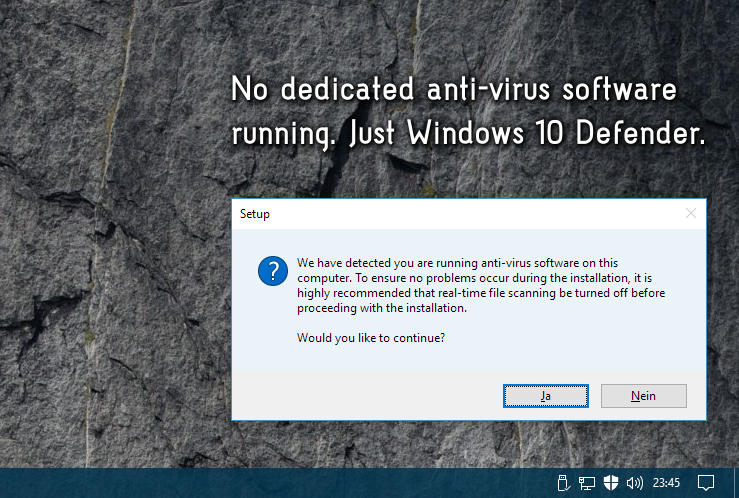
It's not acceptable that CCS is polluting professionally setup Windows installations, adhering to Microsoft standards, with defined security, backup and restore schedules in place.

CCS should not force administrators to weaken their security plans only because CCS programmers are not willing to adhere to Microsoft standards.

Please ensure that CCS adheres to Microsoft standards.


  • Hello,

    Issues with CCS updates when installed in the Windows "Program Files (x86)" folder is a long time known issue that we still don't have a good workaround for, due to the elevated permissions required. Hence the recommendation to avoid installing in that folder.

    A D said:

    CCS is complaining about some mysterious existence of anti-virus software - which isn't installed. Only the default Windows 10 Defender tool is running:

    Windows Defender is an antivirus software (among other things). Note that the warning is a blanket warning as described in the thread below:

    https://e2e.ti.com/support/development_tools/code_composer_studio/f/81/p/566052/2074476#2074476

    Windows Defender is one of the antivirus software that does not interfere with CCS installation.

    Thanks

    ki

  • It's not only the updates not working. App Center can't be launched, either, from the Getting Started page.

    I am very pessimistic about whether the build scripts or library references will work, either. ... Yet, this is but my assumption as I'm not able to start using CCS yet due to App Center not launching.

  • Has there been any update on this issue recently?
  • Hello,
    There has been no changes in this area. The issue is related to the inherent behavior of Eclipse and the nature of write access to the Windows "Program Files" folder for Windows version where UAC was introduced. If your user account has administrator permissions and you also run CCS as administrator, it should resolve some of the issue with updates. But in any case we still recommend installing outside that folder.

    Thanks
    ki