This thread has been locked.

If you have a related question, please click the "Ask a related question" button in the top right corner. The newly created question will be automatically linked to this question.

CCS: Can't install ccs on windows 10 PC


Tool/software: Code Composer Studio

Hi

Every time I try to install Code Composer Studio I get the error message in the attached image. I get the same error when trying to install version 6.2 and 7.0. This has happened on my two computers, a labtop and a desktop.
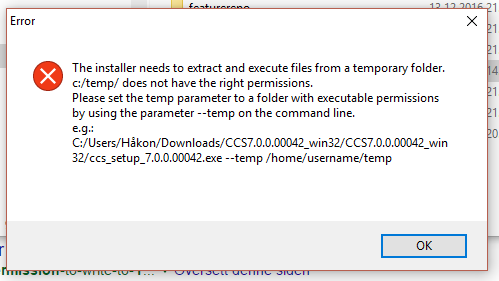
This is the first time I have ever gotten this message on my computers.

Anyone else encountered this problem or have a possible solution?

Best regards, 

Haakon

  • user4875666 said:
    Every time I try to install Code Composer Studio I get the error message in the attached image.

    The CCS installer needs to be able to write to a temporary location and execute programs from it. By default, it uses the system temporary directory %TEMP% but it looks like your temporary directory (c:/temp) does not have the right permissions. Can you make sure that directory has full permissions?

    Or if you cannot change permissions on the system TEMP directory, then run the installer on a Windows command prompt with the --temp parameter (as indicated in the message) and specify a different temp directory that has full permissions (it could be any folder that you create on your machine).

  • Thank you for your reply.

    I have looked at my temp folder, which seems to be located at C:\Users\Håkon\AppData\Local\Temp.

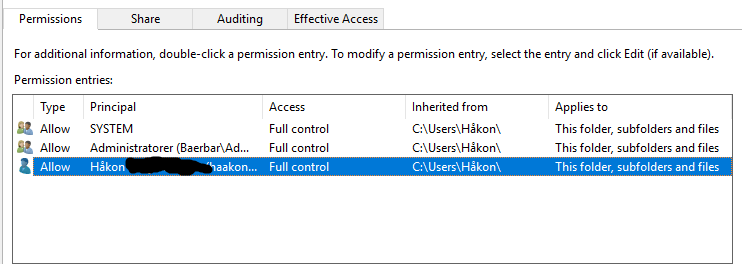
    Looking at the folder properties, in the security tab, both the user and the administrator seems to have full access to it.

    Do you know of any guide to extend the permissions in this folder, if possible?

    I've tried to run it as an administrator both normally and through cmd.  I've never seen this error message before on any other program I've tried to install on this or any other computer for that matter.

  • user4875666 said:
    I have looked at my temp folder, which seems to be located at C:\Users\Håkon\AppData\Local\Temp.

    I think the issue is with the non-ascii character in your Username, which unfortunately, the installer is unable to handle properly.
    Please see http://processors.wiki.ti.com/index.php/Troubleshooting_CCSv7#General_tips_for_installing_CCSv7

    You could either create a temporary admin username without any special characters, or try to run the installer from command prompt by passing the --temp parameter and specifying a custom temp directory with a simple path (as I mentioned earlier).

  • You are correct, thank you.

    I created another user with only ASCII characters and it worked. Including on the original user.