This thread has been locked.

If you have a related question, please click the "Ask a related question" button in the top right corner. The newly created question will be automatically linked to this question.

CCS: CCSv7 old projects imported all have Error creating output section ".data" without a SECTIONS


Tool/software: Code Composer Studio

Hi all,

I'm working on upgrading my development environment to CCSv7 from CCSv6. I've been trying to build some older projects that were made and developed on in CCSv6 to build and I'm finding that all of my projects that get imported in using the File->Import->CCS Projects method (and really every one I've tried, even just opening and upgrading the CCSv6-made workspace to CCSv7) all give me an error that I didn't get in CCSv6.

The error is the "#10099-D program will not fit" followed by the warning about "Creating output section ".data" without a SECTIONS. This like always leads me to the Command file or the Linker options in Project Properties. But, I've changed none of these from the last time I opened these projects. The only thing I had to change was the compiler to the TI v16.0.9.LTS compiler, and switching the Output Sections to eabi(ELF) because of the dropped support on the new Compiler. I can't imagine this would cause all my old projects to throw these errors, but I don't know enough to be sure. 

Is there a setting change I'm missing? Or maybe I need to change a setting or two because I changed the Compiler?

Thanks for the help,

  • Lunatic911 said:
    The only thing I had to change was the compiler to the TI v16.0.9.LTS compiler, and switching the Output Sections to eabi(ELF) because of the dropped support on the new Compiler.

    Is the project using a MSP430 device and floating point?

    The reason for asking is that with MSP430 legacy COFF the size of double was 32-bits, and in eabi(ELF) the size of double is 64-bits - see Differences between legacy coff and EABI ELF regarding code size for more details.

    With CCS 7 you can install the same compiler as was used in CCS 6, which should result in the same size of program. See http://processors.wiki.ti.com/index.php/Projects_and_Build_Handbook_for_CCS#Changing_Compiler_versions

  • Thanks for the reply.

    Yes, I'm working with MSP430 devices and some MSP432 projects. I do use floating point in my projects, but they're not floating point processors.

    Thanks for the info on installing old compilers. I never had to do that in 6 since all of my project started in 6. I'm downloading old compilers now and I'll let you know if going back fixes this issue.

    Do you think it might safely fix my error if I start a brand new project with the same processor variant, change to the newest compiler, keep the same Project Properties that I had, and copy in the old code?

    Thanks,
  • So actually the link you provided for installing old compilers does not work. I took those steps and selected all the versions of compilers for the MSP430 that I didn't have and installed them, but back in the project, I cannot select it in the drop-down box for Compiler Version in the Project Properties. When I go back to select older versions of compilers it tells me it won't install any of them because I already have a newer version.

    Do you think this is a bug or does the "Compiler Tools" not refer to an actual older compiler version, but something in addition to the compiler?

    Thanks for the help,
  • Lunatic911 said:
    So actually the link you provided for installing old compilers does not work. I took those steps and selected all the versions of compilers for the MSP430 that I didn't have and installed them, but back in the project, I cannot select it in the drop-down box for Compiler Version in the Project Properties.

    Are you still having issues with this? If so, can you provide details on exactly which older version of compiler you need/installed and through which CCS menu did you install it? After installation is that version of the compiler "detected" by CCS (can check under Window->Preferences->Code Composer Studio->Build->Compilers).

  • Yes, I'm still having this problem. 

    I want to get the TI v4.4.3 to be recognized by CCSv7. I went to Help->Install New Software...->Selected All Available Sites and checked all of the older versions of MSP430 Compiler Tools and tried to download them. I do not see them by looking in Window->Preferences->Code Composer Studio->Build->Compilers after I did this. I know I have them on my PC because when I switch back to my project's workspace that uses the TI v4.4.3, it still has it and I can select it from the drop-down in the Compiler box in Project Properties.

    When I check the box at the bottom of Available software to install to "Show only the latest versions of available software," the versions I want show up, but when I select all of them and move to download it fails and says it will not download because a newer version is already installed.

    Thanks for the help,

  • Could you try the following process and let us know if it works? I just went through these steps and confirmed it works on my CCSv7 installation.

    Go to Help->Install New Software, select "Code Generation Tools Updates" in the Work with drop-down list
    Uncheck the box for "Show only the latest version of available software"
    Expand TI Compiler Updates, and select only "MSP430 Compiler Tools" v4.4.3
    Click Next and go through the installation steps

    When CCS restarts is when it will actually install the compiler (ie will bring up the anti-virus messages and go through the installation). After this the v4.4.3 compiler should be recognized by CCS and appear for selection in the Project Properties.

  • Thanks for the reply.

    I followed your steps and this is what happened. After I hit Next on the last step you provided, it brings me to the next screen with a small red x at the top under Install Details saying "The operation cannot be completed. See the details."The details at the bottom says:

    Cannot complete the request. See the error log for details.
    "MSP430 compiler tools" will be ignored because a newer version is already installed.

    The Next button is grayed out at this screen.

    Thanks,
  • Lunatic911 said:
    Cannot complete the request. See the error log for details.
    "MSP430 compiler tools" will be ignored because a newer version is already installed.

    That means a newer version of the same "feature" is already installed. Do you have a newer 4.4.x installed? If so, it will not permit installing an older version until the new version is uninstalled as per this page: http://processors.wiki.ti.com/index.php/Compiler_Updates#Installing_Older_Versions

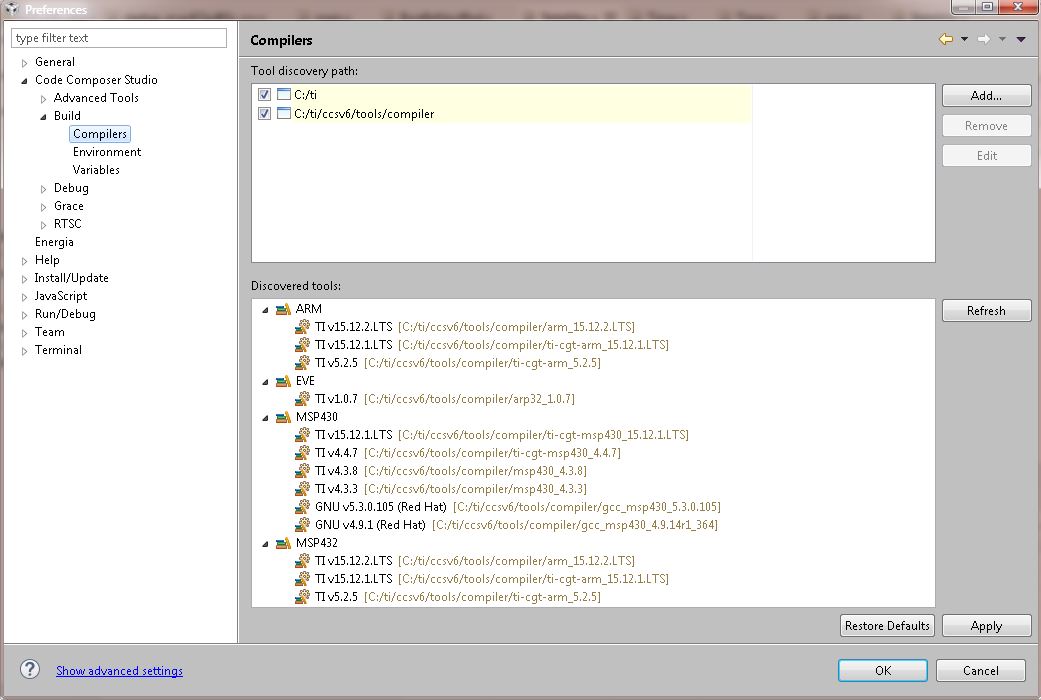
    You can confirm which versions are known to CCS by looking at Window->Preferences->Code Composer Studio->Build->Compilers. Attaching a screenshot of this would also be helpful for us to understand what may be going on here.

  • I think I see a later version of 4.4.x installed here.

    So then it truly may be of little to no harm that CCS gives me warnings on some projects that it's using a newer version of that compiler in its build?

    Thanks,

  • Lunatic911 said:
    I think I see a later version of 4.4.x installed here.

    Yes it shows that v4.4.7 is installed.

    You should be fine building projects that were created with 4.4.3 with 4.4.7. As long as you only see a warning that its using a newer version of compiler for the build, and no build errors, you should be fine.

  • Thanks for the help,