Tool/software: Code Composer Studio
Dear Sir:
In the future I am planning on creating a program which will consume a lot of memory.
I would like to use CCS 7. However, CCs 7 is new to me as it has just been offered to customers this year.
Therefore, I need to learn how to use this IDE efficiently.
I have attached a sample program that runs on a MSP430 Launchpad.
Any TI engineer can download and run this program immediately on CCS7.
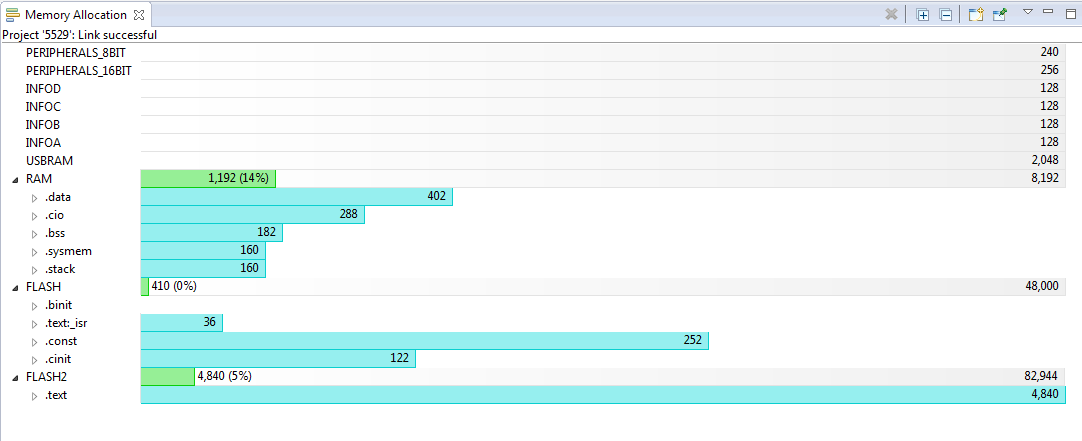
I need direction on how to use CCS7 features to be able to determine in debug mode,
after the program has run, what is next address in RAM that is freely available for the user to use (when I have to expand the program) and, more importantly, the method that was used to make this determination (breakpoint position, etc.)?
What memory address should I look for when I analyze my program in debug mode (or looking at a *.MAP file, *.LST file, or other file) so that I may know when I am getting near to running out of RAM?
Also, I would like to know where the next free address in Flash memory that is available to the user and how the user can detect when they are running out of flash memory?
Thank you for your support.
#include <msp430.h>

void printf(char *, ...);

void main(void)
{
    char *s;
    char c;
    int i;
    unsigned u;
    long int l;
    long unsigned n;
    unsigned x;

    // Disable watchdog
    WDTCTL = WDTPW + WDTHOLD;

    // Use 1 MHz DCO factory calibration
    DCOCTL = 0;
    BCSCTL1 = CALBC1_1MHZ;
    DCOCTL = CALDCO_1MHZ;

    printf("%s", "\r\n*** printf() test ***\r\n");

    s = "test";
    c = 'X';
    i = -12345;
    u =  12345;
    l = -1234567890;
    n =  1234567890;
    x = 0xABCD;

    printf("String        %s\r\n", s);
    printf("Char          %c\r\n", c);
    printf("Integer       %i\r\n", i);
    printf("Unsigned      %u\r\n", u);
    printf("Long          %l\r\n", l);
    printf("uNsigned loNg %n\r\n", n);
    printf("heX           %x\r\n", x);

    printf("multiple args %s %c %i %u %l %n %x\r\n", s, c, i, u, l, n, x);

    printf("\r\n*** Done ***\r\n");


}