This thread has been locked.

If you have a related question, please click the "Ask a related question" button in the top right corner. The newly created question will be automatically linked to this question.

CCS/LAUNCHXL-CC2650: Update TI Emulators to 6.0.504.2 using CCS built-in update procedure ?

Part Number: LAUNCHXL-CC2650
Other Parts Discussed in Thread: CC2650

Tool/software: Code Composer Studio

I'm installing a fresh new CCSv7 on my colleague's Windows 7 SP2 PC. The built-in TI Emulators is version 6.0.504.1.

According to the XDS Emulation Software Package, the latest version is 6.0.504.2, and it also states that manually installation is not preferred; I should first try to update through CCS built-in update procedure. 

So I executed Help > Check New Update, but found nothing to update.

And then I executed Help > Install New Software. There are 3 "TI Emulator Update" items available, and two of them are version 6.0.504.2.

I checked these two items and clicked "Next", and then got this error:
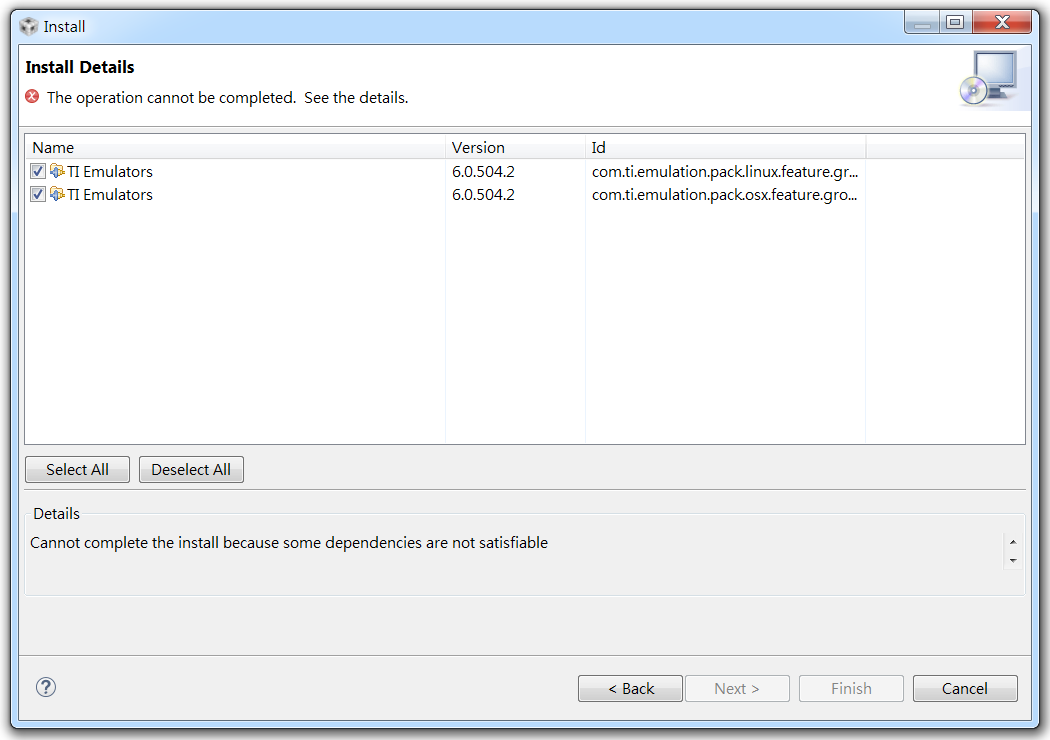
It turns out that these two 6.0.504.2 updates are for Linux and Mac OS X platform, not Windows.

Does that mean I can only manually update TI Emulators to 6.0.504.2 ?

  • Hi,

    >>Does that mean I can only manually update TI Emulators to 6.0.504.2 ?
    Yes. Unfortunately this is a bit confusing. The 6.0.504.2 was pulled from the update server last week due to some Windows 10 issues that were difficult to reproduce inside TI. These issues were found and the package will be re-posted soon under the version number 6.0.504.3.

    The delta between 6.0.504.1 and 6.0.504.2 is to address certain trace issues which are only seen when the TI Emulators component is applied to an older version of CCS. Therefore there is absolutely no problem using the 6.0.504.1 in CCSv7.

    >>There are 3 "TI Emulator Update" items available, and two of them are version 6.0.504.2.
    You can select what is shown by checking the boxes under the Details box. Check section 3 of the following page:
    processors.wiki.ti.com/.../Updating_CCSv6

    Please apologize for the confusion,
    Rafael

  • Thanks for reply.

    My main concern is the firmware version of XDS110 on CC2650 LaunchPad. Please refer to my previous question.

    My CC2650 LaunchPad is bought from DigiKey three weeks ago. I don't know why it came with older firmware version. We've ordered extra two sets that should arrive this week; I guess I'd better manually update firmware before connecting to CCS. If the firmware.bin file in 6.0.504.1 is the same as 6.0.504.2, I'll be OK with that.