This thread has been locked.

If you have a related question, please click the "Ask a related question" button in the top right corner. The newly created question will be automatically linked to this question.

CCS: Having issues importing a project

Other Parts Discussed in Thread: MSP430WARE

Tool/software: Code Composer Studio

I'm working on a project which the previous engineer used vs6.1.0. so in order to open the files i had to download the specific version(not sure if that was necessary). Now i keep getting this error??? Please help.

See details below...
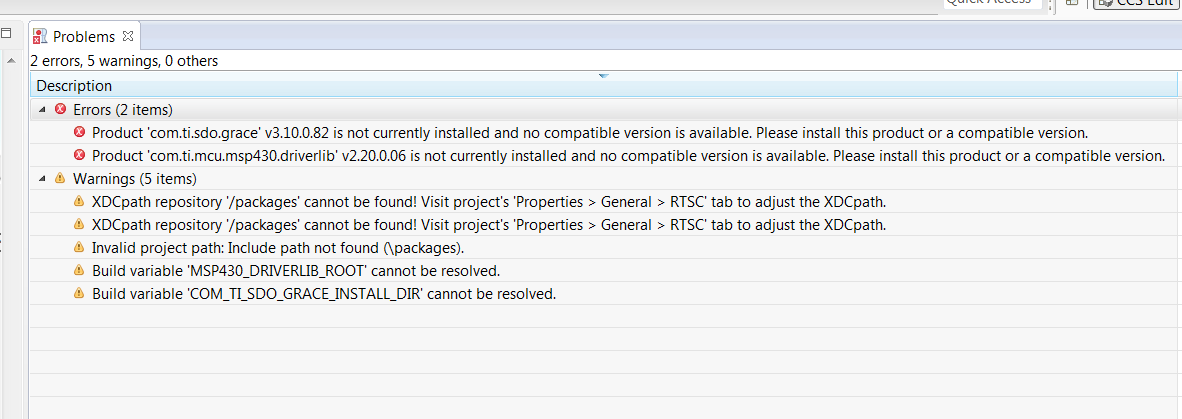
Unrecognized product of type 'com.ti.sdo.grace' is required by project 'Fighter_UI_V1' - please install at least one product of this type before building this project.
Unrecognized product of type 'com.ti.mcu.msp430.driverlib' is required by project 'Fighter_UI_V1' - please install at least one product of this type before building this project.

  • Hi,

    The error message "Unrecognized product of type 'com.ti.sdo.grace' is required by project" indicates you need to install a feature to CCS called "Grace".

    To do this, go to menu View --> CCS App Center. Once it opens, locate the top category "Code Composer Studio Add-ons" and click on the link "See more" at the right.

    The Grace product should be at the bottom of this list with the following icon:

    Follow the installation on-screen instructions and see if your project is able to be re-imported. 

    Hope this helps,

    Rafael

  • Hi Rafael,

    Thanks for taking the time out to answer my post. In fact I did attempt you suggestion after doing some digging but the software failed to up load. The error is below. I'm still new to this platform but I thought it may be a version compatibility issue but not sure.  the version am using is 6.1.1 but the code that I wanted to run is from version 6.1.0. If you can toss me a pointer to this issue it would be greatly appreciated.

  • Hi,

    Thanks for sending the screenshot, which contains the exact versions. In this case you will have to go through the trouble of re-creating the previous setup. 

    I see the Grace version missing is v3.10.0.82 which, if I recall correctly, was only available in CCSv6.1.2 App Center.

    If you are running this version of CCS you can install Grace from the App Center as I mentioned before. During install make sure the version of Grace matches what is shown below (and in your error message).

    After download, you will be asked to restart CCS.

    If you go to menu Window --> Preferences and follow the items on the screenshot below, you should have Grace added to your install.

    From the Grace release notes shown in the file <C:/ti/grace_3_10_00_82/docs/grace_release_notes.html>, you will also need to download the MSP430 driverlib, which is usually part of the MSP430Ware package. In your specific case, the version you need is inside MSP430Ware 2.20.00.19. Check the section "Previous versions" of the MSP430Ware page at:

    http://software-dl.ti.com/msp430/msp430_public_sw/mcu/msp430/MSP430Ware/latest/index_FDS.html 

    You can install this package under C:\ti (or wherever you installed), so it is easily found by CCS.

    After installing MSP430Ware, from inside CCS you can go to the same screen above and click on "Search Now". This will find three MSPWare components. Select them and restart CCS when asked. 

    After restart, go to the same screen above and find the three added components to your setup.

    With this you should be able to import the project. 

    Hope this helps,

    Rafael