This thread has been locked.

If you have a related question, please click the "Ask a related question" button in the top right corner. The newly created question will be automatically linked to this question.

RTSC Config Winodow not functioning properly?

Guru 15580 points

Other Parts Discussed in Thread: TMS320C5515, CCSTUDIO

John,

I am attempting to develop a RTSC-based project by using the example steps on page 7 of the DSP/BIOS 6.2 Getting Started Guide. However, in step 10 it says

"10) Also on the “RTSC Configuration Settings” page, click the drop-down arrow next to the


RTSC Platform field. CCSv4 scans the available packages for available".

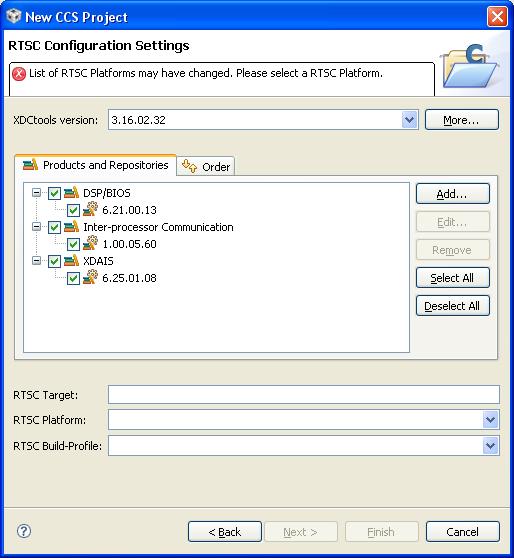
However, the "drop down" arrow does not drop down. Therefore I cannot finish the settings. What could be going wrong?

Here is a snapshot of the config window.
  • Mike,

    I have been seeing the same myself this morning.  Working with the RTSC team to see what is going on.

    John

  • I teporarily got around it by manually entering TMS320C5515 in both fields.

  • While you're at it, have them check into the following statement in section 1.4 on page 9.

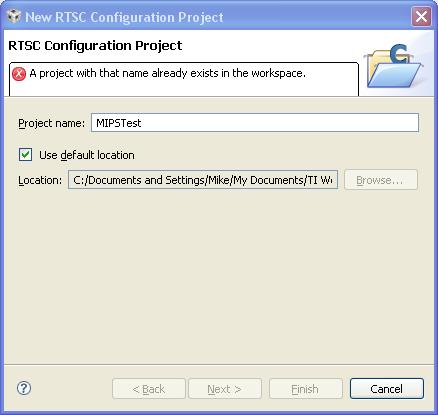
    "To add a RTSC configuration file to an existing project, choose File > New > RTSC Configuration File. Then click Next. Type a name for the file and click Finish."

    ...which produces the following error

  • Is that the same name as your main project?  You can't have 2 projects with the same name.  Try typing _config at the end of the name so that it is different from your other project.


    John

  • Ahhh...yes. You are correct. That was the problem.

    Thanks,

    MikeH

  • Well.....this workaround didn't get me very far.

    Severity and Description Path Resource Location Creation Time Id
    Can't find platform package TMS320C5515  hello_configuration line 0 1279913493782 380

    Any news from the experts?

  • The closest one I see is: ezdsp5505

    To create one that matches exactly would mean running the platform wizard which is where I am stuck.


    John

  • Mike,

    In that dialog in your screen capture where you are selecting the platform type: "ti.targets.C55_large" in the RTSC target box.  That will enable the platform drop down to show a list of compatible platforms.


    John

  • Mike --

    Note that we do not support the 55x device with BIOS 6.x.   The list of devices supported by BIOS 6.x is specified int the release notes.  You are on the wrong track.

    You need to use BIOS 5.41 for 55x.

    Regards,
    -Karl-

  • Arrrgghh! Thanks for the heads up.

    Does this mean that C55XX will never be supported in BIOS 6.x? Or is it just behind in development?

    MikeH

  • We do not have any plans to support the C55x devices with BIOS 6.x.   We will continue to support the C55x device family with BIOS 5.x.

    Regards,
    -Karl-

  • Karl,

    Can you point me to a primer or walk-thru on using BIOS 5.x with the C55x devices?

    Thx

    MikeH

  • Hi Mike,

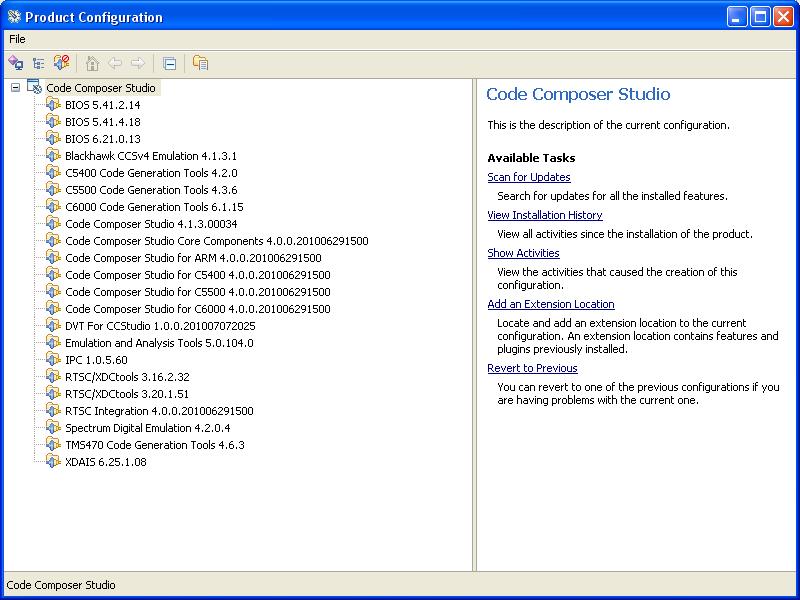
    Karl has asked me to help out.  Can you please tell me which version of CCSv4 you are using as well as which version of BIOS 5.41 you have installed?  Which 55xx device are you using?: I think I can help you get up and running an example rather quickly once I know this information.

    Thanks,

    -Jon

  • Jon,

    Config below


    Device is C5515 ezdsp USB Stick

    Thx

    MikeH


  • Mike,

    You can create a new c55xx project as follows.

    Start CCSv4.0

    File--> New--> CSS project

    Give the project a name as you create it, i.e., stairstep_c5515

    Select project type of c5500

    When you get to the project settings window pane, select TMS320C5515 for the device variant and then select the radio button at the bottom for Target Content to "Use DSP/BIOS v5.xx

    Click "finish"

    There should now be a new project created in CCS.  Create the .c and .tcf files below for 5515. Right click on the "stairstep_c5515" project and select "add files to project". Add the two newly created files stairstep.c and staistep.tcf.  Build the project.   Let me know if you need help configuring your target and running the example.  You should be able to open the debugger for your 5515 board and open the Tools--> RTA -->Printf Logs and CPU Load to see the example run.

    -Jon


    Create a file called "stairstep.c" with the following content:

    --------------------------snip-------------------------

    /*
     *  Copyright 2010 by Texas Instruments Incorporated.
     *  All rights reserved. Property of Texas Instruments Incorporated.
     *  Restricted rights to use, duplicate or disclose this code are
     *  granted through contract.
     *
     */
    /*
     *  ======== stairstep.c ========
     *
     *  This testcase tests the cpuload graph. In cpuloadInit it gets the
     *  CPU frequency using an API and fills the loadValue array with load
     *  values corresponding to 25, 50, 75 and 98 percent cpuload.
     *  The loadPrd which has a small period calls AUDIO_load function
     *  with loadValue. The stepPrd which has a very long period changes the
     *  loadValue in a circular fashion. The expected output on the cpuload graph
     *  is a staircase with steps of 25 percent.
     */

    #include <std.h>

    #include <log.h>
    #include <clk.h>
    #include <sts.h>
    #include <prd.h>
    #include <gbl.h>
    #include <sys.h>

    #include "stairstepcfg.h"

    #define LOAD_WINDOW     500     /* window size in milliseconds */
    #define TSHIFT  0   /* timer shift */
    #define QSHIFT  4   /* fractional arithmetic shift */

    #define QFACTOR (1 << QSHIFT)


    #if defined(_54_) || defined(_28_) || defined(_55_)
    /* to avoid left shift too large warning on 28, 54, 55 platforms */
    #define MAX 0x100000
    #else
    #define MAX (1 << (24 - QSHIFT))
    #endif

    #define LOAD_STAGE              5

    /*
     * LOAD_getcpuload() returns the estimated CPU load as a (truncated) integer.
     */
    Int LOAD_getcpuload(void);

    /*
     * LOAD_idlefxn() must be configured and called from a DSP/BIOS IDL object.
     * Make sure that 'Include in CPU load calibration' is checked (TRUE).
     */
    Void LOAD_idlefxn(void);

    /*
     * LOAD_init() must be called from application's main() function.
     */
    Void LOAD_init(void);

    /*
     *  ======== LOAD_setPeriod ========
     */
    Void LOAD_setPeriod(Int new);

    Void cpuloadInit();
    Void AUDIO_load(Uns load);

    Int loadPercent[LOAD_STAGE] = {25, 50, 75, 98, 0};
    LgUns loadValue[LOAD_STAGE] = {0, 0, 0, 0, 0};
    static LgUns loadVal = 0;
    Uns loadPeriod = 0;

    /*
     *  ======== main ========
     */
    Void main()
    {
        cpuloadInit();
       
        LOG_printf(&trace, "stairstep example started!!\n");   

        /* Fall into BIOS idle loop */
        return;                
    }


    /*
     *  ======== cpuloadInit ========
     */
    Void cpuloadInit()
    {
        PRD_Handle loadHandle = &loadPrd;
        LgUns maxLoad;
        Int i;
           
        if (loadHandle->period > 0) {
            loadPeriod = (Uns)loadHandle->period;
        }
           
        /* maxLoad is maximum instructions per second (100% cpuload) */
        maxLoad = loadPeriod * (GBL_getFrequency()/1000);
           
        if (loadValue[0] == 0) {
            /* calculate cpuload increase value */
            for (i = 0; i< LOAD_STAGE; i++) {
                loadValue[i] = loadPercent[i] * maxLoad / 100;
            }
        }
    }

    /*
     *  ======== load ========
     */
    Void load(Void)
    {
        static LgUns oldLoad = 0;
        LgUns t;

        /* display confirmation of load changes */
        if (oldLoad != loadVal ) {
            oldLoad = loadVal;
            LOG_printf(&trace, "load: new load = %d000 instructions every %d ms",
                    (Uns)loadVal, loadPeriod);
            if (loadVal == loadValue[3]) {  //maxload
                LOG_printf(&trace, "sts0 average should be around 10 millisecond");
            }
        }

        if (loadVal) {
            if (loadVal == loadValue[3]) {  //maxload
                t = CLK_gethtime();
                STS_set(&sts0,t);
                AUDIO_load((Uns)loadVal);
                t = CLK_gethtime();
                STS_delta(&sts0,t);
            }
            else
            {
                AUDIO_load((Uns)loadVal);
            }
        }
       
    }

    /*
     *  ======== step ========
     */
    Void step(void)
    {
        static Int loadIndex = 0;
        Uns cpuloadReal;
          
        loadVal = loadValue[loadIndex];
           
        cpuloadReal = LOAD_getcpuload();
        LOG_printf(&trace, "real cpuload change was: %d %%", cpuloadReal);
               
        LOG_printf(&trace, "calculated cpuload change will be: %d %%",
                loadPercent[loadIndex]);
        loadIndex++;
        if (loadIndex == LOAD_STAGE) {
            loadIndex = 0;
        }
    }

    /*
     * 'minloop' is the shortest time thru the IDL loop.  minloop is initialized
     * to the max long unsigned value, and modified by the Load_idlefxn() when
     * it finds a shorter path.
     */
    static Uint32 minloop = 0xffffffff;
    static Uint32 maxloop = 0x0;

    /*
     * 'window' is time window in CLK_gethtime() units.  window is initialzed
     * by Load_init().
     */
    static Uint32 window = 0xffffffff;

    /*
     * 'cpuload' is the CPU load for the last measured window.
     */
    static Int cpuload = 100 * QFACTOR;

    /*
     *  ======== Load_getcpuload ========
     */
    Int LOAD_getcpuload(void)
    {
        return ((cpuload + QFACTOR / 2) / QFACTOR);
    }

    /*
     *  ======== Load_idlefxn ========
     */
    Void LOAD_idlefxn(Void)
    {
        static Uint32    count = 0;
        static Uint32    total = 0;
        static Uint32    t0 = 0;
        Uint32           t1;
        Uint32           delta;

        count++;        /* bump number of times thru IDL loop */

        /*
         * Compute the time difference since the last call to Load_idlefxn.
         */
        t1 = CLK_gethtime() >> TSHIFT;
        delta = t1 - t0;
        t0 = t1;

        total += delta; /* accumulate time */

        /*
         * 'minloop' keeps track of the shortest time thru the IDL loop.
         * Note that we check to make sure delta is not zero (delta
         * will be zero during IDL loop calibration)
         */
        if (delta != 0 && delta < minloop) {
            minloop = delta;
        }
        if (delta > maxloop) {
            maxloop = delta;
        }

        /*
         * Compute the CPU load if the time window has expired.
         */
        if (total >= window) {
            Uint32 idle = count * minloop;

            if (total > MAX) {
                /* if total's too big, we scale it down to avoid overflow */
                cpuload = (
                        (100 * QFACTOR * ((total - idle) >> (7 + QSHIFT)))
                        + (total >> (8 + QSHIFT))
                    ) / (total >> (7 + QSHIFT));
            }
            else {
                cpuload = 100 * QFACTOR - (
                    (100 * QFACTOR * idle + (total >> 1)) / total
                );
            }
            count = total = 0;
        }
    }

    /*
     *  ======== Load_init ========
     */
    Void LOAD_init(void)
    {
        LOAD_setPeriod(LOAD_WINDOW);
    }

    /*
     *  ======== Load_setPeriod ========
     *  Set the CPU load sampling period in ms
     *
     *  This period determines the rate that we compute a new "instaneous" cpu
     *  load value. 
     *
     */
    Void LOAD_setPeriod(Int new)
    {
        window = (CLK_countspms() * new) >> TSHIFT;
    }

    /*
     *  There must be a 1 to 1 ratio between CLK_gethtime() and clock cycles here.
     */
    Void AUDIO_load( Uns count )
    {
        LgInt start, end;

        start = CLK_gethtime();
        end = start + (((LgInt)count * 1000)/CLK_cpuCyclesPerHtime());
        while (CLK_gethtime() < end)
            ;
    }

    --------------------------snip-------------------------

    Create a file called "stairstep.tcf" with the following content.

    --------------------------snip-------------------------

    /*
     *  Copyright 2010 by Texas Instruments Incorporated.
     *  All rights reserved. Property of Texas Instruments Incorporated.
     *  Restricted rights to use, duplicate or disclose this code are
     *  granted through contract.
     *
     */
    /*
     *  ======== stairstep.tcf ========
     *  Configuration script used to generate the example's configuration files
     */

    utils.loadPlatform("ti.platforms.evm5515");

    bios.enableRealTimeAnalysis(prog);
    bios.enableMemoryHeaps(prog);
    bios.enableRtdx(prog);
    bios.enableTskManager(prog);

    /*
     * Enable heaps in DARAM and define label SEG0 for heap usage.
     */

    bios.DARAM.createHeap      = true;
    bios.DARAM.enableHeapLabel = true;
    bios.DARAM["heapLabel"]    = prog.extern("SEG0");
    bios.DARAM.heapSize        = 0x500;
    bios.MEM.BIOSOBJSEG = prog.get("DARAM");
    bios.MEM.MALLOCSEG = prog.get("DARAM");


    /*
     *  Define the GBL memory model
     */

    bios.GBL.MEMORYMODEL = "LARGE";

    /*
     *  Create a trace LOG object for printing basic program output.
     */

    trace = bios.LOG.create("trace");
    trace.bufLen = 256;
    trace.logType = "circular";

    /*  Call LOAD_init() before BIOS_start */
    bios.GBL.CALLUSERINITFXN = true;
    bios.GBL.USERINITFXN = prog.extern("LOAD_init", "C");


    /*
     * ======== loadPrd ========
     */
    var loadPrd = bios.PRD.create("loadPrd");
    loadPrd.fxn = prog.extern("load");
    loadPrd.mode = "continuous";
    loadPrd.period = 10;

    /*
     * ======== stepPrd ========
     */
    var stepPrd = bios.PRD.create("stepPrd");
    stepPrd.fxn = prog.extern("step");
    stepPrd.mode = "continuous";
    stepPrd.period = 10000;

    bios.PRD_swi.priority = 1;

    /*
     * ======== loadIdl ========
     */
    var loadIdl = bios.IDL.create("loadIdl");
    loadIdl.fxn = prog.extern("LOAD_idlefxn");
    loadIdl.calibration = 1;

    /*
     * ======== sts0 ========
     */
    var sts0 = bios.STS.create("sts0");
    sts0.unitType = "High resolution time based"

    // !GRAPHICAL_CONFIG_TOOL_SCRIPT_INSERT_POINT!

    if (config.hasReportedError == false) {
        prog.gen();
    }

    --------------------------snip-------------------------

  • Jon,

    I appear to have a path problem with the .tcf file (see below). FYI, when intially creating the .tcf file (before inserting your text), I used the new ti.platforms.ezdsp5515 platform file that I created from the evm5505 file. I then erased all of the existing text and added yours to the new file.

    =======================================

    'js: "C:/Program Files/TI3/xdctools_3_20_01_51/include/utils.tci", line 946: Error: Can't load platform definition 'ti.platforms.evm5515': Error: Can't load 'ti/bios/config/bios_5515.tci': Error: Can't find import file: 'ti/bios/config/bios_5515.tci' (not found along 'C:\Program Files\TI3\xdctools_3_20_01_51\packages\ti\platforms\evm5515/;;C:/Documents and Settings/Mike/My Documents/TI Workspaces/test/stairstep_c5515;C:/Program Files/TI3/bios_5_41_02_14/packages;C:/Program Files/TI3/xdctools_3_20_01_51/include;C:/Program Files/TI3/xdctools_3_20_01_51/packages')

    Correct any script errors in C:/Documents and Settings/Mike/My Documents/TI Workspaces/test/stairstep_c5515/.gconf/stairstep_c5515/stairstep_c5515.tcf

    using the Configuration Tool or a text editor, if necessary.


    TConf initialization arguments:

    -e environment['config.importPath']='C:/Documents and Settings/Mike/My Documents/TI Workspaces/test/stairstep_c5515;C:/Program Files/TI3/bios_5_41_02_14/packages' -e environment['config.scriptName']='stairstep_c5515.tcf'"

  • Hi Mike,

    Check the build properties for the project and make sure you are pointing to BIOS 5.41.04.18 in the project.  From the errors, it is using BIOS 5.41.02.14 which does not have support for 5515.   I think if you get that straightened out it should build.

    -Jon

  • Jon,

    Yes, that was the problem.

    However, now I am getting this.

    "could not open source file "stairstepcfg.h" stairstep_c5515 stairstep.c line 29 1280512550718 421"

    Where should staristpcfg.h come from?

    MikeH

  • Hi Mike,

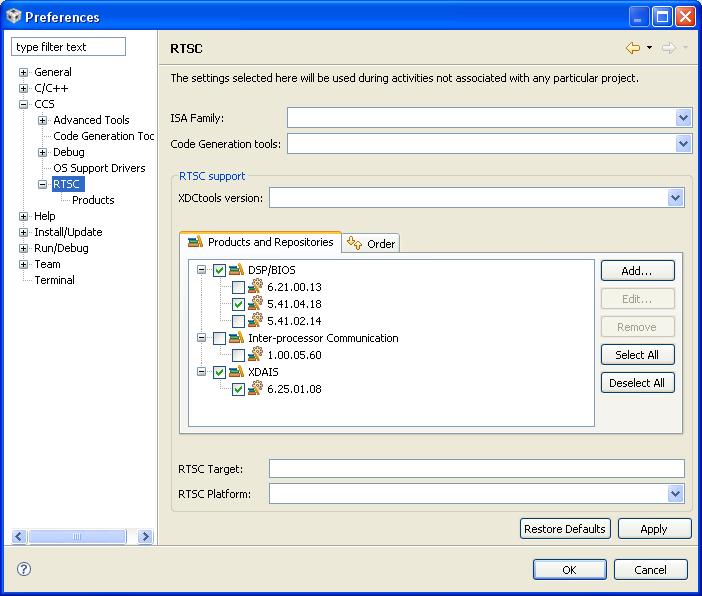
    This file is auto-generated.  In CCSv4 open "Windows --> Preferences --> CCS"  Click on RTSC and make sure that the correct version of BIOS 5.41.04.18 is selected.  Make sure that the XDCtools version is also set to the correct version here.

    -Jon

  • Jon,

    I realize the file is auto-generated. What should I do to correct the compile error? I have verified that the BIOS is the correct release and the XDAIS is set to 6.25.01.08 (see below). The compile error remains.

  • Hi Mike,

    I've just re-created the same setup with same versions and I'm building  the same stairstep example for 5515 without the error you are seeing.  Only difference I see is that I have the XDCtools set to XDCtools 3.20.01.51.  In your screen shot there is no XDCtools selected "XDCtools version:" box right below RTSC support line.  It should not matter but could you set the XDCtools version, try a "project clean" and then try "rebuild project" so it rebuilds the everything.  If that does not work can you post the whole output from the console window so I can see the entire compile message with error.

    Thanks,

    -Jon

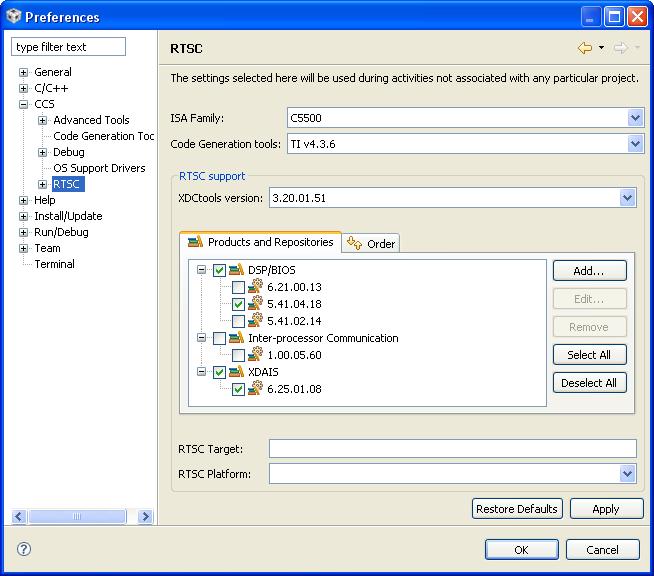
  • Jon,

    1. Set XDCtools to 3.20.01.51 (see screenshot)

    2. Set Code Generation Tools to TI V4.3.6

    3. Cleaned and rebuilt project.

    Same problem exists ("cannot find stairstep.h")

    4. Changed the include line to read "#include stairstep_c5515cfg.h" instead of "#include stairstepcfg.h".

    The project builds but give the following error.

    "file "C:/Program Files/TI3/bios_5_41_04_18/packages/ti/bios/lib/bios.a55L<fxn.o55L>" specifies large memory model, which is not compatible with huge memory model specified in a previous file or on the command line  stairstep_c5515 line 0 1280685650765 443"

    Below is the contents of the console window after renaming stairstipcfg.h to stairstep_c5515cfg.h and building the project.

    ====================================

    **** Build of configuration Debug for project stairstep_c5515 ****


    C:\Program Files\TI3\ccsv4\utils\gmake\gmake -k all

    'Building file: ../stairstep_c5515.tcf'

    'Invoking: TConf Script Compiler'

    "C:/Program Files/TI3/xdctools_3_20_01_51/tconf" -b -Dconfig.importPath="C:/Program Files/TI3/bios_5_41_04_18/packages;" "../stairstep_c5515.tcf"

    'Finished building: ../stairstep_c5515.tcf'

    ' '

    'Building file: ../stairstep.c'

    'Invoking: Compiler'

    "C:/Program Files/TI3/ccsv4/tools/compiler/c5500/bin/cl55" -v5515 -g --include_path="C:/Program Files/TI3/ccsv4/tools/compiler/c5500/include" --include_path="C:/Documents and Settings/Mike/My Documents/TI Workspaces/test/stairstep_c5515/Debug" --include_path="C:/Program Files/TI3/bios_5_41_04_18/packages/ti/bios/include" --include_path="C:/Program Files/TI3/bios_5_41_04_18/packages/ti/rtdx/include/c5500" --diag_warning=225 --ptrdiff_size=32 --memory_model=huge --preproc_with_compile --preproc_dependency="stairstep.pp" "../stairstep.c"

    'Finished building: ../stairstep.c'

    ' '

    'Building file: stairstep_c5515cfg.s??'

    'Invoking: Compiler'

    "C:/Program Files/TI3/ccsv4/tools/compiler/c5500/bin/cl55" -v5515 -g --include_path="C:/Program Files/TI3/ccsv4/tools/compiler/c5500/include" --include_path="C:/Documents and Settings/Mike/My Documents/TI Workspaces/test/stairstep_c5515/Debug" --include_path="C:/Program Files/TI3/bios_5_41_04_18/packages/ti/bios/include" --include_path="C:/Program Files/TI3/bios_5_41_04_18/packages/ti/rtdx/include/c5500" --diag_warning=225 --ptrdiff_size=32 --memory_model=huge --preproc_with_compile --preproc_dependency="stairstep_c5515cfg.pp" "stairstep_c5515cfg.s55"

    'Finished building: stairstep_c5515cfg.s??'

    ' '

    'Building file: stairstep_c5515cfg_c.c'

    'Invoking: Compiler'

    "C:/Program Files/TI3/ccsv4/tools/compiler/c5500/bin/cl55" -v5515 -g --include_path="C:/Program Files/TI3/ccsv4/tools/compiler/c5500/include" --include_path="C:/Documents and Settings/Mike/My Documents/TI Workspaces/test/stairstep_c5515/Debug" --include_path="C:/Program Files/TI3/bios_5_41_04_18/packages/ti/bios/include" --include_path="C:/Program Files/TI3/bios_5_41_04_18/packages/ti/rtdx/include/c5500" --diag_warning=225 --ptrdiff_size=32 --memory_model=huge --preproc_with_compile --preproc_dependency="stairstep_c5515cfg_c.pp" "stairstep_c5515cfg_c.c"

    'Finished building: stairstep_c5515cfg_c.c'

    ' '

    'Building target: stairstep_c5515.out'

    'Invoking: Linker'

    "C:/Program Files/TI3/ccsv4/tools/compiler/c5500/bin/cl55" -v5515 -g --diag_warning=225 --ptrdiff_size=32 --memory_model=huge -z -m"stairstep_c5515.map" --warn_sections -i"C:/Program Files/TI3/ccsv4/tools/compiler/c5500/lib" -i"C:/Program Files/TI3/ccsv4/tools/compiler/c5500/include" -i"C:/Program Files/TI3/bios_5_41_04_18/packages/ti/rtdx/lib/c5500" -i"C:/Program Files/TI3/bios_5_41_04_18/packages/ti/bios/lib" --reread_libs --rom_model -o "stairstep_c5515.out" -l"./stairstep_c5515cfg.cmd" "./stairstep_c5515cfg_c.obj" "./stairstep_c5515cfg.obj" "./stairstep.obj" -l"libc.a"

    <Linking>

    fatal error: file "C:/Program

    Files/TI3/bios_5_41_04_18/packages/ti/bios/lib/bios.a55L<fxn.o55L>"

    specifies large memory model, which is not compatible with huge memory model

    specified in a previous file or on the command line


    >> Compilation failure

    C:\Program Files\TI3\ccsv4\utils\gmake\gmake: *** [stairstep_c5515.out] Error 1

    C:\Program Files\TI3\ccsv4\utils\gmake\gmake: Target `all' not remade because of errors.

    Build complete for project stairstep_c5515


  • FYI. Just changed the Runtime Model in the projcet to Large (was Huge) and the project builds, links, and runs. Hmmm...??

    Now, can you point me to a tutorial on actually *using* the RTSC tools?

    thx

    MikeH


  • Hi Mike,

    There are some tutorials posted here that should be helpful.   Let me know if you are looking for something more specific.

    http://rtsc.eclipse.org/docs-tip/Using_RTSC_with_CCStudio_v4

    -Jon


  • Jon,

    All of the information in the link you sent describe the basics of setting up an RTSC project. Now that we have accomplished that, how do I use the RTSC tools to look at the results of the captured data? What tools are available (ie ROV, RTA, etc) and how do I use them to analyze the cpu load, etc? I am looking for a basic example walk-thru of using the RTSC tools to analyze the performance of the cpu while running my application.

    A great example is, what do I now do with stairstep?

    thx

    MIkeH

  • Jon,

    OK. I think I get it now. Let's close this thread and start a new one.

    Thanks!

    MikeH


  • Mike,

    There is a description  of the example and what it does in the comment at the top of  stairstep.c file. 

    You can open the the different RTA tools to see the how the stairstep example is running and what values are returned.  The previous link I shared has descriptions on how to use RTA and ROV when running an application.  

    http://rtsc.eclipse.org/docs-tip/Real-Time_Analysis_Tools

    http://rtsc.eclipse.org/docs-tip/Runtime_Object_Viewer

    If you load and run the stairstep example with the RTA CPU load graph window open you should see a line with a step every 25% cpu load until it reaches 99% where it will drop back to 0% and repeat itself.  This should show you that your example is configured and running at the correct CPU value.

    -Jon