This thread has been locked.

If you have a related question, please click the "Ask a related question" button in the top right corner. The newly created question will be automatically linked to this question.

Error compiling ez430-RF2500-SEH firmware: please help.

Other Parts Discussed in Thread: MSP430F2274, CC2500

Hello, I've bought 2 eZ430 RS2500-SEH-development tools. I've installed all the programs (CCS v4, SLAC219 etc) in the included CD as described in the user guide pdf file: slau273.pdf. I've also upgraded the IDE to Version: 4.1.2.00027. Following the instructions at "4.1.1 Downloading Firmware to the MSP430", I tried to compile the firmware but I couldn't because the compiler reports some errors:

--
**** Build of configuration End Device - Debug for project SEH Sensor Monitor **** C:\Program Files (x86)\Texas Instruments\ccsv4\utils\gmake\gmake -k all 'Building target: APasdatahub.out' 'Invoking: Linker' "C:/Program Files (x86)/Texas Instruments/ccsv4/tools/compiler/msp430/bin/cl430" --cmd_file="C:/Texas Instruments/eZ430-RF2500-SEH_Sensor_Monitor-v1.5/CCE_Source/Projects/Examples/peer_applications/eZ430RF/SEH Sensor Monitor/Peer Applications/Configuration/smpl_nwk_config.dat" --cmd_file="C:/Texas Instruments/eZ430-RF2500-SEH_Sensor_Monitor-v1.5/CCE_Source/Projects/Examples/peer_applications/eZ430RF/SEH Sensor Monitor/Peer Applications/Configuration/End Device/smpl_config.dat" --define=MRFI_CC2500 --symdebug:dwarf --opt_level=0 --printf_support=full -z --reread_libs --warn_sections --search_path="C:/Program Files (x86)/Texas Instruments/ccsv4/tools/compiler/msp430/lib" --search_path="C:/Program Files (x86)/Texas Instruments/ccsv4/tools/compiler/msp430/include" --rom_model --heap_size=80 --stack_size=80 -o "APasdatahub.out" --library="rts430.lib" "../lnk_msp430f2274.cmd" undefined first referenced symbol in file --------- ---------------- main C:/Program Files (x86)/Texas Instruments/ccsv4/tools/compiler/msp430/lib/rts430.lib error: unresolved symbols remain error: errors encountered during linking; "APasdatahub.out" not built >> Compilation failure C:\Program Files (x86)\Texas Instruments\ccsv4\utils\gmake\gmake: *** [APasdatahub.out] Error 1 C:\Program Files (x86)\Texas Instruments\ccsv4\utils\gmake\gmake: Target `all' not remade because of errors. Build complete for project SEH Sensor Monitor
--

I've tried to solve the problem, also installing all the software in an other pc with Win XP (now I'm using Win 7 64 bit). Nothing changes, I obtain always the same error. I never had similar problems with other tools of TI's competitor and this is an incredible situation because not even the included firmware doesn't works. I was expecting a ready to use system from TI, but as I can see it's not the case. Can someone help me? Thank you in advance. Francesco
  • Francesco Orfei said:
    undefined first referenced symbol in file --------- ---------------- main C:/Program Files (x86)/Texas Instruments/ccsv4/tools/compiler/msp430/lib/rts430.lib error: unresolved symbols remain error: errors encountered during linking;

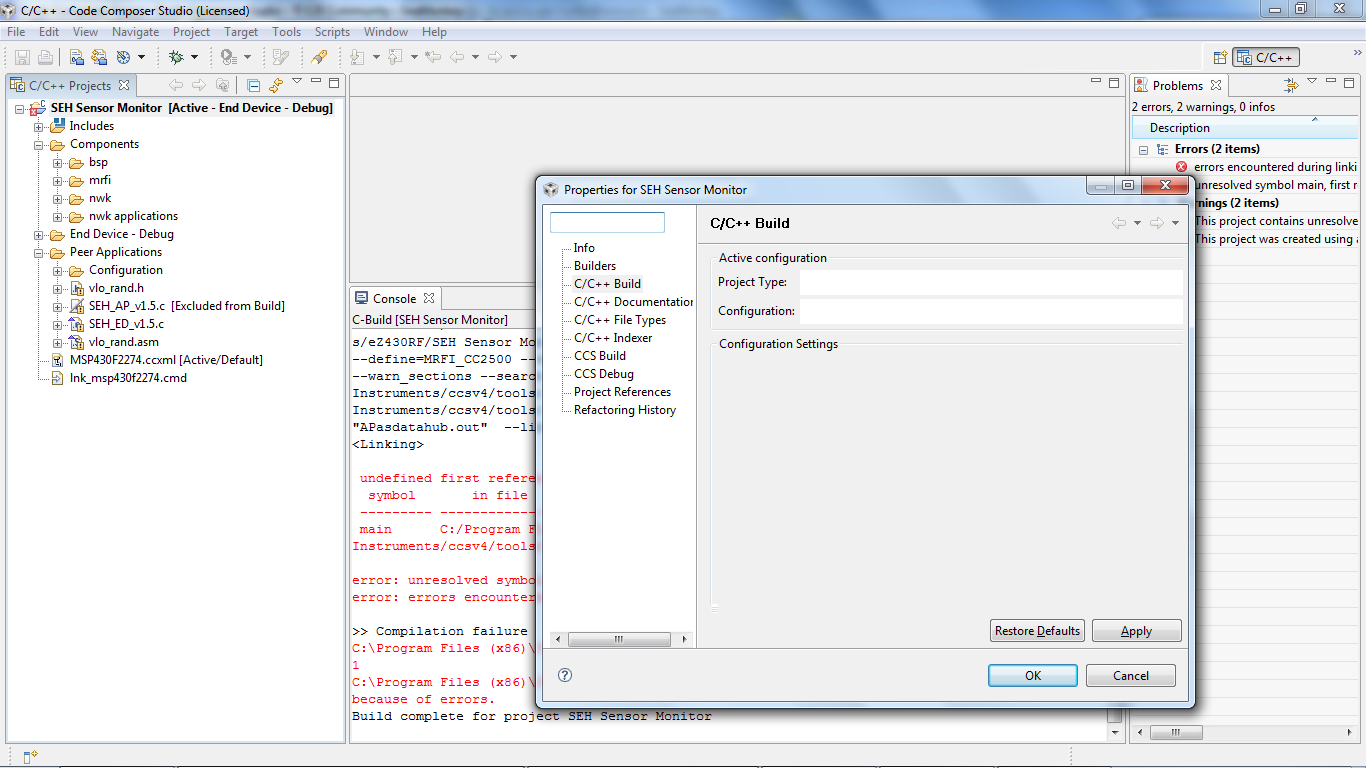
    Do you have a 'main' defined in your application? If not, you will need to specify the entry point of your application with the -e linker option. You can set this in the Build Properties (right-click on the project, select 'Build Properties' in the context menu, select 'C/C++ Build' in the left pane, select the 'Tool Settings' tab and under the Linker options mode, select 'Symbol Management' and see the option to Specify the program entry point.

  • Thank you Ki-Soo Lee, the firmware I'm trying to compile is the one included in the CD of the development tools. I never changed anything. Anyway please see the attached picture, as you can see there isn't the "Tool Settings" tab you suggested me to find. I can also attach the firmware in a zip file in a new reply.
  • There is a known issue with 64-bit windows where the GUI does not draw properly. See this video for a workaround:

    http://software-dl.ti.com/dsps/dsps_public_sw/sdo_ccstudio/CCSv4/Demos/ccsv4_ui_issue.htm

    Thanks

    ki

  • Francesco,

    Please open the CCS workspace to this directory prior to importing your project: C:\Texas Instruments\eZ430-RF2500-SEH_Sensor_Monitor-v1.5\CCE_Source\Projects\Examples\peer_applications\eZ430RF

    The project is designed to build correctly when opened in this workspace. This is one of the steps documented in the README.txt file that can be found in C:\Texas Instruments\eZ430-RF2500-SEH_Sensor_Monitor-v1.5\CCE_Source

    If you already open in a workspace, you can go to File->Switch Workspace, go to the above workspace, and then import the project. This should allow it to build without errors.

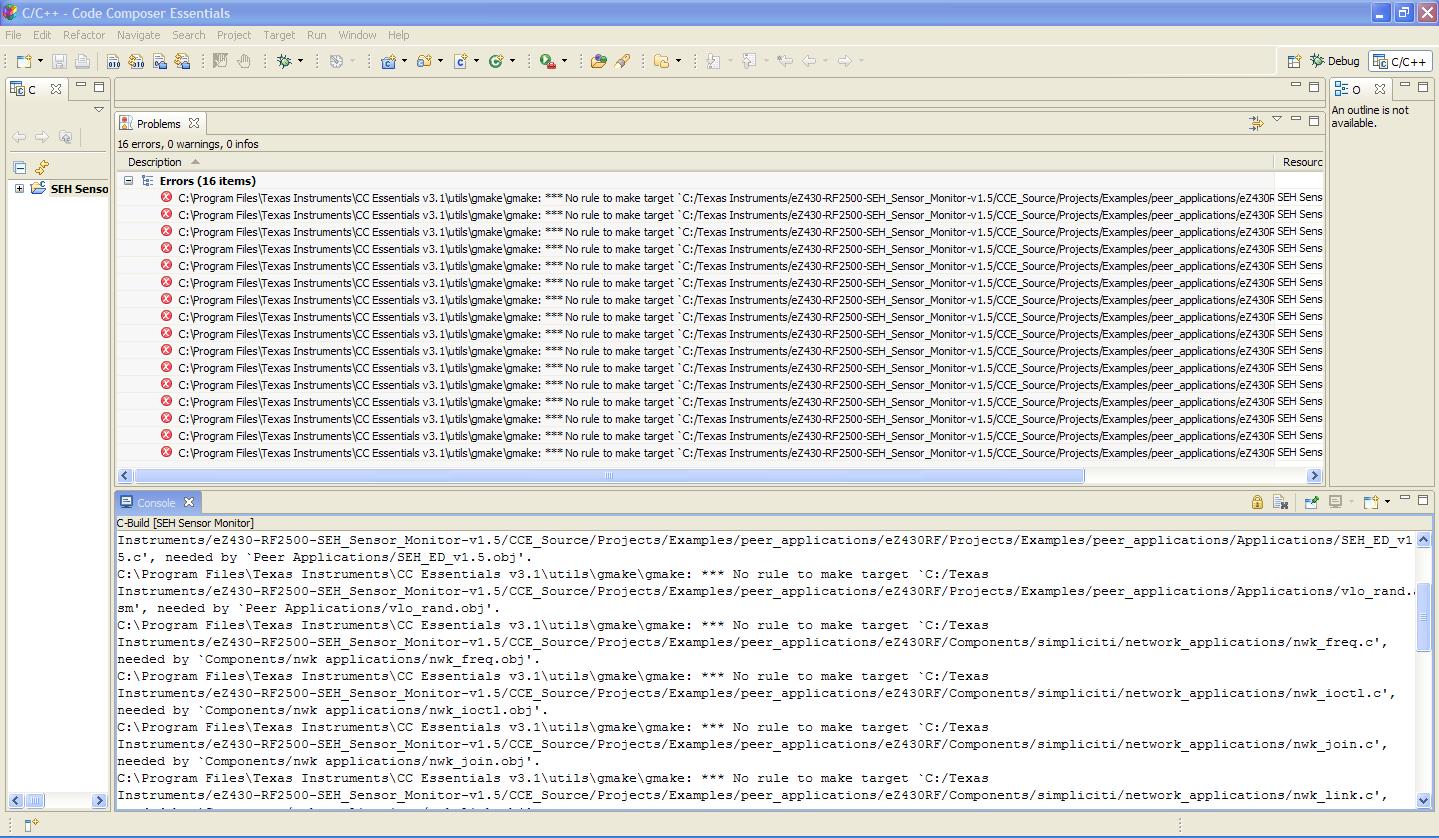
  • In your screenshot, I notice that CCS can't find the source files (the yellow exclamation mark). Do you have the source files? That could explain the linker error.

  • I just saw Aarti's reponse now. That could explain my previous post.

  • Thank you Aarti and Ki. Ok for the workaround. Now the GUI works properly. I've added "-e" but the compliation still stops saying "no input files". I opened the CCS workspace to this directory prior to importing your project: C:\Texas Instruments\eZ430-RF2500-SEH_Sensor_Monitor-v1.5\CCE_Source\Projects\Examples\peer_applications\eZ430RF as described to do in README.txt. I followed the instructions step by step. When I open the project for the first time I've an error message about the indexer. Please see the attached screenshot: as you can see some file are missing but I don't know where to find then because all I've installed comes from the CD of the demo. Thank you again. Francesco
  • The problem has been resolved. The compilation error was due to the lack of source files: they were not where they should be. Obviously the package installer could not write all the files correctly. Now the compilation gives no error. Thank you everybody. Francesco
  • This morning I've solved the problem using another PC with Windows XP SP3 instead of Windows 7 64 bit. In this way I was able to download the firmware to do my test with the energy harvesting system I'm working to. I'm sorry that the development tools are not yet ready for Windows 7 because in this way it's no possible to use newer pc instead of the oldest ones and some TI's competitor full support the new OS. What TI is waiting for?
  • If you are referring to the UI drawing issue on Win 7 64-bit, we have added a fix with will be available in a release sometime in the fall.

    Thanks

    ki

  • Hi, I am using Windows XP 32bit,  Version: CCE v3.1   Build: 3.2.3.6.4. I am getting an error that I don't understand (see attached image). Any help to resolve this issue is greatly appreciated. I have the source files from the path below as the readme guide has advised:

     C:\Texas Instruments\eZ430-RF2500-SEH_Sensor_Monitor-v1.5\CCE_Source\Projects\Examples\peer_applications\eZ430RF

     Another thing not understood: The readme file indicates that if the file is in the above link, i would not have to setup the linked resources file. But, inspecting the linked resources shows no DEV_ROOT, and I end up having to go add DEV_ROOT.

  • Larry,

    Did you specify your workspace path to be C:\Texas Instruments\eZ430-RF2500-SEH_Sensor_Monitor-v1.5\CCE_Source\Projects\Examples\peer_applications\eZ430RF? If this is specified as the workspace, then the DEV_ROOT is already set up and you should just be able to build the project.

    if your installation is in a path other than c:\Texas Instruments, then you would need to select the appropriate workspace and point DEV_ROOT to your appropriate install path.

    If the DEV_ROOT is missing from your default workspace, maybe it was inadvertantly deleted at some point. If the steps in the README file are followed, there should be no errors building the project.

  • Aarti,

    Yes, like I said in my post, I have that exact folder as the workspace, but DEV_ROOT is not setup there. At any case, I have pointed DEV_ROOT to that folder and still have trouble compiling the project. I have followed the steps on the readme file exactly.


    Any suggestions?

  • Larry,

    What is DEV_ROOT set to? It should be pointing to C:\Texas Instruments\eZ430-RF2500-SEH_Sensor_Monitor-v1.5\CCE_Source

  • Hello Francesco and TI staff,

    I would like to know how did Francesco resolved the error of lack of source files. How did you know which file was missing ? Can you suggest me a step by step method to do that !!

    Thanks

    Tarun Kalwani