This thread has been locked.

If you have a related question, please click the "Ask a related question" button in the top right corner. The newly created question will be automatically linked to this question.

CCS/MSP430FR2633: library problems

Part Number: MSP430FR2633
Other Parts Discussed in Thread: CAPTIVATE-PHONE

Tool/software: Code Composer Studio

newbie

I am having problems trying to include a library "driverlib"

If I follow the instructions in the driver library users guide it tells me to install using Source>Apply Project Template

but when I go to Project Template there are no project templates

The user guide mentions that the "project template must have discovered the driver RTSC product" and states if having problems go to installation steps of the release notes but these dont describe anything...it is of course possible I am looking at the wrong release notes as these arent specified.

This shouldnt be so difficult even for a newbie, I am not new to C just CCS and its proving inpenetrable..anyone found a decent intruction manual?

  • Hi Sean,

    Sean Zoega said:
    The user guide mentions that the "project template must have discovered the driver RTSC product

    This is likely the issue.

    Check the installed products in the preferences (Window -> Preferences):

    Make sure you have an entry for MSP430 DriverLib in the Installed Products list. If you do not see it, then you may need to add the path to it to you Product Discover Path like I did and then press the Rediscover button to have CCS search in the newly added path.

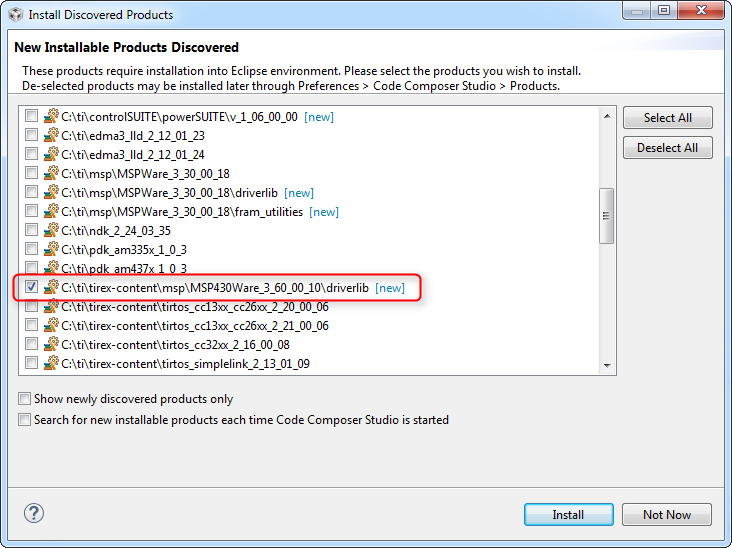
    CCS will then provide a list of all discovered products. Select the option for driverlib:

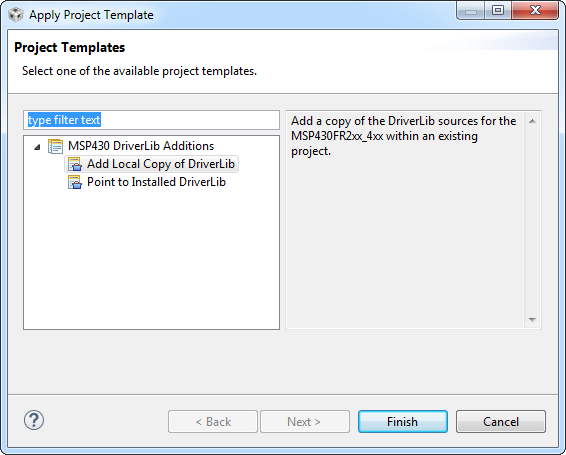
    When press install, CCS will install the product and prompt you to restart CCS. After that, it should be installed and the templates will be available to you:

    Hope this helps

    ki

  • Many thanks that sorted the problem, but I realise why I was having a problem thats the most convoluted/illogical set of steps....in windows>preferences! I know I'm a newbie but with that sort of structuring of the program the fog isnt goint to clear any time soon. Not your fault of course and still a big thanks for the help, couldnt of sorted that without you.
  • Glad to hear it worked! You are not the only one that got stuck here. We certainly can make some improvements on the usability end. Thanks for the feedback.

    ki
  • Unfortunately I am still having problems. Is there a code example anywhere that shows Master TX with I2C not using interrupts that works with the MSP430FR2633. I did pull up the example in the MSPWare folder associated with MSP2...4 but unfortunately that applied to the 4133. That wouldnt normally be a problem but I would really like something that allows me to understand the MSP430 implementation of I2C without having to learn the MSP430 implementation of interrupts first..i.e. trying to keep to one problem at a time!

  • Hi Sean,
    Regarding your last post, I suggest posting in the MSP forum. The experts there will have the most knowledge on that subject and can help you best.

    Thanks
    ki
  • Hi Sean,

    Sean Zoega said:
    If I follow the instructions in the driver library users guide it tells me to install using Source>Apply Project Template

    Do you have a link to the user's guide you are referencing? I would like to get it updated


    Thanks

    ki

  • Ki, sorry but I'm not using the libraries any more and am still trying to get to grips with i2c

    I have read and re-read the

    MSP430FR4xx and MSP430FR2xx Family Users Guide

    from p618 onwards but I cant get i2c to work at all, I've been through and double checked everything and I cannot get the example on p621 to work at all. I have checked that I have the logic analyser setup right by loading the CAPTIVATE-PHONE DEMO which uses i2c and can see the output fine. But if I load the example it just doesnt produce any output at all, no SCL no SDA at all. I've tried it with/without the interrupts, I've toggled some of the associated registers in UCB0CTLW0 (bits 0-6) in case they should be doing something or are somehow set wrong. I've checked the registers from the chip in CCS to make sure I havent made any silly mistakes in setting up the registers. I've tried looking for detailed info on MSPFR2633 in case there are any special setups but all of the documentation for this chip refers to driverlib. I spent ages deciphering the pin setup information for the MSPFR2633...a note, if you are going to refer to primary/secondary/tertiary functions give us a clue how to find them...I eventually found a table in a different manual. Just to put my mind at rest...is this the right pin config for i2c on MSPFR2633

       P1SEL0 &= ~0xC; // configure I2C pins, port 1.2, pin 9 (MSP430FR2633 specific)
        P1SEL1 |=0xC; // configure I2C pins, port1.3, pin 10  (MSP430FR2633 specific)
        SYSCFG2 &= 0x3F3; // turn off ADC on I2C pins(MSP430FR2633 specific)

    because this is the only thing that I can think is wrong...otherwise the example on p621 is wrong/incomplete or is incompatible with FR2633

    sort of losing the will to live on this chip, getting close to throwing in the towel...if I cant get a basic slave address and clock sent from i2c it doesnt bode well when I have to do something complicated with it. The wiki page seems to bear this out ..starting with "Making I2C work under MSP430 device can be tricky" is proving to be an understatement confounded with no FR2633 examples where they say yhey will be on the wiki page

    are there any code examples, everything seems to want to use driverlib re: FR2633 on MSP430 page

  • Hi Sean,
    It is best to get help from the experts in the MSP forum. They can help you best.

    Thanks
    ki
  • Ki-Soo Lee said:

    Do you have a link to the user's guide you are referencing? I would like to get it updated

    I just want to remind about this as anytime I install new CCS and driverlib, the recommendations in the driverlib User's Guide doesn't work out of the box.

    It is still in the current revision of the MSP430 Driverlib User's Guide (DOCNUM-2.91.00.20), and still points to the (quite useless) 'release notes'.

    Only recommendations given here render the 'Apply Project Template' usable. Would be very-very nice to include them into the User Guide.

  • Hi Andrei,
    They did add something in the Release Notes:
    software-dl.ti.com/.../release_notes.html

    Pretty much the same information in this thread.

    Thanks
    ki
  • Ah, my apologies.

    I did check the new driverlib User's Guide but didn't check the new 'release notes', in the 2.80.00.01 there still was nothing. Nice that it's fixed. Apologies once again.