This thread has been locked.

If you have a related question, please click the "Ask a related question" button in the top right corner. The newly created question will be automatically linked to this question.

CCS: fernando

Other Parts Discussed in Thread: TM4C123GH6PM

Tool/software: Code Composer Studio

hello

I can not load a program into my tiva "tm4c123gh6pm" cause it shows me CORTEX_M4_0: Error connecting to the target, I did not have this problem before.

First I loaded the program and debugged, until that everything was fine, then I ran it step by step, i did not notice that I wrote in port C "GPIO_PORTC_PCTL_R &= ~0xF0; ", when i got there, suddenly, the debug stopped and showed up "the flash memory is full", I do not remember the exact words, I unpowered the device, I deleted what I wrote, cause I was using pin C4, I reloaded and it showed me

 Error connecting to the target


I loaded it on another tiva device and everything works correctly.

I followed the instructions of  ISSUE#6: JTAG connects, the program loads but on RUN JTAG, but nothing happened, please I need help.

Thanks

  • Hi,

    >>I loaded it on another tiva device and everything works correctly.
    The statement above indicates the first device may be locked up. Please check the sections 6.2 and 5.3.1 of the document below to try to unlock this device.

    www.ti.com/.../spma075.pdf

    Hope this helps,
    Rafael
  • Hi,
    I have done all the steps and now it shows tis error :

    CORTEX_M4_0: Flash Programmer: Error while writing to Flash memory
    CORTEX_M4_0: File Loader: Verification failed: Values at address 0x00000000 do not match Please verify target memory and memory map.

    this was the first error that I had before, I used "erase etire Flash" but its still the same problem when I load a program
  • Fernando Miranda said:
    I have done all the steps and now it shows tis error :

    CORTEX_M4_0: Flash Programmer: Error while writing to Flash memory
    CORTEX_M4_0: File Loader: Verification failed: Values at address 0x00000000 do not match Please verify target memory and memory map.

    Which exact version of CCS are you using?

    There was bug CCBT-2023 in CCS 7.0.0 which caused data verification errors for TM4C devices. The bug is reported as fixed in CCS 7.1.0

  • Hello,

    I updated the CCs to th version 7.1.0 and I still can't upload a program into the device

    now the new error is 

    CORTEX_M4_0: Flash Programmer: Flashing programming timed out.

    CORTEX_M4_0: File Loader: Verification failed: Values at address 0x00000001 do not match Please verify target memory and memory map.

    CORTEX_M4_0: GEL: File: C:\Users\Fernando\workspace_v7\display\Debug\display.out: a data verification error occurred, file load failed.

    I guess the memory is out of order now, but how could it happen? it was just a program that I uploaded, then I run it step by step and suddenly nothing worked cause I wrote GPIO_PORTC_PCTL_R &= ~0xF0;

  • Fernando Miranda said:
    it was just a program that I uploaded, then I run it step by step and suddenly nothing worked cause I wrote GPIO_PORTC_PCTL_R &= ~0xF0;

    GPIO pins PC[3:0] on the TM4C123GH6PM are set for JTAG/SWD operation at device reset.

    The expression GPIO_PORTC_PCTL_R &= ~0xF0 will zero the Port Mux Control fields for GPIO pins [7:1] which will have the effect of stopping the JTAG/SWD functionality which will cause the CCS debugger to no longer communicate with the device.

    Once in that the state the debugger may not be able to take control of the device to download another program without first unlocking the device.

    What did you want to achieve by use of GPIO_PORTC_PCTL_R &= ~0xF0 ?

  • that was a mistake, I copied and pasted the pins configuration from another program that I had made before , I changed port F to port C, but i didn't noticed that sentence, after I got the error I deleted that sentence and debugged again, now it can't communicate with the device

    How can I fix it? I used the LM Flash Programmer but nothing changed

  • Fernando Miranda said:
    How can I fix it? I used the LM Flash Programmer but nothing changed

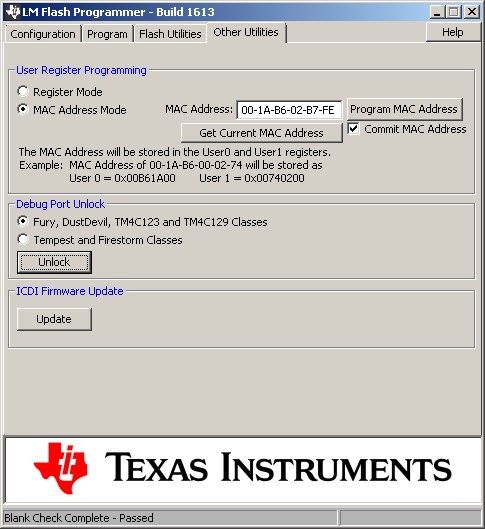
    Did you try the Debug Port Unlock facility on the LM Flash Program?

    I tested the Debug Port Unlock in that:

    a) Downloaded a program to a TM4C123 LaunchPad which contained the statement GPIO_PORTC_PCTL_R &= ~0xF0. After had stepped over that statement the CCS debugger reported errors that could no longer communicate with the device.

    b) Further attempts to launch debug sessions caused the CCS debugger to report "CORTEX_M4_0: Error connecting to the target".

    c) After the LM Flash Programmer Debug Port Unlock was used was then able to use the CCS debugger to run other programs. i.e. the Debug Port Unlock was successful.