


Other Parts Discussed in Thread: BQ76PL536, MSP430F5529, BQ76PL536EVM-3, MSP-EXP430F5529LP
Tool/software: Code Composer Studio
Hello Forums
I am trying to run a program on CCS Cloud, that I have verified as working in CCS v7. The problem is, the program never builds in CCS Cloud and always ends up with an error like:
"../SourceCode/BQ76PL536/bq_pack.c", line 78: fatal error: cannot open source file "Common\types.h"
1 catastrophic error detected in the compilation of "../SourceCode/BQ76PL536/bq_pack.c".
Compilation terminated.
gmake: *** [SourceCode/BQ76PL536/bq_pack.obj] Error 1
The culprit appears to be the following lines of code:
#include "Common\types.h"
#include "Common\hal_macros.h"
All other include lines in this file just have the name of the header file in the inverted commas. The only solutions I have found to this problem are to:
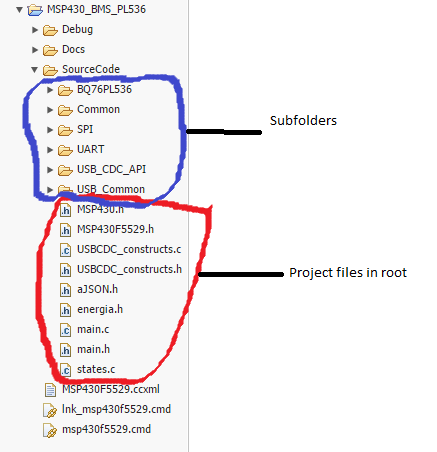
- Place all files in the same subfolder. This means manually moving all files from subfolders in the project folder, into the root of the project folder itself.

- Remove all "common\" from the #include lines. If this is done, it has to be done for EVERY file in the project folder. And there are a lot of other files that would give similar errors to above; an example contains the following lines of code:
#include "..\Common\types.h"              // Basic Type declarations
#include "..\USB_Common\defMSP430USB.h"
#include "..\USB_Common\usb.h"            // USB-specific Data Structures
#include "..\USB_CDC_API\UsbCdc.h"
These 2 solutions I've found are extremely tedious for larger projects with many files, especially since the program worked as is in CCS v7.
Is this a bug in CCS Cloud, or the way it should be? Is there an option to allow the program to work straight from CCS v7 without these modifications?
Regards
