


I've searched through the forum and read every post regarding uninstall problems only to find
http://e2e.ti.com/support/development_tools/code_composer_studio/f/81/p/56812/201757.aspx#201757 which indicates a bug has been filed (SDSCM00037369). What is the status on this bug? Was it resolved in v4.1.3? The answer provided there also does not help me get the versions out of my Programs and Features in Device Manager. If possible I would like to remove them.
Can someone please help me to uninstall all vestiges of CCS from my machine so I can start fresh?
First off my setup (from system information):
OS Name Microsoft Windows 7 Professional
Version 6.1.7600 Build 7600
System Type x64-based PC
Processor AMD Athlon(tm) 64 X2 Dual Core Processor 4600+, 2400 Mhz, 2 Core(s), 2 Logical Processor(s)
BIOS Version/Date Phoenix Technologies, LTD ASUS M2N32-SLI DELUXE ACPI BIOS Revision 2209, 9/7/2009
SMBIOS Version 2.4
Windows Directory C:\Windows
System Directory C:\Windows\system32
Boot Device \Device\HarddiskVolume1
Locale United States
Hardware Abstraction Layer Version = "6.1.7600.16385"
Time Zone Pacific Daylight Time
Installed Physical Memory (RAM) 6.00 GB
Total Physical Memory 6.00 GB
Available Physical Memory 3.98 GB
Total Virtual Memory 6.00 GB
Available Virtual Memory 4.13 GB
Page File Space 0 bytes
The problem:
I have managed to somehow get two entries in my Programs and Features list for Code Composer Studio:
Code Composer Studio v4.1.2 and Code Composer Studio v4.1.3.
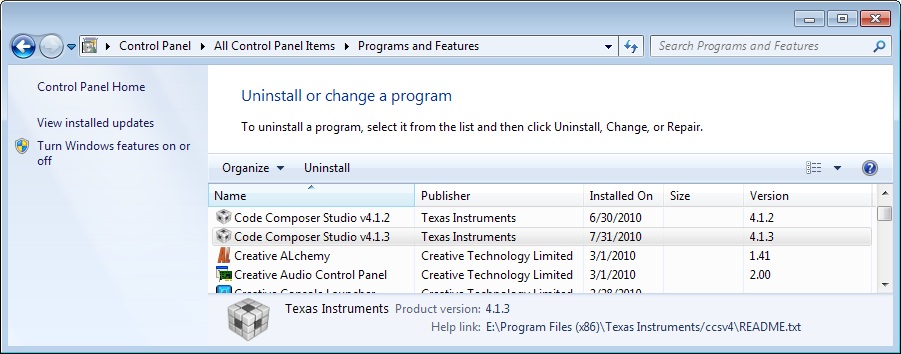
If you notice in the Programs and Features window below the Help Link is: E:\Program Files (x86)\Texas Instruments/ccsv4\README.txt. The same help link is listed for v4.1.2 and v4.1.3, so I must have installed one over the other without doing an uninstall first. For this I apologize, but would still like help if you have time. When I try to uninstall either version I am prompted with the following error message:
(typed for searchability, pictured below)
Error in action ExecuteScript
Only part of a ReadProcessMemory or WriteProcessMemory request was completed.
while executing
"::InstallJammer::actions::$component $this"
while executing
"$obj execute"
(procedure "::InstallJammer::ExecuteActions" line 62)
invoked from within
"::InstallJammer::ExecuteActions "Startup Actions""
(procedure "::InstallJammer::UninstallMain" line 20)
invoked from within
"::InstallJammer::UninstallMain"
(procedure "ThemeMain" line 2)
invoked from within
"ThemeMain"
invoked from within
"if{![info exists::InstallJammer]}{ ThemeMain }"
(file "/installkitvfs/main.tcl" line 30428)

After clicking OK, nothing happens and both versions are still installed. I would like to completely remove all instances of CCS from my machine so that I can install from scratch and have a fresh start. If you can help I would greatly appreciate it. I'm not afraid of regedit, so if you have a solution that required wiping some keys I'm completely open to that approach. Thank you for your time and consideration.
Best Regards,
Cullen Logan

