


Other Parts Discussed in Thread: LM3S3748
Hello,
I have followed the steps in the getting started guide to create my own project. I have included two other projects that build libraries for driverlib and grlib for the LM3S3748. I did this by importing those two projects from my Stellarisware installation directory but not copying the projects locally. I should note the following:
My Stellarisware installation directory is: E:\StellarisWare
Code Composer Studio v4.1.3.00034 installation directory: E:\Program Files (x86)\Texas Instruments
My OS drive letter is: C:\ ... I do not install tools or SDKs here as it is a smaller SSD reserved for OS files. Anyhow I have the following projects in my workspace:
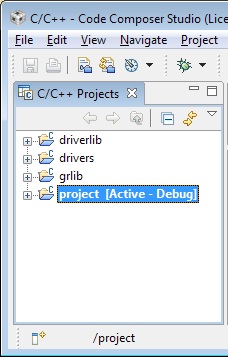
I have setup the dependencies properly so that project pulls in the .libs from driverlib and grlib. The problem I am having is that no matter what I put in the macros.ini file for any of the projects, the SW_ROOT system variable is ALWAYS set to C:\StellarisWare. For instance: the macros.ini file for my project named "project" is located in the following path: E:\StellarisWare\projects\memXpand\project\macros.ini
It contains only one line which is the following: SW_ROOT = ../../..
Upon right-clicking project and going to it's properties I am always shown the following for SW_ROOT:

The problem also occurs for driverlib, grlib, and usblib. The only solution I have so far is to create a directory junction in C:\ named StellarisWare and map it to E:\StellarisWare: i.e. mklink /J "C:\StellarisWare" "E:\StellarisWare". Without this directory junction the compiler always goes looking to the C:\ drive for the files in driverlib, et cetera.
How does CCS know to use the macros.ini file, and what considerations do I need to take into account when creating it?
-Where does it need to live in the project tree?
-Do I need to reference it somehow in the project settings? -- I found pathvariable.SW_ROOT=C\:/StellarisWare in org.eclipse.core.resources.prefs but changing it here made no difference, which brings me to the final bullet of these questions:
-Which files in the .settings (.metadata, and .launches) are important to keep? The reason that org.eclipse.core.resources.prefs has pathvariable.SW_ROOT=C\:/StellarisWare in it is because the file was checked into a code repository from a computer where the StellarisWare directory is in C:\
The SW_ROOT variable seems pretty important to StellarisWare, so how can I go about making it relative to the project rather than hard-coded? and if I don't need the files in .metadata, .settings, et cetera, how do I know which ones are safe to remove from my code repository so I don't run into more trouble down the line?
I appreciate any help and guidance. I have a workaround, but it is not ideal.
Thank You,
Cullen Logan
