This thread has been locked.

If you have a related question, please click the "Ask a related question" button in the top right corner. The newly created question will be automatically linked to this question.

CCS/CCSTUDIO: RTOS Analyzer in debug session is not enabled by default

Part Number: CCSTUDIO

Tool/software: Code Composer Studio

Hello!

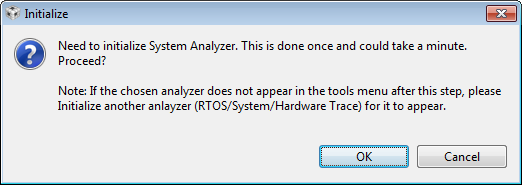
After recent update to CCS 7.1.0.00016 I have noticed, that RTOS Analyser item in Tools menu of Debug perspective does not have sub-items, as it was before. Instead, I have to click RTOS Analyzer, then message pops up telling me I have to enable the analyzer first (see screenshot). It happens every time I start debug session. No need to say that's annoying. Is there a way to have analyzer enabled by default? Actually, I want to printf logs in my debug session enabled by default, if there is a way to do that, would appreciate the hint.

Thanks.
  • rrlagic said:
    After recent update to CCS 7.1.0.00016 I have noticed, that RTOS Analyser item in Tools menu of Debug perspective does not have sub-items, as it was before. Instead, I have to click RTOS Analyzer, then message pops up telling me I have to enable the analyzer first (see screenshot).

    Yes this was a change that came about as a result of picking up a newer version of Eclipse in CCSv7. The new Javascript parser in Eclipse was causing the IDE to really slow down if the menu was left to auto-populate as before, hence the change was made to only initialize the analyzer tools when needed by the user.

    rrlagic said:
    Is there a way to have analyzer enabled by default?

    Unfortunately there isn't a way to do this currently. The initialization needs to be done for every new startup of CCS, (ie) if you just terminate the debug session and restart the debug session you should not need to re-initialize. But if you close and restart CCS then you would need to initialize again. 

    We are currently looking at ways to improve the usability of this and hope to make some improvements in the coming releases. Thank you for your feedback.

  • Thank you for clarification.
    I thought I messed up with update. Deleted completely and reinstalled twice before I realized behaviour is the same all the time.

    Just in case if my feedback might mean something, with previous release of v.7 I had something strange with RTOS Analyser menu. When I clicked Tools, and moved cursor over RTOS Analyser item, the IDE seems to stuck for couple of seconds, and then menu folded up. Next time I click Tools menu, I was able to get desired item. My machine has enough resources to do the job - it is i7 with 32GB of memory, SSD, and discrete graphics.