This thread has been locked.

If you have a related question, please click the "Ask a related question" button in the top right corner. The newly created question will be automatically linked to this question.

CCS/LAUNCHXL2-RM57L: Can't read User registers through DSS

Part Number: LAUNCHXL2-RM57L


Tool/software: Code Composer Studio

Hi,

I'm using Hercules RM57Lx board and I have 2 problems:

1. I try to read User registers through DSS script by run the command long reg = debugSession.memory.readRegister("R8_USER"); but i get the following error: SEVERE: Register R8_USER not found. I can read any other core register.

2. When i connect to the target through DSS script by the command debugSession.target.connect(); the ERR red led is turn on, any idea why and how can i avoid this behavior. When i connecting to the target through CCS i don't see this behavior.


Thanks,

Avi

  • Hi Avi,

    avi morali said:
    1. I try to read User registers through DSS script by run the command long reg = debugSession.memory.readRegister("R8_USER"); but i get the following error: SEVERE: Register R8_USER not found. I can read any other core register.

    For non CORE registers, you would need to specify the group via <GROUP NAME>_<REGISTER NAME>.

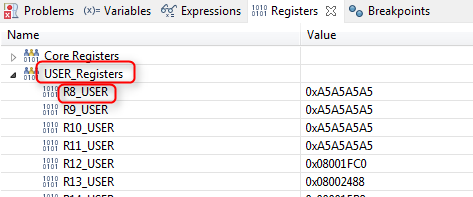
    For example, to read the register R8_USER shown below:

    I would do something like:

    debugSession.memory.readRegister("USER_Registers_R8_USER");

    avi morali said:
    2. When i connect to the target through DSS script by the command debugSession.target.connect(); the ERR red led is turn on, any idea why and how can i avoid this behavior. When i connecting to the target through CCS i don't see this behavior.

    Assuming all things being equal (CCS version, target configuration, GEL files, debugger options, etc) target.connect should have the same behavior as connecting the target via CCS. Do you know what that ERR led means when lit?

    Thanks

    ki

  • thanks Ki,

    1. Now i manage to read the User registers. This is strange because to read the FIQ registers i didn't add the GROUP_NAME and the command reg = debugSession.memory.readRegister("R8_FIQ"); work well for me.

    2. The ERR led indicate on some safety error, for example RAM ECC error. What do you mean by "Assuming all things being equal.." what things should be equal? i tried it on two different computers with two different board and i've got the same behavior. On DSS the ERR led lit and on CCS there is no issue. i'm using CCS Version: 7.0.0.00043.

    Thanks,
    Avi

  • Hi Ki

    Any idea how to avoid from the ERR led to lit when i connect to the target?

    Can someone from your team can try to reproduce it with RM57L board and see what i'm talking about?
    This is the code i'm using to connect to the target:

    ScriptingEnvironment env = ScriptingEnvironment.instance();

    debugServer = (DebugServer) env.getServer("DebugServer.1");
    debugServer.setConfig("RM57L8xx.ccxml");
    debugSession = debugServer.openSession("Texas Instruments XDS110 USB Debug Probe/CortexR5");

    if (!debugSession.target.isConnected())
    {
        debugSession.target.connect();
    }

    Thanks,
    Avi

  • avi morali said:
    Any idea how to avoid from the ERR led to lit when i connect to the target?

    The post in RM57 Flash Programming Error has one possible explanation of why the ERR led can be lit upon connecting to the target, along with a suggested work-around of 0x5 to the ErrKey register in the ESM module.

    Does that match your symptoms?

  • avi morali said:
    1. Now i manage to read the User registers. This is strange because to read the FIQ registers i didn't add the GROUP_NAME and the command reg = debugSession.memory.readRegister("R8_FIQ"); work well for me.

    Actually, I agree it is strange. That is because my previous comment was wrong. USER_Registers are indeed core registers. You should not have to prepend the core name like with the FIQ registers. I'm not sure what is happening. We are investigating this.

    avi morali said:
    2. The ERR led indicate on some safety error, for example RAM ECC error. What do you mean by "Assuming all things being equal.." what things should be equal?

    "equal" being the CCS version, target configuration file (ccxml) and debugger options. Regarding the latter, note that when launching a debug session via DSS, it will always apply the default debugger options every time. So if you are launching a debug session via CCS with modified (from the default) debugger options, then how you launch the debugger via CCS would differ from how the debugger is launched via DSS

    I can't seem to reproduce the issue you see, but I am not using the exact launchpad that you are using. I don't have access to that one here. I will see if I can obtain one.

    Thanks

    ki

  • Yes. thanks Chester the work-around indeed help.