This thread has been locked.

If you have a related question, please click the "Ask a related question" button in the top right corner. The newly created question will be automatically linked to this question.

CCS/OMAP-L138: Modifying GUI Composer parameters within C code in CCS

Part Number: OMAP-L138


Tool/software: Code Composer Studio

Hi,

I am trying to use the GUI Composer as a GUI for a voice-controlled chess game that I am creating use an LCDK board. Essentially, I want to be able to modify the position "left" and "top" parameters (of the Layout) of an imported image in the GUI Composer within my C code in order to represent the action of moving a chess piece around the board. I can easily do this within the GUI Composer by modifying the values in the Design pane of the GUI Composer or by changing the Source code, but I want to be able to do this programmatically (within the C code) as the game progresses.

I hope this description was involved enough for my question to be understandable.

Thanks!

  • Hi Benjamin,

    Good to see that you are trying to use GUI Composer to its max potential. You might want to consider using GUI Composer v2 online, your app can be hosted online and share with others in the Gallery. However, GUI Composer v2 doesnt' support your device at the moment.

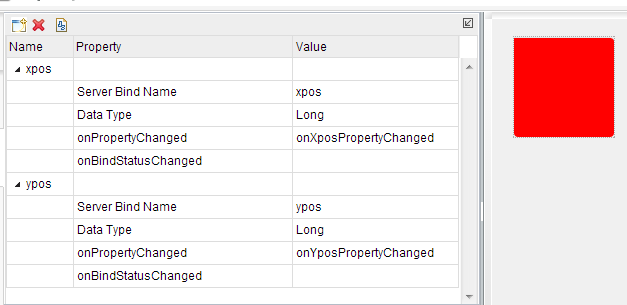
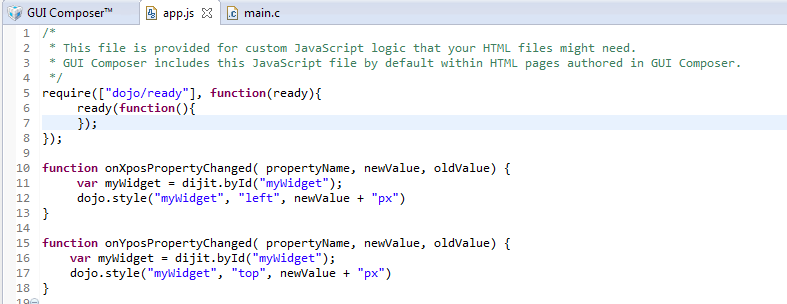
    OK, back to answering your question. You can create GUI Var bindings to your target variables and change the CSS styles in the onPropertyChanged handler.

    Here is an example of the GUI Vars and its corresponding JS code, myWidget is the red image in the screenshot. 

    Good luck on your project!

    Regards,
    Patrick

  • Patrick,

    Thank you so much for your reply! Unfortunately, I am not very well-versed in JavaScript so I am having a little trouble understanding the intricacies of the code that you gave as a response. If you could clarify how it is used, that would be greatly appreciated! Also, for my purposes, since I want to be able to modify the x,y positions of every chess piece on the board, I would need to have an xpos and ypos (with corresponding JS functions) for every piece?

    Also, my main question is, given this implementation in the JS code, how does this work with my C code (where all of the game logic lives)? I.e. is there a shared variable between the two (C and JS) that can be changed in the C code, which updates the JS? If so, could you briefly give me a short example of how this variable could be used in the C code?

    Thanks again!
  • edit: I think I figured it out! I just needed to declare 'xpos' and 'ypos' as global in the C code and then change their values as I normally would. So I am still assuming I would need a pair of xpos/ypos for every game piece.

    Thanks a lot!
  • You can optimize the binding to a string instead of xpos/ypos for each game piece. i.e "BQueen,xpos,ypos". "WKnight,xpos,ypos", then you use JS to parse the three string segments and perform your css style change. BQueen, WKnight is the widget name of your pieces in GC, xpos and ypos is number for the CSS position offset.

    Regards,
    Patrick

  • Got it!

    I'm also trying to bind the 'visible' parameter to my C code in order to toggle it on will. Drawing inspiration from the implementation of xpos and ypos, I tried something like this (in my JS code):

    function onVisible_rook_black_1PropertyChanged( propertyName, newValue, oldValue) {

    var myWidget = dijit.byId("rook_black_1");
    dojo.style("rook_black_1", "visible", newValue);

    }

    I also tried changing "visible" to "visibility" based on what I found online, but that didnt work either. Also since I'm using C, I'm stuck to using char arrays as strings -- I have included <string.h> so I can use strcpy for changing strings.

    Is 'visible' part of 'style'? I looked at the html source code of the GUI window and it seems to be separate so do I do something like "dojo.visible(....)"??

    Thanks!

  • Try this, change the if statement to your need:

    if (newValue) {
        dojo.style("rook_black_1", "display", "");
    } else {
        dojo.style("rook_black_1", "display", "none");
    }

    You can actually remove the var myWidget line. I had it in my example code that I gave you, which I forgot to remove it before I send it to you.

    Regards,
    Patrick