This thread has been locked.

If you have a related question, please click the "Ask a related question" button in the top right corner. The newly created question will be automatically linked to this question.

Compiler/msp430f5529: Code Composer 6 downloading and installing compilers

Part Number: MSP430F5529


Tool/software: TI C/C++ Compiler

Dear Sir:

    I installed an old version of CCS 6 on one computer and then I installed another version of CCS6 (a later version) on another computer.   I copied my programs from the computer with the older version of CCS6 and pasted them onto the computer with the later version of CCS6.  

     When I tried to compile my old programs using the computer with the later version of CCS6 that used a different compiler I received an error message.

Paraphrasing what the error message basically said:

" Old projects were created using a version of compiler that is not currently installed: 4.3.3 [MSP430]. Another version of the compiler was used during build: 4.4.6."

Can you please point me to a link where I can directly install the compiler 4.3.3 and then point me to a link that can tell me how to direct the CCS6 IDE to use this compiler, instead of 4.4.6?

Also, pointing out the pitfalls of using a different compiler, instead of the compiler installed with a typical CCS6 software package, would be helpful.

Thank you for your technical support. 

  • Michael Choi said:
    Paraphrasing what the error message basically said:

    " Old projects were created using a version of compiler that is not currently installed: 4.3.3 [MSP430]. Another version of the compiler was used during build: 4.4.6."

    Can you please point me to a link where I can directly install the compiler 4.3.3 and then point me to a link that can tell me how to direct the CCS6 IDE to use this compiler, instead of 4.4.6?

    Installing Older Versions describes how to install an older version of a compiler in such situations. Once the compiler 4.3.3 is installed CCS should automatically use that compiler (and remove the warning about "Old projects were created using a version of compiler that is not currently installed: 4.3.3 [MSP430]").

  • Michael Choi said:
    Also, pointing out the pitfalls of using a different compiler, instead of the compiler installed with a typical CCS6 software package, would be helpful.

    To understand the differences among different versions of the compiler, please see the wiki article Compiler Version Numbers and What They Mean.

    Thanks and regards,

    -George

  • Dear Chester;

          I would like to thank you for reply.

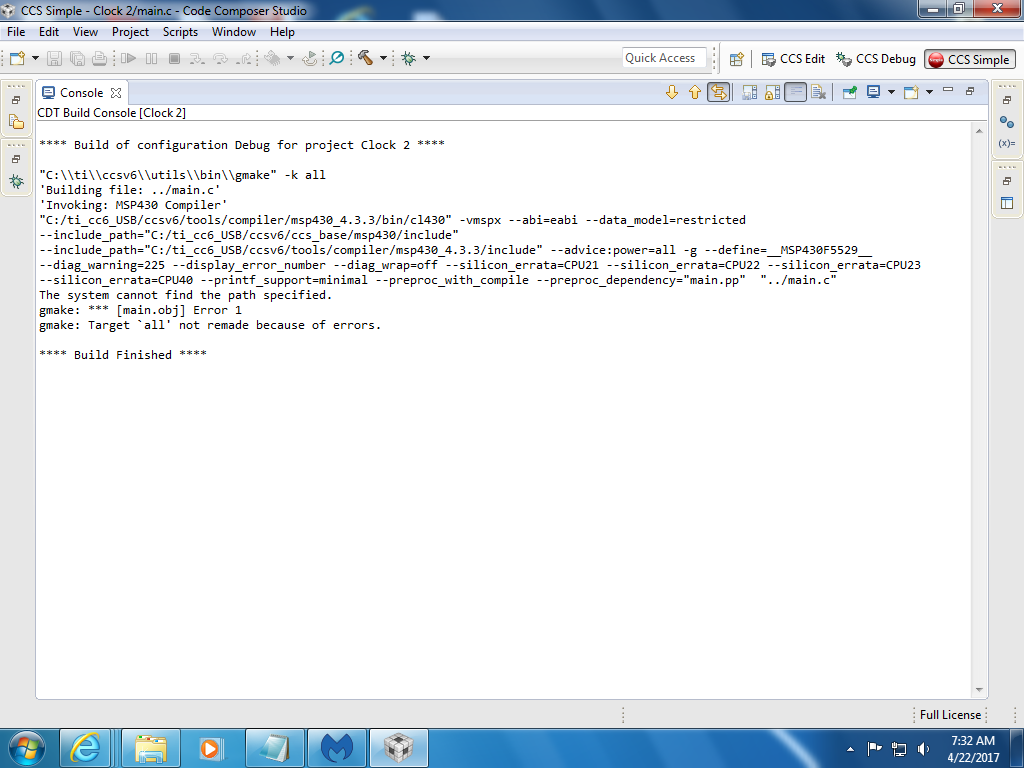
          I uninstalled the old compiler and re-installed the new compiler.   However, there is a problem.    The new compiler requires a "path" and I am not certain what path the compiler is referring to.   I am attaching a screenshot of the error message.   Can you please  tell me what path the compiler is referring to and how do I configure CCS6 and the compiler to see this path?

          Thank you, again for your technical support.


  • Michael Choi said:
    Can you please  tell me what path the compiler is referring to and how do I configure CCS6 and the compiler to see this path?

    From the screen shot it appears that CCS is installed in C:\ti (based upon the path of gmake), but that the makefile is attempting to access a compiler installed under C:\ti_cc6_USB (presumably the directory C:\ti_cc6_USB doesn't exist).

    By default CCS is supposed to automatically generate the makefile when performing a build, such that the makefile contains the correct path to the compiler (based upon the detected compiler).

    Can you check in the CCS project properties that "Generate Makefiles automatically" is ticked:

    Also, if you right-click on the project in the Project Explorer and select "Rebuild Project" to force a complete re-build of the project that might help.

  • Dear Chester;

    Thank you for your advice. Your answer got my system working. You are the greatest!!!