This thread has been locked.

If you have a related question, please click the "Ask a related question" button in the top right corner. The newly created question will be automatically linked to this question.

CCS/BQ76PL455EVM: ccs compiler

Part Number: BQ76PL455EVM

Tool/software: Code Composer Studio

Hi,

I wanted to test the sample code for BQ76PL455 using CCS.

But the code was compiled in version 5.1.5.

I am using Windows10 home. Here i am unable to install version V5 on it.

Can anyone recompile the same code in a higher version like V6.

BQ76PL455A-Q1 Example Code (Rev. A)

Thanks

Ritul Shah

  • Ritul,

    I tried importing the example project in CCSv7.1 and I was able to import it and build it.  The names and steps mentioned in the users guide did not match with what I saw but this is what I selected when importing the project.

    For me it took a long time to build as the project uses a version of the C runtime support library that the compiler doesn't ship a prebuilt version of so it has to be built the first time.  This must have taken 15 minutes, but my laptop is not very fast.

    As far as usage of the example I won't be able to help as I am not familiar with this device.  If you have questions on that someone in the power management forum should be able to help.

    Regards,

    John

  • Hi John,

    I performed the same steps as instructed by you.

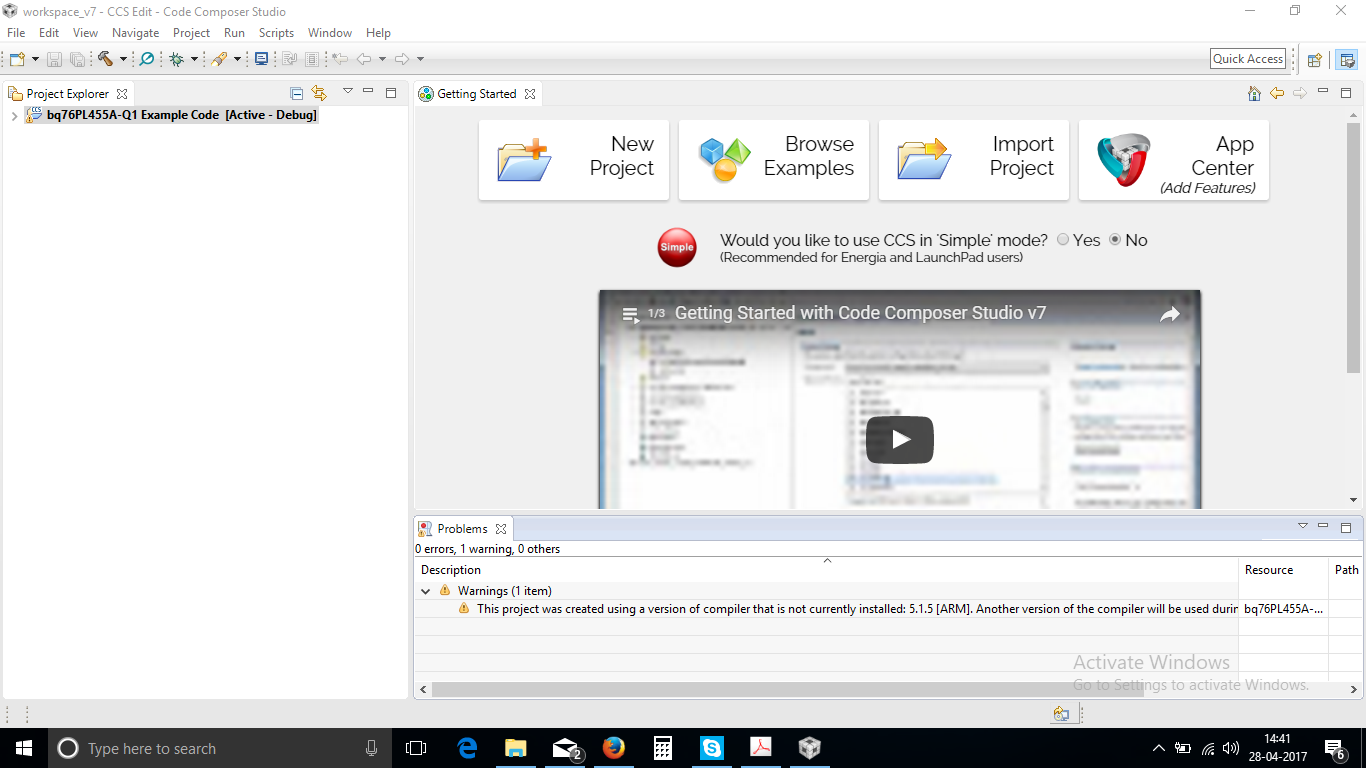
    Once i click the Finish button it builds and gives one warning.

    I have attached the snap. It is visible at the bottom.

    Please help me out for this issue

  • The warning is simply stating that the project was created using the 5.1.5 version of the compiler but is now being built with another version.  If you want to get rid of the warning you can open the project properties.  Select General on the left and then change the compiler version on the right to one that you have installed.

    Regards,

    John

  • Thanks John.

    My problem is solved.