This thread has been locked.

If you have a related question, please click the "Ask a related question" button in the top right corner. The newly created question will be automatically linked to this question.

CCS/CCSTUDIO: Adding build tools

Part Number: CCSTUDIO


Tool/software: Code Composer Studio

That's a rather annoying form (especially having to re-select the forum).

Code Composer Studio  Version: 5.3.0.00090

I'm trying to do something that I "know" should be simple but I have not determined how to do it with TIs build system. I know it should be simple since it's something every developer needs to do.

I'm trying to figure out how to add tools to the build process. To do static analysis and unit testing to start but code generation tools would, of course, follow. So these tools cannot run as pre-build or post build steps (those appear to be straightforward to add) since those steps appear to be run once per build regardless and apparently do not stop the build on error. Both static analysis and unit testing need to run before compilation and cause the build to fail if they fail.

Robert

  • There is some limited static analysis that comes built in with CCS, however for more advanced analysis, there are some commercial tools that we recommend.
    Please see this post and this post for related information.

  • If you re-read my post you will find that I am not asking about tool availability but how to integrate the tools into the build process. Sorry if that was unclear.

    Tools I've got, instructions on tool integration I'm missing. The tools I referenced are just some examples for anyone who might not understand why a compiler is insufficient.

    Robert

    BTW the TI compiler really doesn't appear to have much static analysis support

  • Integration of 3rd party code analysis tools will really depend on the tool itself and the instructions would typically come from the vendor of the tool. Most of the ones mentioned in the link I referenced above provide a plug-in that integrates into the Eclipse environment (for example, here are a couple of references I found for Klockwork, and LDRA).

    Regarding the built-in code analysis in CCS, that comes from the Eclipse CDT and is indeed limited. It is also disabled by default for CCS projects, but can be enabled from the project settings as mentioned in this page.

  • AartiG said:
    Most of the ones mentioned in the link I referenced above provide a plug-in

    I'm not looking for a plug in (certainly not for any code generators I write). As I said previously, I'm looking for instructions on how to integrate into the build. All of the tools I work with have straight-forward command line interfaces with error code returns and have had for at least 30 years. This is a standard integration issue.

    This should be simple and straight forward and yet I see no instruction on how to do it.

    Robert

  • Hi Robert,

    For custom pre-build step (or post-build step) behaviour, you can script your own hooks into the generated makefile.

    To achieve the behaviour you've described (in CCS v5.3.0):

    1. Add the attached "makefile.init" file into the root of your project.

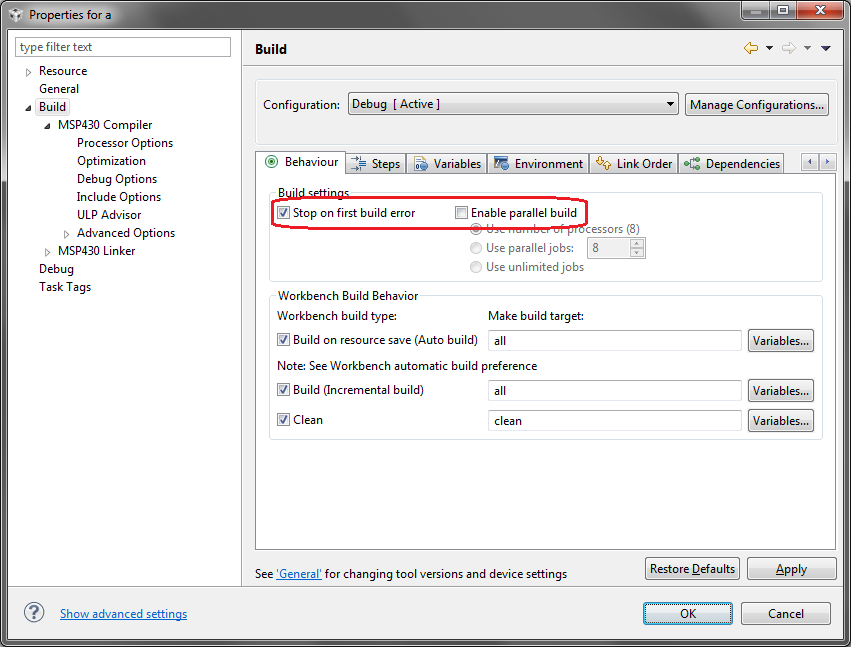
    2. Go to project properties Build > Behaviour tab, select "Stop on first build error", and make sure that "Enable parallel build" is not selected:

    Now, when you build your project, the build will stop immediately after failing to execute the "@mkdir a*b" command in your custom-step.  And if you change the command to "@mkdir ab", your custom-step will succeed and the rest of the build will proceed.

    Let me know if this answers your question.

    Thanks,

    - Baltasar

  • Getting closer

    Baltasar Belyavsky said:
    Add the attached "makefile.init" file into the root of your project.

    There is no attached file that I see. Is there some link I am missing?

    Baltasar Belyavsky said:
    For custom pre-build step (or post-build step) behaviour

    From the original post

    Robert Adsett said:
    So these tools cannot run as pre-build or post build steps (those appear to be straightforward to add) since those steps appear to be run once per build regardless...

    Perhaps this needs additional clarification. These are part of the build process not a separate independent step from the build. ie you might run something like

    for object file a

    • convert text table a to C (file a) with support code
    • run static analysis on generated code a
    • run unit tests on generated code a
    • compile generated code a to object file a

    for object file b

    • run static analysis on code b
    • run unit tests on code b
    • compile code b to object file b

    And finally link together compiled files to a binary

    To run as a pre-build step you would need to reproduce and maintain two build systems. You'd be a lot further ahead to just throw out the TI build system in that case since it could only cause confusion.

    Robert Adsett said:
    ... and apparently do not stop the build on error

    I had assumed that the stop on build error did not apply to pre and post build steps since there was no indication otherwise and the option name indicates it only applies to the build. Good to have that cleared up.

    Robert

  • Sorry, attaching the "makefile.init" file, referenced in my previous post (with an additional ".txt" extension to bypass upload filters): 

    all: custom-step
    
    custom-step:
    	@echo Custom pre-build step
    	@mkdir a*b

    This example illustrates how to hook into the generated makefile to script a custom pre-build step.  But similarly, hooks can be scripted for individual source-files.  Or, if you wish to completely customize the makefile, you could go to project properties, Build > Builder tab, and deselect "Generate Makefiles automatically".  If you do that after building your project once, you can then edit (or completely rewrite) the generated makefiles.

    - Baltasar

  • That's better.

    Baltasar Belyavsky said:
    Or, if you wish to completely customize the makefile, you could go to project properties, Build > Builder tab, and deselect "Generate Makefiles automatically".  

    Saw that, just trying to see if there is any reasonable path that avoids that.

    I think to do that you would need to modify the top level target to control build order. Adding rules for something like unit testing is then straightforward.

    But if you've not provided a hook for that then I think we are back to replacing the build system.

    Robert