This thread has been locked.

If you have a related question, please click the "Ask a related question" button in the top right corner. The newly created question will be automatically linked to this question.

CCS/CC2640R2F: Linker error during build

Part Number: CC2640R2F

Tool/software: Code Composer Studio

Hi,

I get the following errors during a build for the simple_peripheral project in the BLE5 stack example.
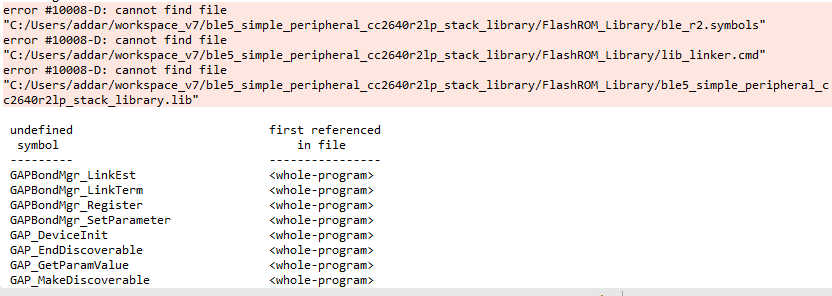
I am using Code composer studio v7.1.0.0 and I don't know why this is happening. I tried to delete all files and do a fresh re-install and I face the same error. Any reasons why this is happening?

  • The error message is saying that the linker is not able to find those files within that path. It appears that you are building a modified version of the example project, is that correct? I assume it is a copied or modified version as the project and directory names are different from the out-of-box example.

    In this case, I would suggest comparing your project settings with the out-of-box example. Specifically compare the pre-build step, as I believe the files ble_r2.symbols and lib_linker.cmd are copied over to the build configuration directory during the pre-build step.

  • Hi AartiG,

    I was using the same version out of the box but the problem was that the stack library of the app was not listed as a dependency in the build settings for some reason. When I added the stack library as a dependency, the build went through.

    Thanks for your help!