This thread has been locked.

If you have a related question, please click the "Ask a related question" button in the top right corner. The newly created question will be automatically linked to this question.

CCS/MSP-EXP432P401R: STD has no member to_string

Part Number: MSP-EXP432P401R


Tool/software: Code Composer Studio

Hello everyone, I have been developing in C in CCS for a while.  I want to port to C++ but am running into all sorts of issues.  After battling with them a bit I decided to create a new project completely blank and begin by creating a main.cpp file.  Starting from a hello world aspect if you would. So here is some code that builds just fine:  

#include <string>
#include <iostream>

using namespace std;

int main()
{
    int x = 8;
    string c = "whatever";
    cout << c << endl;
}

Now when I do the following...

#include <string>
#include <iostream>

using namespace std;

int main()
{
    int x = 8;
    string c = "whatever";
    cout << c << endl;

    cout << std::to_string(x) << endl;  // #136 namespace "std" has no member "to_string"
}

So the to_string is definately in the std namespace, this namespace isn't polluted or anything, can anyone help here?

  • So I have found the answer I suppose. Project->Properitesd->C/C++Build->Uncheck: "Use default build command" -> enter the following in text box: "-std=c++11"

    I understand why this is. I am using the MSP432, could someone please tell me what options if any I should select in the following location: CCS Build -> MSP432 Compiler -> Advanced Options -> Language Options.....or anything in this category as there are quite a few items I am unfamiliar with
  • Unchecking the "use default build command" will change the command that we send to make but not the compiler options. It won't actually impact the compiler at all.

    The Advanced Options -> Language Options section is the place to go.

    I believe we only support up to C++03 and not C++11. That matches with what I see in the dialog box as well as what I see here:
    processors.wiki.ti.com/.../C++_Support_in_TI_Compilers

    We are working on C++14.
  • JohnS,

    Thank you for the link it is a good read.  Haven't fully digested it's contents but I will over the next few days.  Within the advanced options I currently have the following options checked:  

    Support C++ run-time type information

    Allow extern C functions to propagate exceptions

    Are the other two options useful?  Should I use them if my intention is to develop as c++'ish as I can?

  • MICHAEL RILEY said:
    Are the other two options useful?  Should I use them if my intention is to develop as c++'ish as I can?

    Those are advanced options seldom needed by new users.

    Thanks and regards,

    -George

  • JohnS,

    Hey i'm sorry to bring this up again.  Please let me know if I should start a new thread.  I've read that entire embedded c++ page.  I wanted to use embedded c++ but when I select it I get the errors that it is no longer supported.  But that is not the real problem.  I still cannot get CCS to compile in c++ mode.  Above I had thought I figured it out but no matter what I code I get zero errors or warnings.  I even changed

    int main(void) {...}

    to 

    bob main(void) {...}

    And no errors were present so then I looked at the build log and I get the following output:  

    **** Build of configuration Debug for project habs_rtos ****
    
    "C:\\ti\\ccs710\\ccsv7\\utils\\bin\\gmake" -std=c++03 -k -j 4 all -O 
    C:\ti\ccs710\ccsv7\utils\bin\gmake: invalid option -- =
    C:\ti\ccs710\ccsv7\utils\bin\gmake: invalid option -- c
    C:\ti\ccs710\ccsv7\utils\bin\gmake: invalid option -- +
    C:\ti\ccs710\ccsv7\utils\bin\gmake: invalid option -- +
    C:\ti\ccs710\ccsv7\utils\bin\gmake: invalid option -- 0
    C:\ti\ccs710\ccsv7\utils\bin\gmake: invalid option -- 3
    This program built for Windows32
    Report bugs to <bug-make@gnu.org>
    
    **** Build Finished ****
    

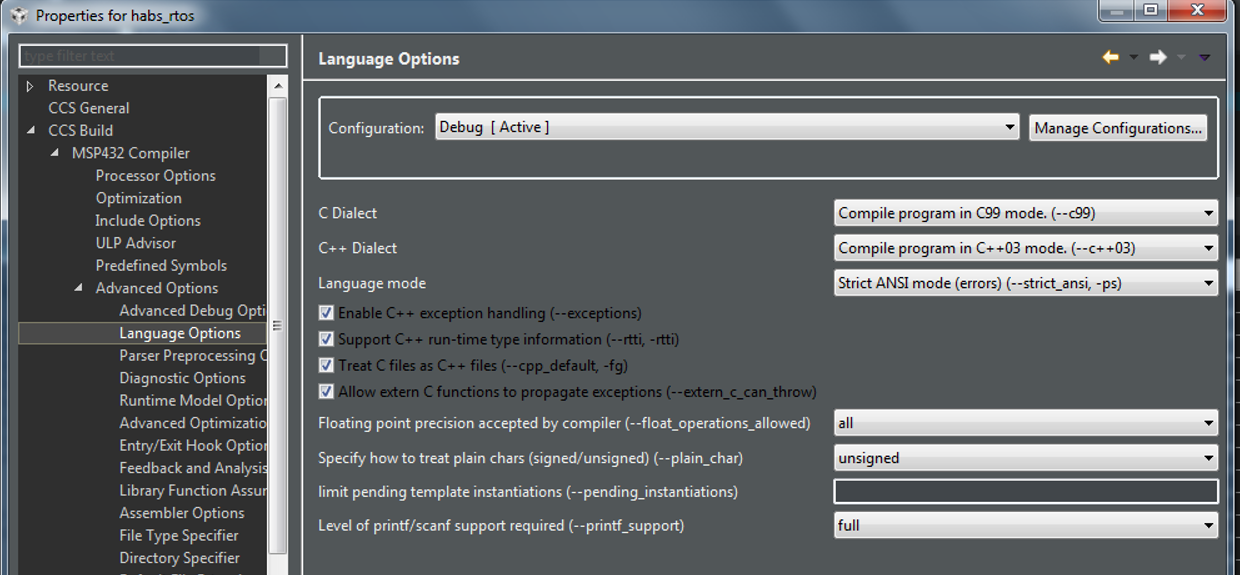
    Now I have used -std=c++11, 03, and 0x but none of them seem to work.  Reading your reply I can see that this doesn't matter so I have checked the box to use the default command line options.  Now I get errors which is great actually.  The question is what should I really have selected under language options?  Here is a picture of what I currently have selected.  

  • Mike,

    You don't want to change the command that is passed to gmake.  The build is stopping there as the command specified is not valid.  The options for the compiler end up inside the make file that is generated by CCS when you specify the options in the GUI, you don't want to pass them on the make command line.

    You will want to restore the make command back to:

    Regards,

    John

  • JohnS,

    Thanks, yes I did that already and i get errors which is good.  There are 4 options under language mode would you have any advice for those?  Also Strict ANSI vs Relaxed?  I've never heard of that before.  Thanks!

  • Please see the section of the ARM compiler manual titled Changing the ANSI/ISO C/C++ Language Mode.

    Thanks and regards,

    -George