This thread has been locked.

If you have a related question, please click the "Ask a related question" button in the top right corner. The newly created question will be automatically linked to this question.

Error in creating obj files while building example prog

Other Parts Discussed in Thread: LM3S8962

Hi,

I am currently working with LM3S8962 evaluation kit. While working on the CAN simple_tx.c (StellarisWare\examples\peripherals\can) example given in the stellarisware software I encountered the following errors.

(Since there were 16 errors I have included them as screen shot)


I initially imported the “StellarisWare/driverlib” file before opening a new proj.

Then I created a new proj named “cc” and added the driverlib folder to it.

I created a file source file named main.c in the new proj and copied-paste the simple_tx.c content into it.

I clearly defined the location of each and every header file in the main prog, but still I got the above mentioned errors.

This sort of error shows up for almost all example prog given in StellarisWare. But a handful of programs like Uart_polled.c and rom_direct.c are getting executed without any errors. I followed the same set of steps for the above mentioned prog too.

Is there any error in my way of doing things because there cannot be mistakes in the example program?

This is how I defined the location of headers in the main prog.

#include "C:/StellarisWare/inc/hw_memmap.h"

#include "C:/StellarisWare/inc/hw_types.h"

#include "C:/StellarisWare/inc/hw_can.h"

#include "C:/StellarisWare/inc/hw_ints.h"

#include "C:/StellarisWare/driverlib/can.h"

#include "C:/StellarisWare/driverlib/interrupt.h"

#include "C:/StellarisWare/driverlib/sysctl.h"

#include "C:/StellarisWare/driverlib/gpio.h"

#include "C:/StellarisWare/utils/uartstdio.h"

In addition to it as I have mentioned earlier I also added the drivelib files to my main prog.


Note: I compiled this prog using CCS v4.

  • sidd,

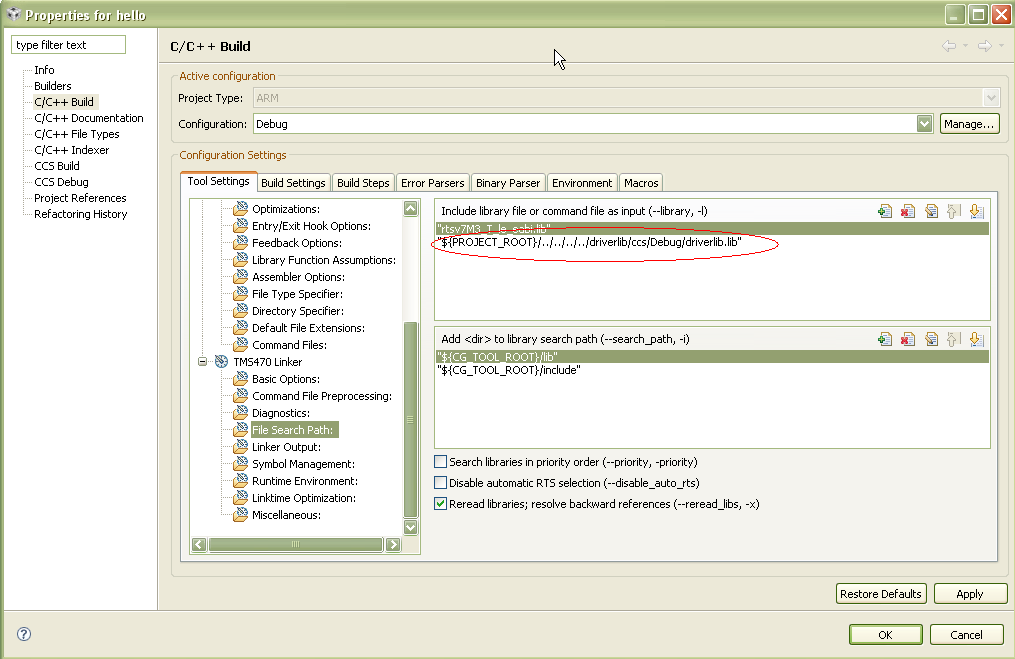
    You are getting unresolved symbol linker errors. Most likely you are not including a library.

    sidd said:
    Then I created a new proj named “cc” and added the driverlib folder to it.

    In your screenshot, I don't see where you added the driverlib folder to you 'cc' project. I just see another project folder called 'driverlib'. Did you create a project dependency between the two?

  • Hi Ki-soo Lee,

    I followed the same steps mentioned in the "Quickstart-Eval-Kit-CCS.pdf" which came along with the CD for creating a proj and importing the driver files into it.

    It could be that I may have misunderstood what was mentioned in that.

    Can you please guide me in this issue. Can u pls explain the me the procedure for adding the driverlib files through screen shots.


  • I did run through the Stellaris Quick Start Guide and everything worked (builds correctly). The example projects properly include the driverlib.lib file. Make sure you include it in your custom project ("cc") you are working on.


  • Hi

    Thanks for the pains you have taken to answer my questions.

    I made the modification in the Build Properties as mentioned by you but now none of the headers are getting recognises. 

    In addition to this  while creating a new project in the additional information window the driverlib option is not displayed (Please see screen shot  below).

    Whereas the screen shot given in the Quickstart-Eval-Kit-CCS.pdf has a entire list of additional informations which could be added to the project.

    This was the reason why I separately imported the driverlib file to my project.

    Is this the mistake of the software or my way of creating the project.


  • sidd said:
    I made the modification in the Build Properties as mentioned by you but now none of the headers are getting recognises. 

    Are you now getting compile errors instead of linker errors?

    sidd said:
    In addition to this  while creating a new project in the additional information window the driverlib option is not displayed (Please see screen shot  below).

    The list of projects to reference is blank because you don't have any open projects in your workspace (your C/C++ Projects view is empty). It will only allow you to set up dependencies with projects that are open in your workspace

  • Hi 

    This was the error which I got when I compiled the same program after making the modification u had mentioned


    could not open source file "inc/hw_memmap.h" ADC main.c


    Note: "${PROJECT_ROOT}C:/StellarisWare/driverlib/ccs/Debug/driverlib.lib"

    This was the string which i entered in the File search Path. Please check the string for any mistake. 

  • Hi Ki soo Lee,

    Could you please brief me about the general procedure for adding driverlib files to a new project in CCS v4.

    I would be benefited if you could send me some link which explains about adding files in CCS v4.

  • Under the 'Project' menu, you will have options to Add or Link files to the active project. See slide 15 of the below link for an explanation between the two

    http://processors.wiki.ti.com/images/0/09/CCSv4_Tips_%26_Tricks.pdf

    Thanks

    ki