This thread has been locked.

If you have a related question, please click the "Ask a related question" button in the top right corner. The newly created question will be automatically linked to this question.

CCS: Failed to initialize the debug server


Tool/software: Code Composer Studio

Hi,

I installed CCS6.2.0 on my PC with windows XP Operation System, 32 bits service pack2 that is supported by latest version of CCS6.2.0.   Building (compile) one of the example projects (like Hello, qs_rgb,….) at Tivaware series 2.1.4.178 version is done  correctly, However when I try to download codes to target board (TM4c123GXL) by using debugging command.  I get this error message:

 Debugger Initialization Error

Unable to load C:\ti\ccsv6\ccs_base\DebugServer\drivers\icdi_emu.dvr

Invalid access to memory location

I have checked contents of the folders and looked at this file “icdi_emu.dvr” that is there. Although the file exists into the folder but it cannot be loaded. 

Before install CCS6.2.0. the Windows installer of my PC has been upgraded to 4.5 by using package: Windows Installer 4.5 redistributable WinXP (SP2) KB942288.

If the CCS6.2.0 is uninstalled and then installed again, do you think the problem is going to be resolved?


Thank you for your support

Mohammad 

  • Please take a look at this related thread and the troubleshooting tips suggested there. I suspect you may also be missing some dependencies as mentioned in that post.

  • Thank you for your respond,

    I run the x86 32 bits version of Dependency Walker (2.2.6000.) on icdi_emu.dvr.  It reports two missing dependencies.  The reported error is:

    EFSADU.DLL        “Error opening file:  The system cannot find the file specified (2)”   

    MSJAVA.DLL      “Error opening file:  The system cannot find the file specified (2)”

    I don’t know how to find those missing dependencies.

    Thank you for your help.  

    Mohammad

  • Hi AartiG,

    As I told you before at July 02, there are two missing dependencies; EFSADU.DLL and MSJAVA.DLL based on the Dependency Walker report.

    I followed the troubleshooting tip from your suggested related thread.  I want to know if the missing files; EFSADU.DLL and MSJAVA.DLL are part of ”Microsoft Visual C++2013 Redistributable (x86)”.  Should I install the Visual C++ 2013 Redistributable Packages for Visual Studio 2013 from Microsoft site to fix those missing dependencies?

    If yes, could you please tell me how the ”Microsoft Visual C++2013 Redistributable (x86)" to be installed by the CCS installer.

    Thank you for your support

    Mohammad

  • Mohammad,

    Could you please try to uninstall and reinstall CCS and let us know if the error persists? For uninstall you can simply delete the directory where CCS was installed. Make sure there are no remaining files in the directory before reinstalling to the same location.

  • Hi AartiG,

    I uninstalled CCS and deleted all other remaining files and  then installed CCS but I get  Debugger Initialization Error message again:

    Unable to load C:\ti\ccsv6\ccs_base\DebugServer\drivers\icdi_emu.dvr

    This time, I ran the x86 32 bits Dependency Walker on icdi_emu.dvr.  The new report error is:

    Error: At least one module has an unresolved import  due to a missing export function in an implicitly dependent module.

    The files are: KERNEL32.DLL, MSVCP120.DLL, and MSVCR120.DLL

    ”Microsoft Visual C++ 2012 / 2013Redistributable (x86)” has been already installed on my PC. Should 2013 Redistributable uninstalled and and then to be reinstalled again on my PC? Should it be installed by CCS installer? but I don’t know how?

    Thank you

    Mohammad

  • Mohammad,

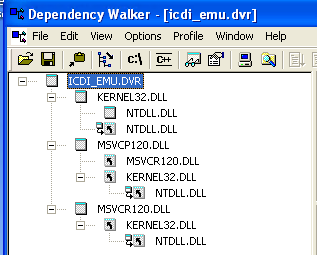
    This is what the dependency walker output should look like:

    If the MSVCR120 and MSVCP120 dependencies are not being found, then your idea of uninstalling and reinstalling this the redistributable package may help.  The redistributable package you want is the Visual Studio 2013 x86 version (not the 64-bit version).  It can be found here : https://www.microsoft.com/en-us/download/details.aspx?id=40784

    When you run this installer, it may offer to repair your existing installation. If it does, allow the installation to be repaired and try the CCS operation again.

  • Hi AndyW,

    Yes, the dependency walker output is look like above so both MSVCR120 and MSVCP120 dependencies are missing. First I  repaired the existing redistributable package of my PC, but it did not work.  Then I uninstalled and reinstalled the redistributable package;  Visual Studio 2013 x86 version. Again the problem was exist.  Finally, I uninstalled both redistributable package and CCS and then reinstalled them. Again the dependency walker show that both MSVCR120 and MSVCP120 are still missing and I get same message "icdi_emu.dvr is not found" when I run (debug) one of the example project like "Hello".

    I do not know how this problem is going to be fixed.

    Mohammad

  • I'm not sure what the issue is. One thing I did notice from your description above (which is very complete and detailed, by the way), is you are running XP SP2.  Is there a reason you are running SP2 instead of SP3?  I don't know for sure this would cause an issue, but more recent versions of CCSv6 were only tested against SP3.  I no longer have access to an XP OS install that has SP2 so I cannot test whether I see the same issue there.