This thread has been locked.

If you have a related question, please click the "Ask a related question" button in the top right corner. The newly created question will be automatically linked to this question.

Problem with Cgtools setup?

Hi, I want to install the ti_cgt_c6000_6.1.11_setup_win32.exe on my new PC, but unfortunately the setup ended with an error:
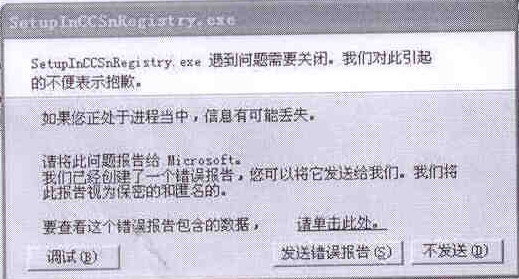
It seems that something was wrong, when runing the SetupInCCSRegistry.exe program.

then I downloaded the latest cgtools(v7.0.3), the error was the same.

My PC:

CPU:QuadCore AMD Phenom X4 9600S, 2300 MHz

mainboard chipset: nVidia nForce 6100-4xx, AMD K10

DDR: Hynix  2G DDR2-800

OS: Windows XP Professional SP3

----------------------------------------------------------------------------------------------------------------

Any good suggestion?

  • It looks like there was a problem with adding the code generation tools information to the CCS registry. Was the installation done with administrator privileges? Has CCS 3.3 already been installed successfully on this PC? Could you translate the full text in the message?

  • Hi, the installation was done with administrator privileges and CCS3.3 has been installed successfully.  I have tried to install the cgtools on another PC(Intel CORE 2 DUO CPU), everything was all right. The error message was:

                SetupInCCSnRegistry.exe was shut down with problem. We are apologized for the inconvenient. The other message was the same with the common windows exception error message.

             The QuadCore AMD CPU is 64bit, is the CPU compatibe with the software?


  • We are unable to reproduce what you see.  We started SetupInCCSnRegistery.exe on a machine with a multiple core CPU and 64-bit Windows XP SP3, and saw no problems. It seems the most likely source of the problem is somewhere within your PC.  Especially since you can make it work on a different PC.

    Thanks and regards,

    -George


  • Thanks a lot for you reply. I just send my client's problem on this board.

    My client have more than 3 PCs that have the same configuration:

    CPU:QuadCore AMD Phenom X4 9600S, 2300 MHz

    mainboard chipset: nVidia nForce 6100-4xx, AMD K10

    DDR: Hynix  2G DDR2-800

    OS: Windows XP Professional SP3

    He has tried to install the cgtools on these PCs, but the error was the same. So is CCS and cgtools compatible with this kind of configuration?

  • Bryan Wu said:
    So is CCS and cgtools compatible with this kind of configuration?

    Yes.  This is the first we have heard of this particular problem.  And we cannot reproduce it.  At this point, I'm not sure what to do next.

    For what is it worth, the only part of your listed configuration that should matter is the OS.  Windows should abstract everything else such that is appears the same to the installation software.  Users have installed on both Intel and AMD based systems for years.  I have never heard of any problems that could be traced to an Intel vs AMD difference.

    Thanks and regards,

    -George


  • Could that be related to an operating system with non-English language ? Maybe you can try to load English version of OS or change the language settings in Control Panel.

    Yuhua

  • This is entered into our defect tracking database as SDSCM00038015.  This issue is likely related to the version of the OS not the hardware.  Can you provide further details on the specifics of the Windows XP environment?  We can then attempt to build a VM with a similar OS environment and see if we can reproduce the crash.  Also, can you provide the specific version of CCS that is installed as well as the directory path where CCS and the codegen tools are installed?  It could be an issue with non-ascii characters in the directory path.  If CCS is installed in a different directory, does the crash still occur?

  • Is the Windows XP Traditional or Simplified Chinese?