This thread has been locked.

If you have a related question, please click the "Ask a related question" button in the top right corner. The newly created question will be automatically linked to this question.

CCS/CODECOMPOSER: I cannot add include files to project WHY!???

Part Number: CODECOMPOSER


Tool/software: Code Composer Studio

I cannot add files to the "includes" folders on your designs. How do you do this? See Below


It is easy to add source files:
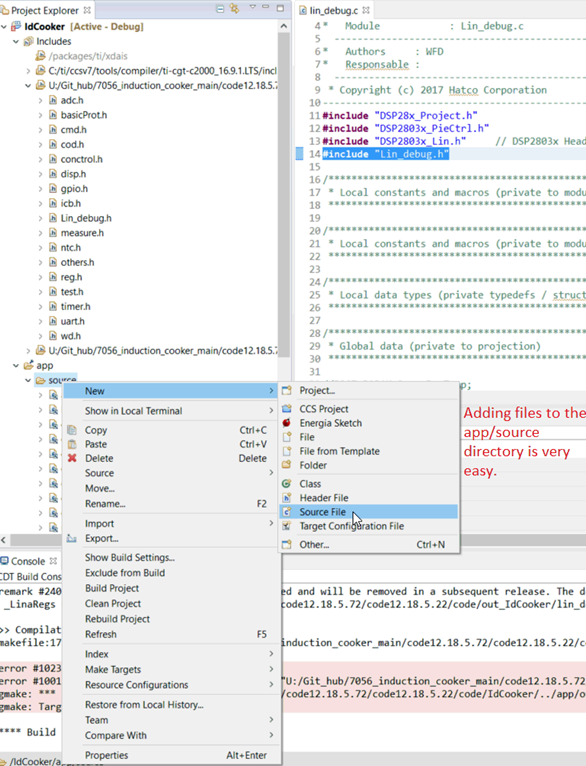

But I cannot add header files

I tried to search for it.

I searched for the directory in the make file variables But it still does not show up. Can you fix this???
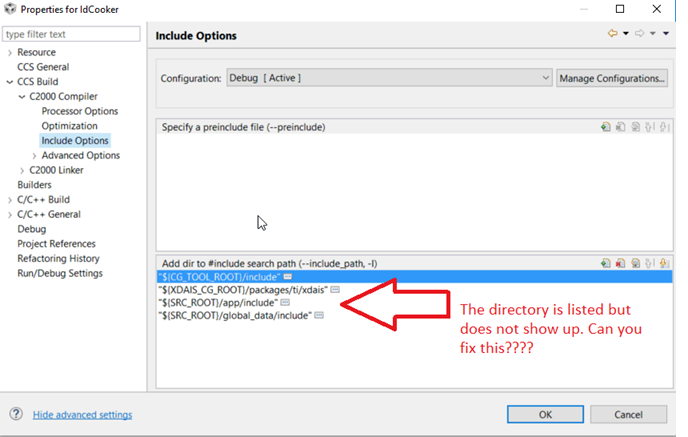
This is driving me nuts how hard can this be? Thanks 

  • Hello,

    William Dussault87 said:
    I cannot add files to the "includes" folders on your designs. How do you do this?

    You cannot drag and drop or use CCS to add files to those paths under "Includes". Those paths are detected from the include search path options (your last screenshot).

    If you want to add your header file to one of those folder, you can do it outside CCS (i.e. Windows Explorer)

    You can also leave the location of the header file alone and add a path to it in the include search path list

    William Dussault87 said:


    Which exact path are you referring to? In your first screenshot, I can see that the first, third and fourth paths are resolved but the second does not. I am going to guess that the XDAIS_CG_ROOT variable is not properly defined. Is it that path in question?

    Thanks

    ki

  • To do this do the following:

    Right click Add or new on project name.
    Select the .c file you wish to add
    Click "Okay" and then once it is in the project move it to the propoer source directory.
    Then Move the .h file into the includes directory in windows explorer. The file will be recognized automatically