This thread has been locked.

If you have a related question, please click the "Ask a related question" button in the top right corner. The newly created question will be automatically linked to this question.

CCS/TMS320F28335: XDS100v2 Drivers Issue

Part Number: TMS320F28335
Other Parts Discussed in Thread: CONTROLSUITE

Tool/software: Code Composer Studio

Hello.

I bought a new emulator, the XDS100v2, to use in TMS320F28335.

First of all, I installed CCS version 7 and then plugged XDS100v2.

Windows 10 installed the drivers and in Device Manager the emulator appears as a general USB Composite Device.

Running CCS and testing the connection to the emulator, it reports the following error:

"

Execute the command:

%ccs_base%/common/uscif/dbgjtag -f %boarddatafile% -rv -o -F inform,logfile=yes -S pathlength -S integrity

[Result]


-----[Print the board config pathname(s)]------------------------------------

C:\Users\Tiago\AppData\Local\TEXASI~1\CCS\
    ti\0\0\BrdDat\testBoard.dat

-----[Print the reset-command software log-file]-----------------------------

This utility has selected a 100- or 510-class product.
This utility will load the adapter 'jioserdesusb.dll'.
The library build date was 'May 23 2017'.
The library build time was '19:37:36'.
The library package version is '6.0.628.3'.
The library component version is '35.35.0.0'.
The controller does not use a programmable FPGA.

An error occurred while hard opening the controller.

-----[An error has occurred and this utility has aborted]--------------------

This error is generated by TI's USCIF driver or utilities.

The value is '-183' (0xffffff49).
The title is 'SC_ERR_CTL_CBL_BREAK_FAR'.

The explanation is:
The controller has detected a cable break far-from itself.
The user must connect the cable/pod to the target.

[End]

"

I tried to manually install, by right-click on the corresponding USB Composite Device->Update Driver Software->Browse my computer...->Let me pick from a list...-->Have disk...,  the drivers pointing then to C:\ti\ccsv7\ccs_base\emulation\windows\xds100_drivers but it returns an error:

"The folder you specified does not contain a compatible software driver for your device. If the folder contains a driver, make sure it is designed to work with Windows dor x65-based systems."

In the end, i uninstall CCS and clear the registries by using the ccleaner.

Reboot the computer, and install once again the CCSv7.

Reboot once again the computer and i install controlSuite.

Reboot and plug the XDS100v2 again.

The problem remains.

What should i do to install the drivers as expected.

Than you.

Best Regards.

  • Hello,

    Tiago Marçal said:
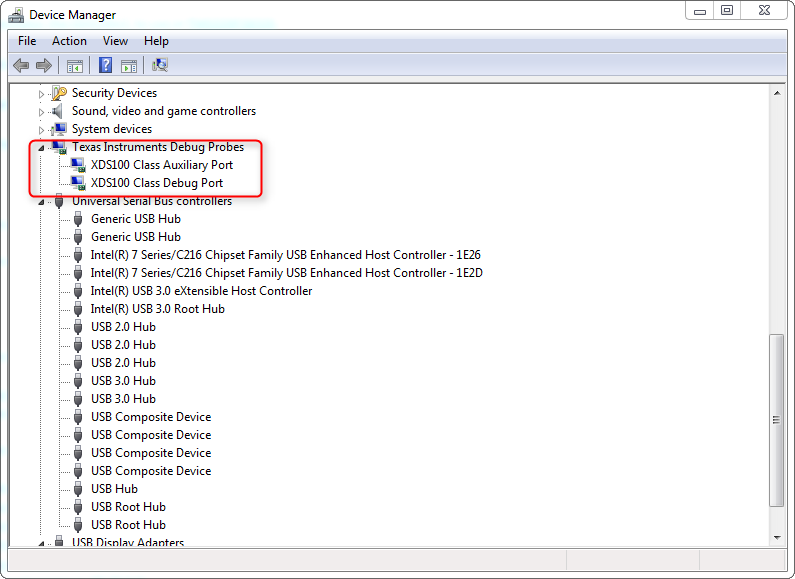
    Windows 10 installed the drivers and in Device Manager the emulator appears as a general USB Composite Device.

    You should also see something like the below:

    Tiago Marçal said:
    The value is '-183' (0xffffff49).
    The title is 'SC_ERR_CTL_CBL_BREAK_FAR'.

    This error is not a driver error but more often a HW error:

    http://processors.wiki.ti.com/index.php/Debugging_JTAG_Connectivity_Problems#Cable_break

    But note the note in the link above:

    in the specific case of XDS100 debug probes, this error may happen also if the wrong variant is selected: for example, a XDS100v2 is configured but a XDS100v1 is present on the target.

    Make sure you indeed have an XDS100v2 and have specifically configured your target configuration file for it

    Thanks

    ki

    in the specific case of XDS100 debug probes, this error may happen also if the wrong variant is selected: for example, a XDS100v2 is configured but a XDS100v1 is present on the target.

  • Hello Ki-Soo Lee.

    I uninstall everything again and I ran ccleaner to clear registries.

    I installed again, after reboot, CCSv7, reboot, check for CCSv7 updates and reboot again.

    The instalation path is c:\ti\...

    I installed controlSuite and reboot.

    With Device Manager open, i plugged in XDS100v2 and how I can see the same as you.

    I build a project in CCS for my target, following the pdf file instructions for that target.

    In project's Properties, General tab, I selected the xds100v2 emulator and click button Verify.

    Know, it returns the following report:

    "

    [Start]

    Execute the command:

    %ccs_base%/common/uscif/dbgjtag -f %boarddatafile% -rv -o -F inform,logfile=yes -S pathlength -S integrity

    [Result]


    -----[Print the board config pathname(s)]------------------------------------

    C:\Users\Tiago\AppData\Local\TEXASI~1\CCS\
        ti\0\0\BrdDat\testBoard.dat

    -----[Print the reset-command software log-file]-----------------------------

    This utility has selected a 100- or 510-class product.
    This utility will load the adapter 'jioserdesusb.dll'.

    An error occurred while soft opening the controller.

    -----[An error has occurred and this utility has aborted]--------------------

    This error is generated by TI's USCIF driver or utilities.

    The value is '-600' (0xfffffda8).
    The title is 'SC_ERR_LIB_ANY_LOCATE'.

    The explanation is:
    A required dynamic library could not be located.
    The library isn't on the search path.

    [End]

    "

    What am I missing?

    Until now, I did not plugged a target to the emulator.

    Thank you.

    Best regards,

  • Hello,
    Have you seen the troubleshooting guide for this error?
    processors.wiki.ti.com/.../Debugging_JTAG_Connectivity_Problems

    Thanks
    ki
  • Hello,

    Yes, I did.

    "

    Library error

    This error means the software and device drivers are not properly installed. A reinstall of the TI Emulators component or CCS will be required.

    Also, this issue happens if the installation directory is not accessible (CCS is installed in C:\Program Files or other protected area by Windows).

    This error could also happen if the "Connection" and "Board" selected in the Target Configuration are not the correct selections for the target board.

    Note: Additional troubleshooting tips can be found at this e2e forum post

    This error is generated by TI's USCIF driver or utilities.

    The value is '-600' (0xfffffda8).

    The title is 'SC_ERR_LIB_ANY_LOCATE'.

    The explanation is:

    A required dynamic library could not be located.

    The library isn't on the search path.

    "

    1st Bold: Should I reinstall CCS? Uninstall it first? Where to find TI Emulators components?

    2nd bold: It is installed at c:\ti\

    3rd bold: I can find Connection by right click in project's name and selecting Properties->General. Where to find Board?

    Thank you,

    Best Regards,

  • Tiago Marçal said:
    1st Bold: Should I reinstall CCS? Uninstall it first? Where to find TI Emulators components?

    First try checking for updates and see if there is a "TI Emulators" update available. If so, apply the update

    Tiago Marçal said:
    2nd bold: It is installed at c:\ti\

    That should be fine

    Tiago Marçal said:
    3rd bold: I can find Connection by right click in project's name and selecting Properties->General. Where to find Board?

    There is no "Board" field. Check the "Device Variant" field above it.

    Thanks

    ki

  • It is frustrating.

    I uninstall CCS, delete the installation folders and run ccleaner.

    I unplugged the xds100v2 from the computer.

    Reboot the computer and disable real time protection.

    Installed the CCS and search for updates.

    Reboot the computer and I installed controlSuite and ti_emupack.

    Reboot and i start a new project.

    In Properties-->General, i press Verify button for xds100v2 but it returns the following error:

    "

    [Start]

    Execute the command:

    %ccs_base%/common/uscif/dbgjtag -f %boarddatafile% -rv -o -F inform,logfile=yes -S pathlength -S integrity

    [Result]


    -----[Print the board config pathname(s)]------------------------------------

    C:\Users\Tiago\AppData\Local\TEXASI~1\CCS\
        ti\0\0\BrdDat\testBoard.dat

    -----[Print the reset-command software log-file]-----------------------------

    This utility has selected a 100- or 510-class product.
    This utility will load the adapter 'jioserdesusb.dll'.

    An error occurred while soft opening the controller.

    -----[An error has occurred and this utility has aborted]--------------------

    This error is generated by TI's USCIF driver or utilities.

    The value is '-600' (0xfffffda8).
    The title is 'SC_ERR_LIB_ANY_LOCATE'.

    The explanation is:
    A required dynamic library could not be located.
    The library isn't on the search path.

    [End]
    "

    Thank you

  • Finally i discovered the problem.

    Following the pdf file to create a new project for the TMS320F28335 in one of the controlSuite subdirectories "C:\ti\controlSUITE\device_support\f2833x\v142\doc", i found that I was giving the wrong path to the rts2800_fpu32.lib file.

    There is one available at "C:\ti\controlSUITE\libs\utilities\flash_api\2806x\v100\lib" but it is not the right one.

    The right one is available at "C:\ti\ccsv7\tools\compiler\ti-cgt-c2000_16.9.3.LTS\lib".

    Thank you.

  • Hello Tiago,
    That may help with any build and application performance related issues, but it is not related to your target connection issue you mentioned in your prior post. I am assuming you are still having problems connecting to the target, yes?

    Thanks
    ki
  • Hello.

    I did the following procedure:

    1.Use a different computer.

    2.Installed CCS_v7 and controlSuite and updates.

    3.Reboot the software and the computer the number of times the software asks and reboot always when a software had finished the installation.

    4.Created a new project and followed the pdf file suggestions for the TMS320F28335.

    5.Verify the connection and the library error remains.

    6.I remember that the rts2800_fpu32.lib file added was not in the microcontroller folder example and I decided to search rts2800_fpu32.lib in the ccsv7 folder instead of the controlSuite folder.

    7.I found the file in one of the ccsv7 subfolders and I replaced it in the project's Properties.

    8.It worked and finally I returned to the first computer and I proceed to replace the path for the rts2800_fpu32.lib file and it also worked.

    The message when I press the Verify button is

    "

    [Start]
    Execute the command:
    %ccs_base%/common/uscif/dbgjtag -f %boarddatafile% -rv -o -F inform,logfile=yes -S pathlength -S integrity
    [Result]
    -----[Print the board config pathname(s)]------------------------------------
    C:\Users\Pc\AppData\Local\TEXASI~1\CCS\ti\
        0\0\BrdDat\testBoard.dat
    -----[Print the reset-command software log-file]-----------------------------
    This utility has selected a 100- or 510-class product.
    This utility will load the adapter 'jioserdesusb.dll'.
    The library build date was 'May 23 2017'.
    The library build time was '19:37:36'.
    The library package version is '6.0.628.3'.
    The library component version is '35.35.0.0'.
    The controller does not use a programmable FPGA.
    The controller has a version number of '4' (0x00000004).
    The controller has an insertion length of '0' (0x00000000).
    This utility will attempt to reset the controller.
    This utility has successfully reset the controller.
    -----[Print the reset-command hardware log-file]-----------------------------
    The scan-path will be reset by toggling the JTAG TRST signal.
    The controller is the FTDI FT2232 with USB interface.
    The link from controller to target is direct (without cable).
    The software is configured for FTDI FT2232 features.
    The controller cannot monitor the value on the EMU[0] pin.
    The controller cannot monitor the value on the EMU[1] pin.
    The controller cannot control the timing on output pins.
    The controller cannot control the timing on input pins.
    The scan-path link-delay has been set to exactly '0' (0x0000).
    -----[The log-file for the JTAG TCLK output generated from the PLL]----------
    There is no hardware for programming the JTAG TCLK frequency.
    -----[Measure the source and frequency of the final JTAG TCLKR input]--------
    There is no hardware for measuring the JTAG TCLK frequency.
    -----[Perform the standard path-length test on the JTAG IR and DR]-----------
    This path-length test uses blocks of 64 32-bit words.
    The test for the JTAG IR instruction path-length succeeded.
    The JTAG IR instruction path-length is 38 bits.
    The test for the JTAG DR bypass path-length succeeded.
    The JTAG DR bypass path-length is 1 bits.
    -----[Perform the Integrity scan-test on the JTAG IR]------------------------
    This test will use blocks of 64 32-bit words.
    This test will be applied just once.
    Do a test using 0xFFFFFFFF.
    Scan tests: 1, skipped: 0, failed: 0
    Do a test using 0x00000000.
    Scan tests: 2, skipped: 0, failed: 0
    Do a test using 0xFE03E0E2.
    Scan tests: 3, skipped: 0, failed: 0
    Do a test using 0x01FC1F1D.
    Scan tests: 4, skipped: 0, failed: 0
    Do a test using 0x5533CCAA.
    Test 5 Word 14: scanned out 0x5533CCAA and scanned in 0xFF33CCAA.
    Test 5 Word 15: scanned out 0x5533CCAA and scanned in 0xFFFFFFFF.
    Test 5 Word 16: scanned out 0x5533CCAA and scanned in 0xFFFFFFFF.
    Test 5 Word 17: scanned out 0x5533CCAA and scanned in 0xFFFFFFFF.
    Test 5 Word 18: scanned out 0x5533CCAA and scanned in 0xFFFFFFFF.
    Test 5 Word 19: scanned out 0x5533CCAA and scanned in 0xFFFFFFFF.
    Test 5 Word 20: scanned out 0x5533CCAA and scanned in 0xFFFFFFFF.
    Test 5 Word 21: scanned out 0x5533CCAA and scanned in 0xFFFFFFFF.
    The details of the first 8 errors have been provided.
    The utility will now report only the count of failed tests.
    Scan tests: 5, skipped: 0, failed: 1
    Do a test using 0xAACC3355.
    Scan tests: 6, skipped: 0, failed: 2
    Some of the values were corrupted - 29.2 percent.
    The JTAG IR Integrity scan-test has failed.
    -----[Perform the Integrity scan-test on the JTAG DR]------------------------
    This test will use blocks of 64 32-bit words.
    This test will be applied just once.
    Do a test using 0xFFFFFFFF.
    Scan tests: 1, skipped: 0, failed: 0
    Do a test using 0x00000000.
    Scan tests: 2, skipped: 0, failed: 0
    Do a test using 0xFE03E0E2.
    Test 3 Word 0: scanned out 0xFE03E0E2 and scanned in 0x7F01F071.
    Test 3 Word 1: scanned out 0xFE03E0E2 and scanned in 0x7F01F071.
    Test 3 Word 2: scanned out 0xFE03E0E2 and scanned in 0x7F01F071.
    Test 3 Word 3: scanned out 0xFE03E0E2 and scanned in 0x7F01F071.
    Test 3 Word 4: scanned out 0xFE03E0E2 and scanned in 0x7F01F071.
    Test 3 Word 5: scanned out 0xFE03E0E2 and scanned in 0x7F01F071.
    Test 3 Word 6: scanned out 0xFE03E0E2 and scanned in 0x7F01F071.
    Test 3 Word 7: scanned out 0xFE03E0E2 and scanned in 0x7F01F071.
    The details of the first 8 errors have been provided.
    The utility will now report only the count of failed tests.
    Scan tests: 3, skipped: 0, failed: 1
    Do a test using 0x01FC1F1D.
    Scan tests: 4, skipped: 0, failed: 2
    Do a test using 0x5533CCAA.
    Scan tests: 5, skipped: 0, failed: 3
    Do a test using 0xAACC3355.
    Scan tests: 6, skipped: 0, failed: 4
    Some of the values were corrupted - 65.6 percent.
    The JTAG DR Integrity scan-test has failed.
    [End]

    "

    Now, I have another problem, a target connection issue when start debugging:

    "

    C28xx: Trouble Halting Target CPU: (Error -1041 @ 0x0) The debug probe reported an error. Confirm debug probe configuration and connections, reset the debug probe, and retry the operation. (Emulation package 6.0.628.3) 
    C28xx: Failed CPU Reset: (Error -1140 @ 0x0) Lost debug connection to device. Reset the device, and retry the operation. If error persists, confirm configuration, power-cycle the board, and/or try more reliable JTAG settings (e.g. lower TCLK). (Emulation package 6.0.628.3)

    "

    Best regards.

    Thank you

  • Hi,

    The new error you are getting with the verify (or Test Connection) button is unrelated with the previous one (error -600). This new error is pretty much indicative of delays or reflections in your JTAG lines - that, tied to the error in your first post (error -183) indicates there are issues with the a HW error between the JTAG debugger and the device on your board.

    For example, the first failed data on the Instruction Register (IR) leaves the TDI pin of the JTAG debugger as 0x5533CCAA but is received back on the TDO pin as 0xFF33CCAA - a corruption in the first two bytes, which may indicate lags either on the TCLK or the TMS lines.

    The first failed data on the data Register (DR) leaves the TDI pin as 0xFE03E0E2 but is received back on the TDO as 0x7F01F071, which is a right-shift on the original value, which also indicates problems on the TCLK or the TMS lines.

    Therefore I would closely check these lines and compare your design with the different cases mentioned in section 7 of the page below:
    processors.wiki.ti.com/.../XDS_Target_Connection_Guide

    Regards,
    Rafael