Other Parts Discussed in Thread: TMS320C6657, CCSTUDIO
Hello,
I am planning on programming a TMS320C6657 processor with Code Composer Studio and I am having an issue with the demo program that comes with the H.264 Decoder software. I am following the H.264 decoder user guide and attempting to build the project, but I am having difficultly understanding the following instruction:
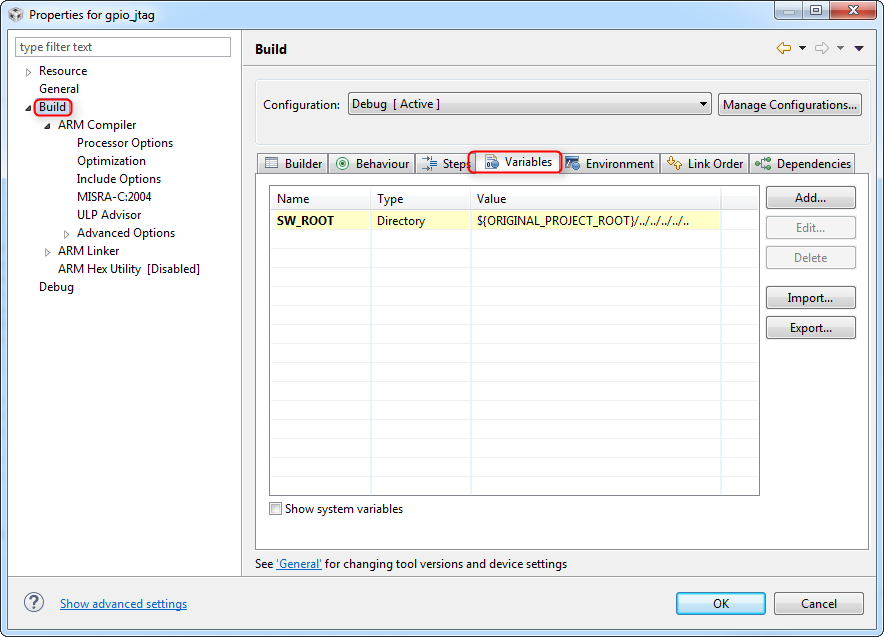
Set the Build properties -> Macros for test application project for BIOS_ROOT and FRMWRK_ROOT, e.g.,
BIOS_CG_ROOT - C:\CCStudio_5.2.1.00018\bios_6_33_06_50
FRMWRK_ROOT - C:\CCStudio_5.2.1.00018\framework_components_3_23_02_16
XDC_CG_ROOT - C:\CCStudio_5.2.1.00018\xdctools_3_23_04_60
I have tried to run the demo on both Code Composer Studio 5 and 7, but I have been unable to figure out this step. When I go to the build properties in either version, I am unsure what the previous direction is asking me to do. Is it telling me to move folders around? I have also tried skipping this step in the demo, but there are warnings and error messages that follow such as: error: (a list of folders) not found in PATH. I am assuming that this error would be fixed if I could understand this section of the code.
Clarification on this instruction would be greatly appreciated and please let me know if I should add more information!
Thank you for your help,
Joseph