This thread has been locked.

If you have a related question, please click the "Ask a related question" button in the top right corner. The newly created question will be automatically linked to this question.

CCS/TMS320F28069: JSON File Error

Part Number: TMS320F28069


Tool/software: Code Composer Studio

Hi,

I have a GUI in GUI Composer that outputs motor speed values to a text box.  This text box utilizes an app.js function that converts the motor values into Q-24 format ("ToQ24_RoundTo2Decimals").  Everything was working fine, and then I started receiving the attached JSON file error and now the values are not converted properly.  For your reference, my project is titled "7_20_2" in the filepath.  What would cause the function not to be defined if it had been working before?
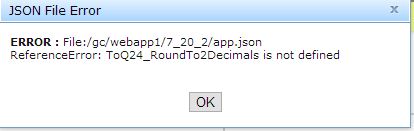
This error appears even if I switch pre-processing functions for the text box to something else besides "ToQ24_RoundTo2Decimals."

---------------------------------------------

Here is my JSON file:

{"widgetBindings": [
{
"propertyName": "value",
"serverBindName": "gMotorVars.Speed_krpm",
"widgetId": "textbox_output_speed",
"options": {
"dataType": "String",
"outPreProcessingFunction": "FromQ24",
"dataFormat": "%.2f",
"inPreProcessingFunction": "ToQ24_RoundTo2Decimals"
}
},
{
"propertyName": "value",
"serverBindName": "gMotorVars.Torque_lbin",
"widgetId": "textbox_output_torque",
"options": {"dataType": "String"}
},
{
"propertyName": "value",
"serverBindName": "gMotorVars.SpeedRef_krpm",
"widgetId": "widget_14292",
"options": {"dataType": "String"}
}
]}

-------------------------

Thank you,

JV

  • Hi JV,
    Can you confirm that ToQ24_RoundTo2Decimals in the javascript file matches the one in the app.json file?

    Thanks
    ki
  • Hi,

    I already posted my app.json, so I will now post my java script file.  There are other functions related to my GUI, but you can see near the top that the function name "ToQ24_RoundTo2Decimals" matches the name in the app.json file.  An important point to note is that even when I changed the binding to a different function (regardless of whether the function made logical sense as a pre-processing function) the same error appeared.

    /*
    * This file is provided for custom JavaScript logic that your HTML files might need.
    * GUI Composer includes this JavaScript file by default within HTML pages authored in GUI Composer.
    *
    * The user will be able to specify the file where the data will be stored; to turn on and off the logging at any time, as well as to reset the file, so the next logged data will be added to the beginning of the file.
    */
    require(["dojo/ready"], function(ready){
    ready(function(){
    // create an empty array to receive all the data //
    var allData[]
    // watch any values for change, assume they have all updated //
    dijit.byId('textbox_output_speed','textbox_output_torque').watch('value',function( prop, newValue, oldValue) {
    allData = getData();
    logData( allData, false);

    });
    });
    });

    function ToQ24_RoundTo2Decimals(oldValue){
    var toQ24 = oldValue/(Math.pow(2,24));
    var result = new Number(Math.round(toQ24 * 100)/100);
    var s = result.toString();
    return (s)
    };

    function FromQ24(oldValue){
    var result = Math.round(oldValue*(Math.pow(2,24)));
    return ( result )
    };

    var FI = undefined;
    var Logged = false;

    function isLogging() {
    return dijit.byId('widget_log_enabled').get('checked');
    }

    function getFileName() {
    return dijit.byId('widget_path').get('value');
    }

    function getOptions() {
    return {
    clientLocation : 'auto'
    }
    }

    function logData( data, reset) {
    if( !reset && !isLogging())
    return;
    var file = getFileName();
    if( !file)
    return;
    var callback = function( fileInfo, errorInfo) {
    if( errorInfo) {
    $TI.helper.showError( "Error Logging.", errorInfo.message);
    }
    }
    var options = getOptions();
    if( !reset) {
    options.append = true;
    options.addCRAfter = true;
    }
    new TI.CSVFile().save( data, FI, options, callback);
    }

    function getData() {
    var data = [];
    // read the data from all the outputs and push it to the array //
    data.push(dijit.byId('textbox_output_speed').get('value'));
    data.push(dijit.byID('textbox_output_torque').get('value'));

    return data


    }

    function setFileName( name) {
    dijit.byId( 'widget_path').set('value',name);
    }

    function updateFileName() {
    var name = '';
    if( FI && FI.localPath) {
    name = FI.localPath;
    }
    setFileName(name);
    }

    function updateFields() {
    updateFileName();
    }

    function onBrowse() {
    var data = getData();
    var callback = function( fileInfo, errorInfo) {
    if( errorInfo) {
    $TI.helper.showError( "Save as...", errorInfo.message);
    }
    else {
    FI = fileInfo;
    updateFields();
    }
    };
    var options = getOptions();
    options.addCRAfter = true;
    new TI.CSVFile().browseAndSave( data, FI, options, callback);
    }

    function onReset() {
    logData( "", true);
    }

    Thanks,

    JV

  • This issue was resolved offline. For those following the thread, the root cause was a syntax error elsewhere in the javascript which caused a ripple effect and led to a misleading error message.

    Thanks
    ki