This thread has been locked.

If you have a related question, please click the "Ask a related question" button in the top right corner. The newly created question will be automatically linked to this question.

CCS: repeated error when performing update

Tool/software: Code Composer Studio

Using CCS version 7. Get errors when performing software update. Using windows 7, 64 bit.

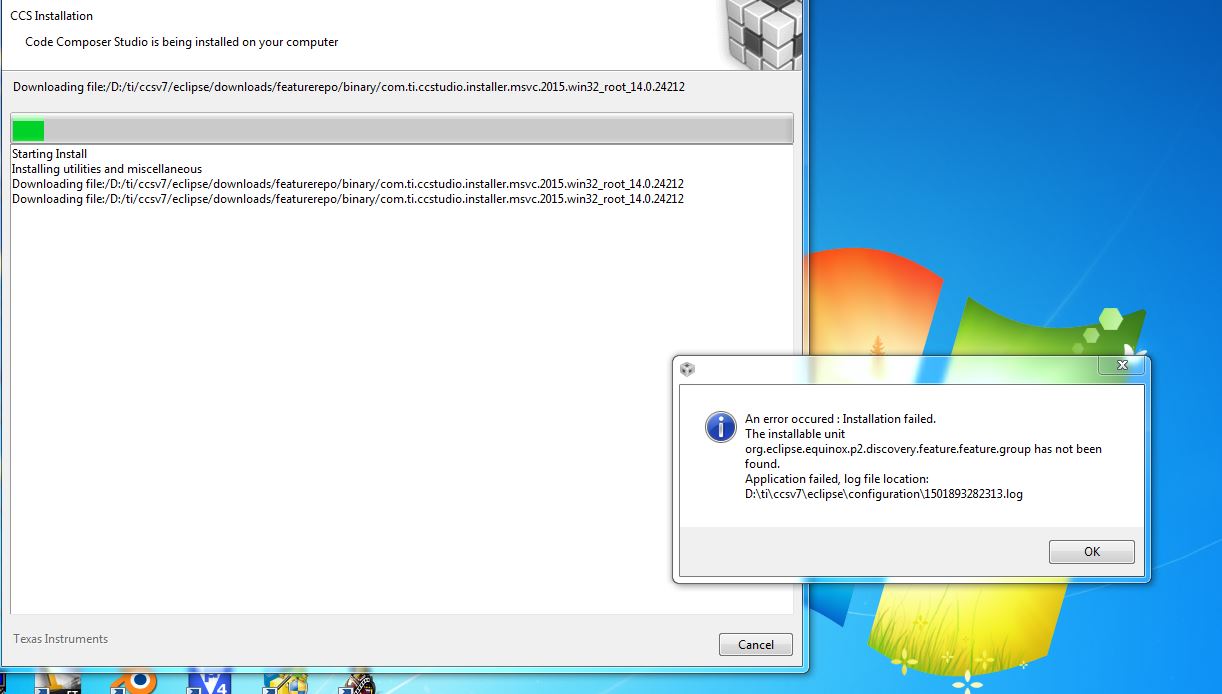
Get an error message something like: installable unit org.eclipse.equinox.p2.discovery.feature.feature.group has not been found.  Application error

and the location of the log file is displayed.  And when I try to send the failure information to TI, that fails, too, so there's no means of informing the people of the error other than this forum.

  • Jan,

    Which exact version of CCSv7 are you currently using? And what updates were you trying to install when you experienced this error - was it an update to CCS itself (like 7.1.0 to 7.2.0) or just compiler/device support updates?

    Sometimes, if the update fails, it is difficult for the installer to recover after a few attempts. In such cases, it is better to remove the CCS installation (delete the directory where it is installed) and re-install from scratch (all versions are available for download from here).  

    Let us know if that helps, and sorry about the inconvenience caused.

  • Thanks for responding.  Interestingly, the information shown when I click "about" in the help does not show a version.  The (long)list of installed software shows it to be version 7.1, I believe.  I was using the check for updates option within CCS to initiate the update.  The issue does repeat if I try to update again. I can provide  screen snips of the error response and installed software and the install log if there's an appropriate location to send them to.

  • Jan,

    If you could attach all of that information here, that would be great. You can zip up the /install_logs folder and also zip the screenshots separately and attach them here. To attach files, click on the "Use rich formatting" link in the bottom right when replying to a message. The pane that opens up will have icons for attaching files, images, etc..

    One thing you could also try to do to isolate which specific update is failing/triggering the error is to select one or two updates at a time rather the whole set that CCS offers up. 

  • Thanks for your response again.

    I zipped the screen snips for the error message and for the first part of the installed programs list but I'll be darned if I can figure out how to attach them.  I'm only allowed to insert.

    Here's the error snip

    and here's the referenced log file

    !SESSION 2017-08-04 17:34:42.143 -----------------------------------------------
    eclipse.buildId=4.6.0.I20160606-1100
    java.version=1.8.0_112
    java.vendor=Oracle Corporation
    BootLoader constants: OS=win32, ARCH=x86, WS=win32, NL=en_US
    Framework arguments:  -application org.eclipse.equinox.p2.director -repository file:/D:/ti/ccsv7/eclipse/downloads/featurerepo,file:/D:/ti/ccsv7/eclipse/downloads/baserepo/eclipserepo -installIU org.eclipse.platform.ide,org.eclipse.help.feature.group,org.eclipse.equinox.p2.discovery.feature.feature.group,org.eclipse.equinox.p2.user.ui.feature.group,org.eclipse.cdt.feature.group,org.eclipse.cdt.debug.ui.memory.feature.group,org.eclipse.tm.terminal.feature.feature.group,org.eclipse.epp.mpc.feature.group,org.eclipse.egit.feature.group,org.eclipse.cdt.build.crossgcc.feature.group,org.eclipse.rse.feature.group,org.eclipse.cdt.launch.remote.feature.group,org.eclipse.gef.feature.group,gnu.io.rxtx.feature.group,org.eclipse.gmf.runtime.thirdparty.feature.group -roaming -uninstalliu org.eclipse.platform.ide,org.eclipse.help.feature.group,org.eclipse.equinox.p2.discovery.feature.feature.group,org.eclipse.equinox.p2.user.ui.feature.group,org.eclipse.cdt.feature.group,org.eclipse.cdt.debug.ui.memory.feature.group,org.eclipse.tm.terminal.feature.feature.group,org.eclipse.epp.mpc.feature.group,org.eclipse.egit.feature.group,org.eclipse.cdt.build.crossgcc.feature.group,org.eclipse.rse.feature.group,org.eclipse.cdt.launch.remote.feature.group,org.eclipse.gef.feature.group,gnu.io.rxtx.feature.group,org.eclipse.gmf.runtime.thirdparty.feature.group
    Command-line arguments:  -os win32 -ws win32 -arch x86 -data C:/Users/jans_asrock/AppData/Local/Temp/ccs_518247b2-6e29-476f-71a2-37ec3c6c04ec/workspace -application org.eclipse.equinox.p2.director -repository file:/D:/ti/ccsv7/eclipse/downloads/featurerepo,file:/D:/ti/ccsv7/eclipse/downloads/baserepo/eclipserepo -installIU org.eclipse.platform.ide,org.eclipse.help.feature.group,org.eclipse.equinox.p2.discovery.feature.feature.group,org.eclipse.equinox.p2.user.ui.feature.group,org.eclipse.cdt.feature.group,org.eclipse.cdt.debug.ui.memory.feature.group,org.eclipse.tm.terminal.feature.feature.group,org.eclipse.epp.mpc.feature.group,org.eclipse.egit.feature.group,org.eclipse.cdt.build.crossgcc.feature.group,org.eclipse.rse.feature.group,org.eclipse.cdt.launch.remote.feature.group,org.eclipse.gef.feature.group,gnu.io.rxtx.feature.group,org.eclipse.gmf.runtime.thirdparty.feature.group -roaming -uninstalliu org.eclipse.platform.ide,org.eclipse.help.feature.group,org.eclipse.equinox.p2.discovery.feature.feature.group,org.eclipse.equinox.p2.user.ui.feature.group,org.eclipse.cdt.feature.group,org.eclipse.cdt.debug.ui.memory.feature.group,org.eclipse.tm.terminal.feature.feature.group,org.eclipse.epp.mpc.feature.group,org.eclipse.egit.feature.group,org.eclipse.cdt.build.crossgcc.feature.group,org.eclipse.rse.feature.group,org.eclipse.cdt.launch.remote.feature.group,org.eclipse.gef.feature.group,gnu.io.rxtx.feature.group,org.eclipse.gmf.runtime.thirdparty.feature.group
    
    !ENTRY org.eclipse.equinox.p2.artifact.repository 4 1000 2017-08-04 17:34:43.083
    !MESSAGE No repository found at file:/D:/ti/ccsv7/eclipse/downloads/baserepo/eclipserepo.
    
    !ENTRY org.eclipse.equinox.p2.metadata.repository 4 1000 2017-08-04 17:34:43.113
    !MESSAGE No repository found at file:/D:/ti/ccsv7/eclipse/downloads/baserepo/eclipserepo.
    
    !ENTRY org.eclipse.equinox.p2.director.app 4 0 2017-08-04 17:34:43.383
    !MESSAGE The installable unit org.eclipse.equinox.p2.discovery.feature.feature.group has not been found.
    

  • The attached Eclipse error log file only shows us that something went wrong with a previous update attempt, and this attempt does not know how to recover from that. In order to track down what caused the initial failure to begin with, we would need to look at the CCS install logs, but those were not attached. 

    If you still wish to attach the /install_logs folder we could try to track down what caused the issue, but in the current state it is likely that all future updates will also fail.
    The best recourse, at this point, is to reinstall the latest version of CCS. Note that if you wish to install to the same directory where your current installation is, then be sure to delete the directory first. http://processors.wiki.ti.com/index.php/Download_CCS

    Sorry about the inconvenience caused due to this.

  • Here are the zipped install logs from Aug 4

    and the associated error message

    Presumably, these may point to the problem.  In the meantime I shall attempt a clean install.  Thank you for your efforts.

    Jan

    comment=Add a comment to your report ...installation of update failure
    contact=jan@tracktion.com
    av=Norton Security  
    logdir=d:/ti/ccsv7/install_logs/20170804173010
    

  • Jan,

    The zip file was not attached. Could you please re-send it?
  • shucks, I sure would like to, but in preparation for a clean install, the entire directory got removed.
  • No worries, please go ahead with your clean install. If you do hit any issues with updates in the future, feel free to get back in touch with us.