This thread has been locked.

If you have a related question, please click the "Ask a related question" button in the top right corner. The newly created question will be automatically linked to this question.

CCS/EK-TM4C123GXL: Orbit OLED Booster Basic Demo Source File Issue

Part Number: EK-TM4C123GXL


Tool/software: Code Composer Studio

Hi,

I am trying to run the Basic Demo for the Orbit OLED Booster Pack, available from https://reference.digilentinc.com/orbit_boosterpack/orbit_boosterpack

I have encountered multiple issues when attempting to run this project in CCS. The first issue was that files such as inc/hw_adc.h could not be opened. I thought this issue was because I had not included driverlib.lib in the file search path yet, but including it did not solve the problem. Instead, deleting the folder 'Peripheral Library C Files' in ex-tm4c123gxl > orbit_basic_demo_tiva_c_series > Orbit Basic Demo Tiva C Series > Source fixed most of the errors I was having. However, I still get this error:


I cannot seem to get rid of it. Here is the file path to show that asmdefs.h is there:
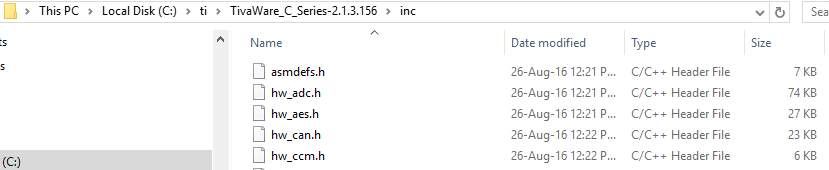
And this is file search path:

I am completely stuck on this issue, and any help will be greatly appreciated.

Thanks,

Andre

  • Andre,

    I suspect you uploaded the same image twice; the two screenshots are identical.

    At any rate, I downloaded the Orbit boosterpack basic demo (file orbit_basic_demo_tiva_c_series.zip) and, after importing it, I found out it uses an older Tivaware package (2.1.0.12573) and sets a hard coded path to it.

    I created a build variable by right clicking on the project and as shown below:

    I then added it to the compiler include options. 

    I then found hardcoded paths inside #include directives in the LaunchPad.h - although valid, these are bad coding practice. 

    Editing these #includes out and adding the necessary include files <stdint.h> and <stdbool.h> to this file were able to make the project build partially.

    However, two undefined register errors on the files ssi.c and sysctl.c prevent it from being properly built: SSI_CR1_SOD and SYSCTL_DC1_MINSYSDIV_66. 

    These differences are due to the older Tivaware version 2.1.0.12573 used with this project.

    In the end, I would strongly suggest to download the older Tivaware and validate this demo. Then I would create symbolic links of all the source files inside the project directory "Peripheral Library C Files" to point to the newer Tivaware and then validate all this. 

    To create symbolic links you can open the Windows File Manager, select the relevant source files on this directory, drag them to your "Peripheral Library C Files" subdirectory and then select the Link to files pointing to the Variable created before. 

    By doing all these steps the project build fine with Tivaware 2.1.3.156.

  • Thanks for your reply,

    Sorry about the duplicate image; the error was that the compiler was unable to find asmdefs.h.

    Unfortunately my computer is in for repair for the rest of the week so I won't be able to test until it returns. I did notice the version problem, and thought I fixed it by changing properties --> general --> compiler version, but it seems to be a larger problem than I thought. Ill reply when I am able to test.

    Thanks,

    Andre

  • I managed to get my display working, which was the point of using the demo. Thank you for your help!