This thread has been locked.

If you have a related question, please click the "Ask a related question" button in the top right corner. The newly created question will be automatically linked to this question.

CCS/CCSTUDIO: Errors aren't detected until compile time

Part Number: CCSTUDIO


Tool/software: Code Composer Studio

Hi,

So I've noticed with Code Composer Studio 7.2.0 that the actual code editing capabilities are somewhat.. limited. If I download Eclipse C/C++ Oxygen, and type in the following invalid code, I get immediate errors are shown below. 


Code Composer Studio, however, doesn't show anything until I try and compile:

After I try to compile, it shows the error:
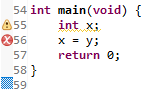
Showing errors on the fly is a super useful feature and immediately makes my typos/mistakes obvious, so I don't have to fix ~10 errors when I try to compile. Is this feature meant to work with Code Composer? If so how can I get it going, and if not why?

Cheers

  • Campbell Young said:
    Is this feature meant to work with Code Composer?

    The  built-in static code analyzer that comes with Eclipse is disabled by default in CCS, but it can be enabled.

    See Code Analysis for details.

  • Chester is correct that it is disabled by default.  The link Chester provided gives more info on why we have it turned off and how to tweak some of the options.

    One thing we should add to that doc is to show a screen shot of how to enable the scanner to run.  Here is a screen shot of where the options are.  Note that you may need click the link to show advanced options at the bottom of the dialog box.

    Once you do that and click OK you will see that it will now show errors as you type.

    Regards,

    John

  • I feel a little silly that I missed that! I think my issue was that I was always looking at eclipse settings, not project specific ones.

    Thanks for your help :)