This thread has been locked.

If you have a related question, please click the "Ask a related question" button in the top right corner. The newly created question will be automatically linked to this question.

CCS/TMS320F28379D: Regarding debug of dual core processor

Part Number: TMS320F28379D
Other Parts Discussed in Thread: TMS320F28377D

Tool/software: Code Composer Studio

Generally, when I debug any program the CCS ask me to choose the CPU1 or CPU2 or BOTH. 

But Now I want to work on one core (CPU1) so where is to configure in CCS to program only one core and debug only one core. 

It also not asking me to choose the core and I have to program both cores which are wasting my time again and again.

Please tell me where to choose the core to the programme.

Ashutosh 

  • Ashutosh,

    If the issue is that you selected both cores in this dialog:

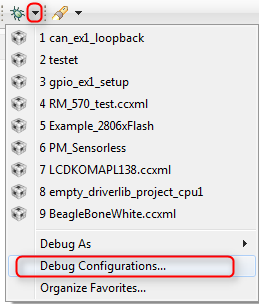
    But want to change it to only load on the first core then you can go to the debug configurations menu by clicking on the down arrow beside the bug icon and selecting Debug Configurations.

    Then in the dialog that opens select the Debug Configuration on the left that matches with your project and click the delete button.

    The next time you debug your project it will give you that same selection dialog box again and you can just select CPU1.

    Regards,

    John

  • Yes, My issue is that the option is not showing (the first Image).
    But the above resolution not worked for me.
    In addition above resolution , I found that there is a file targetconfig-->TMS320F28377D.ccxml.
    open this file and bypass the CPU2 then only It debug for CPU1, NOT both.

    Thank You