This thread has been locked.

If you have a related question, please click the "Ask a related question" button in the top right corner. The newly created question will be automatically linked to this question.

CCS/TMDSEVM6657: Target Configuration Missing

Part Number: TMDSEVM6657
Other Parts Discussed in Thread: TMS320C6657

Tool/software: Code Composer Studio

Hello,

I am using CCS v5 and I attempting to access the TMDSEVM6657 EVM Board. I am following the BiosMulticoreSDK_2.1_GettingStartedGuide and I am setting up a new target configuration. I have followed the guide successfully when I chose the connection as Texas Instruments XDS100v1 USB emulator and the device as TMS320C6657, but the next instruction tells me to "Select the EVM device as specified in the Target Config figure" (which I assumed was to click the Target Configuration link under the Advanced Settings) and the image of what I see is below. I don't see where the EVM device is suppose to be.
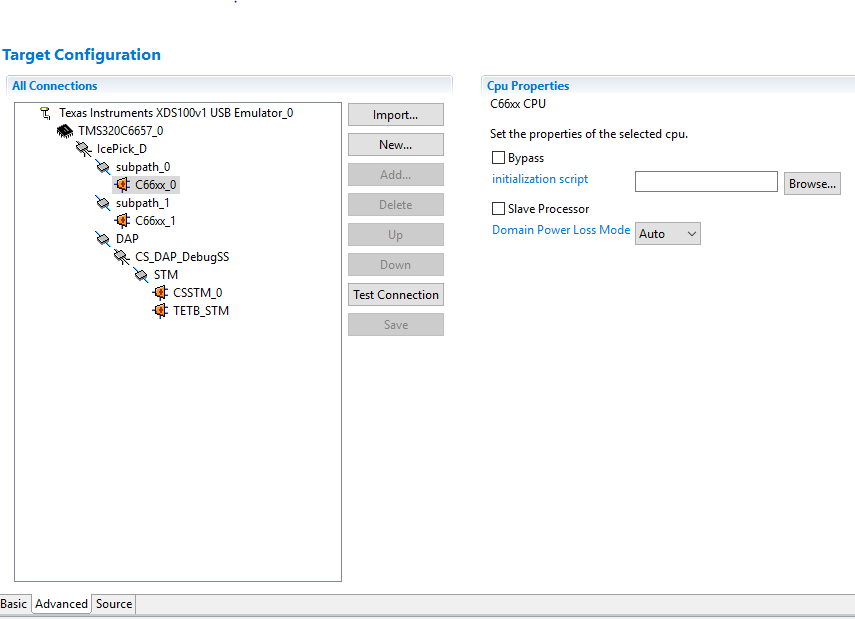
When I attempt to configure the file I receive the following results:

In the Debug window:

Texas Instruments XDS100v1 USB Emulator_0/C66xx_0 (Disconnected : Unknown)

Texas Instruments XDS100v1 USB Emulator_0/C66xx_1 (Disconnected : Unknown)

In the Console window: 

Error connecting to the target:

(Error -600 @ 0x0)

A required dynamic library could not be located.

The library isn't on the search path.

(Emulation package 5.0.838.0)

Am I missing some file for the TMDSEVM6657 board or some software? Any help would be greatly appreciated.

Thank you,

Joseph

  • Joseph,

    I am not aware of there being a special selection for the C6657 EVM. Selecting the C6657 device like you have done would be the way to go. The product folder for that board mentions that it has an XDS200 on it vs an XDS100v1. If you go back to the basic tab at the bottom of your first screen capture are you able to change the connection to an XDS200?

    The fact that we are getting a dynamic library issue makes me think that maybe some of the Microsoft Visual C runtime libraries are missing. If you still get the error after switching the connection we can go through the steps of installing those. My first bet on the missing library would be this one:
    www.microsoft.com/.../details.aspx


    Regards,
    John
  • Joseph,

    One additional detail is to check section 5.12 of the following wiki: 

    http://processors.wiki.ti.com/index.php/Debugging_JTAG_Connectivity_Problems 

  • Hello John,

    Thank you for your response. I tried the XDS200 connection and I got a different error. The error message is listed below when I made the configuration file was:

    IcePick_D: Error initializing emulator: (Error -2083 @ 0x0) Unable to communicate with the emulator. Confirm emulator configuration and connections, reset the emulator, and retry the operation. (Emulation package 5.0.838.0)

    When I ran the test connection function with XDS200 I received the following error as well:

    This error is generated by TI's USCIF driver or utilities. The value is '-250' (0xffffff06). The title is 'SC_ERR_ECOM_EMUNAME'. The explanation is: An attempt to access the named emulator via USCIF ECOM has failed.

    I looked at the debug page that you commented and it mentioned re-downloading CCS, which I did. No change in the error messages occurred. Also, I downloaded the software that you mentioned, but there were no changes in the error messages. Are there any other software downloads you would recommend? I should also mention that I am using Windows 10 and I have my Windows running on a VirtualBox.

    The XDS100 connection error messages didn't change throughout this process. Also, I did successfully run a "Hello World" program on the TI simulator in CCS.

    Thank you,

    Joseph

  • Joseph,

    I am remote at the moment so I am not able to test this config.  If you go to device manager in Windows does the XDS200 show up:

    Regards,

    John

  • John,

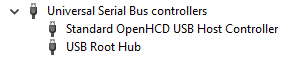
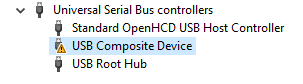
    I checked the device manager in Windows and I do not see the XDS200 port. I will attach the following images of what I do see.

    No connection plugged in:

    XDS 100 plugged in:

    I clicked on the USB Composite Device and it showed the following error: This device cannot start. (Code 10) An invalid parameter was passed to a service or function.

    XDS 200 plugged in:

    Could this have something to do with the driver I downloaded from the DVD that came with the EVM board?

    Thank you,

    Joseph

  • Something is definitely wrong here.

    When I look at the TI website it mentions XDS200 being onboard.  However when I go to the eInfoChips website I see 3 different versions of the EVM.

    https://www.einfochips.com/partnerships-and-alliances/system-partnerships/texas-instruments/tms320c6657-evm/#5-resources

    The OS drivers for all 3 versions should get installed with Code Composer Studio.  One trick there is that for the 560v2 version you need to select the Blackhawk Debug Probe support option when installing CCS.

    When you look at the pictures below can you tell which one you have?  The bottom 2 should have a little mezzanine card that sits on top.

  • I am using the TMDSEVM6657LS with the XDS200 USB JTAG connection.

  • There is one more piece of information that may be useful. In the device manager under Ports I have the XDS2xx as shown in the image below:

    Is there some way to use USB to access these ports? How would I access these ports?

    Thank you,

    Joseph

  • Joseph,

    OK so that is basically the same as the screen capture I sent. The XDS200 is being detected ok and has COM ports assigned but for some reason CCS is not able to communicate with it. That is a start at least. I will pull someone in to help with that.

    John
  • Joseph,

    The previous discussion covers most of the details I would investigate. Two details, however, that I would be very attentive are:
    - CCSv5 and Windows 10 are not officially supported - although this does not mean the SW does not work, incompatibilities with low level device drivers may exist. You can try to workaround this by updating the "TI Emulators" component of your CCS (go to menu Help --> Check for Updates) and see if you have an improvement.
    - CCS is not officially supported nor validated in Virtual Machine environments. Although the XDS200 tends to work well as mentioned in the reference below, we haven't used Windows 10 as a guest OS for our tests. I can't think of a workaround for this, though.

    Regards,
    Rafael
  • Hello John and Rafael,

    Thank you for your responses. I will investigate both those details and possibly try using Windows 7 if I can't work around the possible Windows 10 issue.

    Thank you,

    Joseph

  • Joseph,

    One last additional detail that I forgot to mention: usually the onboard XDS200 debug probe of C6657 come with a very old firmware version (1.0.0.2) which had some instability issues with non-Windows OSes. You can update its firmware by following the steps in section 7 of the page below, but keep in mind that updating it requires a native Windows PC (not a VM).

    processors.wiki.ti.com/.../XDS200

    Regards,
    Rafael
  • Thank you for the extra note Rafael.

    Regards,
    Joseph