This thread has been locked.

If you have a related question, please click the "Ask a related question" button in the top right corner. The newly created question will be automatically linked to this question.

CCS: v6


Tool/software: Code Composer Studio

Hello all,

I would like to ask you for an advice. I have inherited several software projects developed in CCS v3.3.

Now I need to start do changes in these projects in CCS v6.1. Please can anybody give me an advice

how to correctly create the Workspace and import the legacy projects. Thanks in advance.
  • Hello,
    That is quite a jump. We do provide a legacy import wizard, though it is an imperfect process depending on the project:
    processors.wiki.ti.com/.../Importing_CCSv3_Projects_into_CCSv4

    The link above is for an older CCS (v4) but the concepts are similar (it should actually be a simpler process with v6)

    The workspace concept is drastically different from CCSv3. You will not be able to import your CCSv3 .wks file.

    I also suggest taking a look at the below presentation for a summary of changes since v3:
    software-dl.ti.com/ccs/esd/training/CCSv5-FromCCSv3.pdf

    Good luck!
    ki
  • Hello ki,
    thank you for your reaction. I have imported one of the projects with usage of Project->Import Legacy CCS v3.3 Projects ... and I have tried to compile this imported project. I haven't received any error but I have received warnings:

    1. Product 'XDAIS' v1.0.0 is not currently installed. A compatible version 7.24.0.04 will be used during build.
    2. This project contains 1 unresolved buildable linked resource(s). The project may not build as expected.
    3. Invalid project path: Include path not found.

    I am not sure whether it is correct. What do you mean? Thanks.
  • user4318460 said:
    and I have tried to compile this imported project. I haven't received any error

    That is actually pretty good.

    user4318460 said:
    but I have received warnings:

    1. Product 'XDAIS' v1.0.0 is not currently installed. A compatible version 7.24.0.04 will be used during build.
    2. This project contains 1 unresolved buildable linked resource(s). The project may not build as expected.
    3. Invalid project path: Include path not found.

    1. the old project references and old version of XDAIS and CCSv6 will use the version it has.

    2. Sounds like a broken link to one of the source files. Likely the path to it is invalid. I'm surprised the build was successful with this broken link

    3. Sounds like one of the include search paths from the old project is invalid. Again I'm surprised the build was successful.

    These may or may not be issues. It depends on the project. But I would try to fix 2 & 3.

    Thanks

    ki

  • Thanks ki for your answer. Do you have any idea how to identify the cause of warning number 2? I have double clicked onto this warning message but I haven't been directed to anywhere. I have also double checked the building log and I have found several messages like the following:

    warning #16002-D: build attribute vendor section TI missing in "../IQmath.lib<IQ16atan2PU.obj>": compatibility cannot be determined

    Do you think that this could be the reason? Thanks
  • user4318460 said:
    Do you have any idea how to identify the cause of warning number 2?

    It is hard to say without more details on the project. If there was an actual broken link to a required source file, the build would fail. So it could be a misleading warning. Do you see any broken links in the project explorer view when you browse the project contents (there is usually some icon indicator)

    user4318460 said:
    warning #16002-D: build attribute vendor section TI missing in "../IQmath.lib<IQ16atan2PU.obj>": compatibility cannot be determined

    This is unrelated. For the cause of that warning, see:

    https://e2e.ti.com/support/development_tools/compiler/f/343/p/237376/858874

    Thanks

    ki

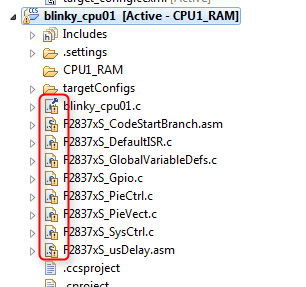
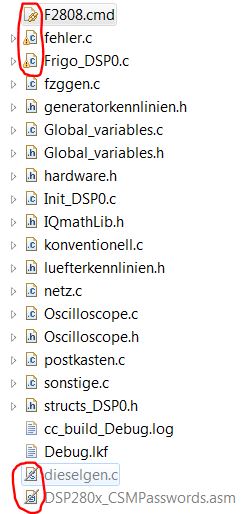
  • Thanks ki. Regarding the warning number 2. Please can you tell me how I can recognize the broken links in the Project Explorer. I have found several files with exceptional icons in the Project Explorer window (please see the original post). Regarding the "warning #16002-D" I am not sure whether I understand correctly but I think that I can ignore this warning. Is it right? Thanks.

  • user4318460 said:
    I have found several files with exceptional icons in the Project Explorer window (please see the original post).

    Oh yes, the "!" icon indicates a broken link. The "/" at the bottom is different and means the files are excluded from the the build (this is often intended).

    user4318460 said:
    Regarding the "warning #16002-D" I am not sure whether I understand correctly but I think that I can ignore this warning. Is it right?

    generally, yes.

  • Hello ki, I have found that the "!" next to some .c modules in project explorer are caused by

    "#225-D function xyz declared implicitly"

    I guess that the problem is caused by missing function prototypes for the functions. The problem is
    that these prototypes aren't present in the original software. So these warnings must be present also
    in CCS v3.3. It isn't a problem caused by migrating in my opinion. But I am not sure whether I can
    ignore these warnings. What is your opinion? Thanks
  • ah ok. The broken link icons are also "!" but the graphic looks different - like so:

    user4318460 said:
    "#225-D function xyz declared implicitly"

    Yes it is a fairly common warning. CCSv3.3 suppressed this warning by default but later versions of CCS does not. There are some rare cases where it can cause an issue, which is why it was requested that we do not suppress this warning. But in your case if it was not an issue in v3.3, then it is likely fine.

  • Thank you very much for your help.