


Other Parts Discussed in Thread: TMS320F2812
Hi,
I am a beginner and I am trying to use a eZdsp tms320f2812 board with an XDS100 emulator with CCS 3.1. However, SDConfig cannot find the emulator. I have my XDS100 drivers properly installed (looks just like this: http://processors.wiki.ti.com/index.php/XDS100).
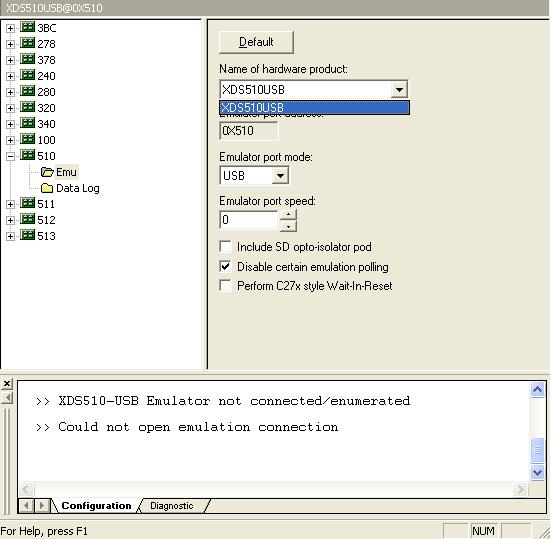
While I was trying to figure out SDConfig, I noticed that 510-513 were for USB, so I went ahead with them. However, SDConfig only lists XDS510USB.
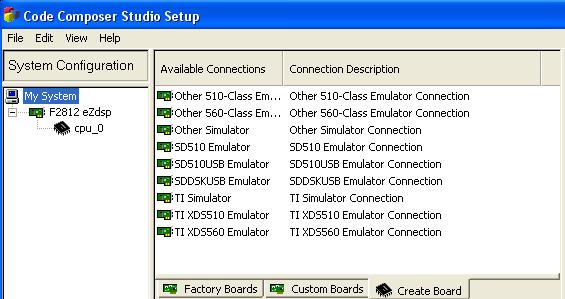
I read somewhere that I needed to add it to "My System" in Code Composer Studio Setup.
However there is not an XDS100 connection in the create board tab.
Also when I run CCS and try to connect, I get this error:
Error connecting to the target:
Error 0x80000200/-2092
Fatal Error during: OCS,
Device driver: Emulation Connection Loss Detected on Target CPU.
It is recommended to RESET EMULATOR. This will disconnect each
target from the emulator. The targets should then be power cycled
or hard reset followed by an emureset and reconnect to each target.
Sequence ID: 0
Error Code: -2092
Error Class: 0x80000200
I/O Port = 378
Board Name: F2812 eZdsp
Cpu Name: cpu_0
Abort: Close Code Composer Studio.
Retry: Try to connect to the target again.
Cancel: Remain disconnected from the target
Diagnostic: Run diagnostic utility.
I have no idea how to proceed. I hope this is the right place for this subject.
Thank you very much in advance,
bbaycan

