This thread has been locked.

If you have a related question, please click the "Ask a related question" button in the top right corner. The newly created question will be automatically linked to this question.

CCS/CC3200: Can't install TI Emulator drivers to "C:\Program Files\TI"

Part Number: CC3200
Other Parts Discussed in Thread: UNIFLASH

Tool/software: Code Composer Studio

The ti_emupack_setup.exe installer fails when trying to install drivers to "C:\Program Files\ti":
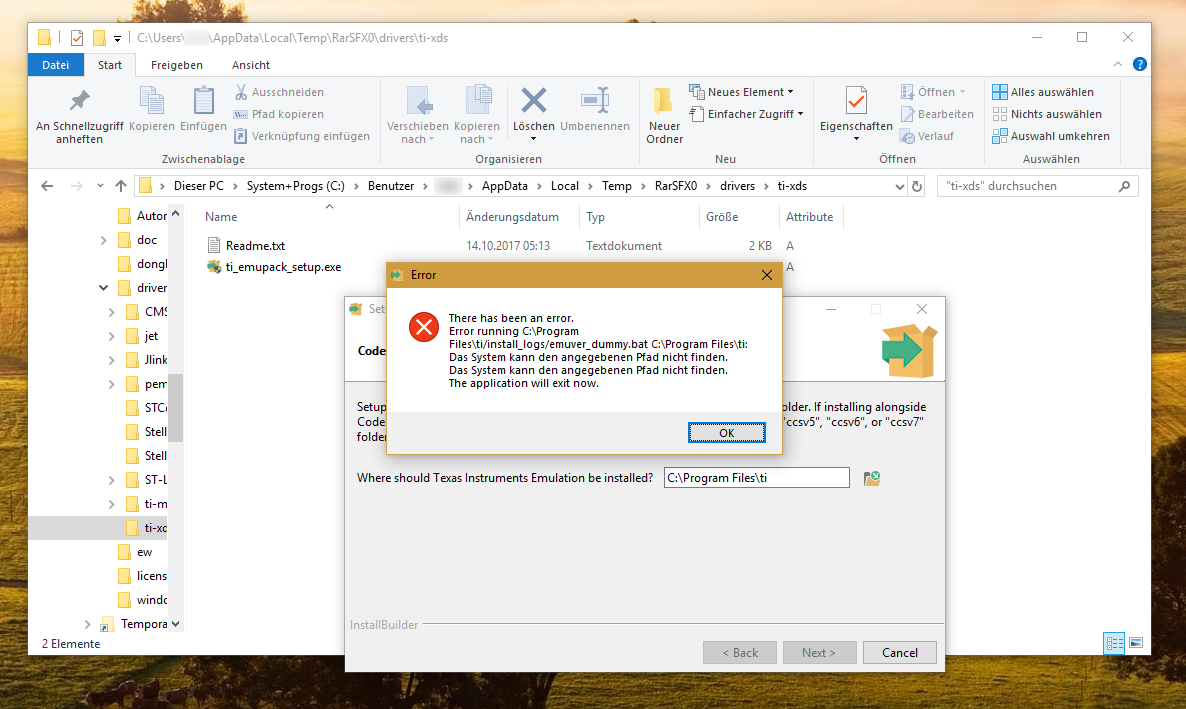
Please fix the installation script.

Just add double quotes around the path and you're done. Then I can install the drivers according to corporate compliance.

  • I am able to reproduce the error and have filed DBGTRC-3692 to track it.

    If you need a quick workaround one option would be to install CCS which does not have this problem or even UniFlash. They include the contents of this package.

    Regards,
    John
  • Thanks a lot, John!

    I'm using IAR Embedded Workbench for Arm at this time. It comes with this emulator driver package.

    Is there a way for me to get to know when an update will be available so I can download it?
  • Hi,

    Just adding to John's response, a workaround is to install in unattended mode.

    From a DOS command prompt, issue the following:
    ti_emupack_setup_7.0.48.0_win_32.exe --mode unattended --prefix "C:\Program Files\ti"

    I hope your corporate IT is aware of the pitfalls of installing CCS and some of its underlying components under C:\Program Files and other areas protected by the UAC. (edit) I saw after my post that you are not using CCS.

    I apologize for the inconvenience,
    Rafael

  • Hi Rafael,

    thank you for this valuable hint!

    Yes, that's why I'm using IAR-EW instead of CCS. CCS fails to comply.

    Best regards,
    Axel