This thread has been locked.

If you have a related question, please click the "Ask a related question" button in the top right corner. The newly created question will be automatically linked to this question.

Error loading program via emulator

Other Parts Discussed in Thread: CCSTUDIO

I have recently upgrade to CCS 3.3 from 3.1, bios from 4.90 to 5.31.02.

After converting the pjt and cdb, The project builds. The project that I use was from previous builds done by other people and was working.

I now load the program via emulator, and got below message: Data verification failed at address 0x19938. Please verify target memory and memory map.

I read some postings about this and it was describled as a memory map issue, but the map was well describled, was working and uses same family of processor C6412.

I am new to DSP and CCS, Anyone could help me with this?

Many thanks,

Terry

  • Here is some additional info.

    After failed load, I unchecked "perform verfication during program load", loaded the program and checked memory 0x19938, it was "TRC_cinit".

    Many thanks,

    Terry

  • Hmmm, that's strange.  Normally you see stuff like this when code/data gets linked to an invalid location or if the SDRAM hasn't been initialized.

    To help track down the reason, please try commenting out some code to make your application a little smaller (or add code to make it bigger).  Then repeat the test and see if the issue follows TRC_cinit or it if stays at 0x19938.  That might help us determine whether you have some kind of hardware issue with your board or if perhaps something is not right in your linker command file, etc.

  • One other thought -- do you have one of the prebuilt executables from CCS 3.1?  Another test is to try loading your old executable with CCS 3.3. That will tell us whether the issue might reside in your building of the file or in the loading of the file.

  • Thanks a lot Brad, I have tried to load an old 3.1 build and it failed too. At 0x8003D640.

    I also tried to use an example program from C:\CCStudio_v3.3\examples\sim64xx\code_coverage\tree and it failed too at 0x7FF0, but after disabling verification, read 0x7FF0 returns some value instead of TRC_cinit.

    Here is my settings:

    Emulator: BH LAN560

    CCS setups: emulator with TMS320C6400

    source code: tree example at C:\CCStudio_v3.3\examples\sim64xx\code_coverage\tree

    Board: specialized board for telecom

    CCS version 3.3

    GEL: none, I have tried to use C:\CCStudio_v3.3\cc\gel\dsp641x.gel and dsp64xxplus.gel with the same results.

    Is there any settings that I need to apply to the DSP before loading any program? Do I need a GEL file at all or need to modify it? Your quick response is appreciated!

    Many thanks,

    Terry

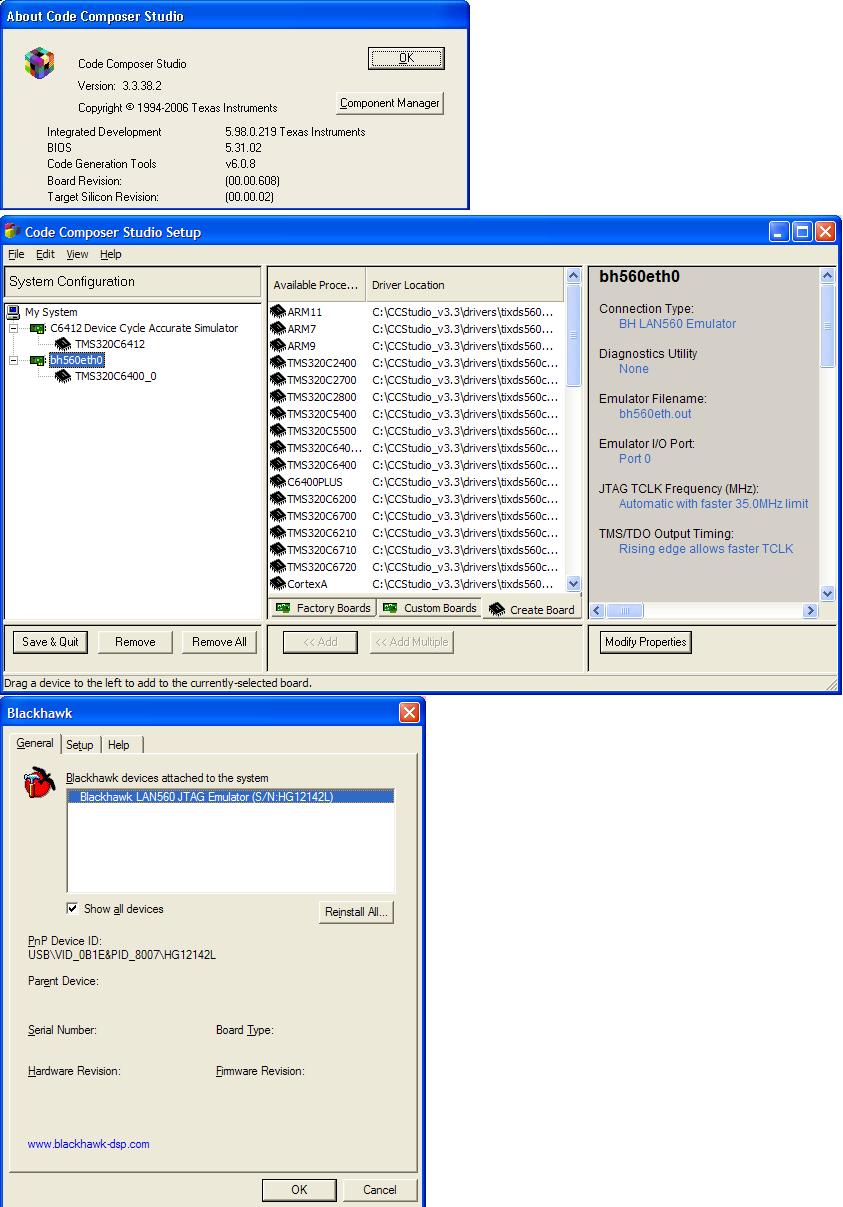
  • What's the complete version number (all digits) for CCS shown in the Help -> About dialog?  Also, what version of the Blackhawk emulation drivers did you install?  Can you post a screenshot of cc_setup?

  • Thanks Brad, Please find the attached screen shots, I was not able to get the versions of the BH driver, the BH control panel didn't show it.

    I got a hardware designer to probe some of the clocks and read some registers, the register DEVSTAT, 0x01B3F004 has its AECLKINSEL1,0(EMIF input clk select) with value 0b11 which is "reserved". Is this normal? Could this be an indication of some issue?

    Many thanks,

    Terry


  • I think the main issue here is that you are using the initial release of CCS 3.3.  In other words, we had 12 service releases to fix bugs but you are not using them!  The service releases are "all inclusive" so you only need to install SR12 (i.e. skip 1-11).

    Once you've done that go to the Blackhawk website:

    http://www.blackhawk-dsp.com/support/Drivers33.aspx

    Download and install the drivers meant for CCS 3.3 SR12 (i.e. BH Release 3.3.300.3).

    The AECLKINSEL value is set by the state of pins AEA[20:19] when reset is released so you must have the wrong termination or else something opposing that termination such as an external device connected to the EMIF.  That's not good that you're in a reserved state, but I doubt that's the issue especially since you see the issue with internal RAM.  I would guess this is a straight-up CCS bug that has been resolved in one of the many service releases.

    Brad

  • Thanks Brad, I have done so and now the CCS hangs upon connecting to the board. Any ideas?

    One more thing, should I click verify answer when you answer my quesiton? This is the first time I am here. My applogies if I am not following the rules right.

    Many thanks,

    Terry


  • Terry said:
    Thanks Brad, I have done so and now the CCS hangs upon connecting to the board. Any ideas?

    Can you try it out with no gel file?  Specifically I'm wondering whether something goes wrong in the gel file or if you truly cannot connect to the board.  In your cc_setup I recommend only having a single board in there at a given time, i.e. don't put both the simulator and emulator in there simultaneously.  Can you take another screenshot of your setup once you make the change?  Exactly which emulator are you using?  The Blackhawk LAN560 or is it something else such as the USB560m?


  • Terry said:
    One more thing, should I click verify answer when you answer my quesiton? This is the first time I am here. My applogies if I am not following the rules right.

    Whoops, forgot this one.  Yes, once your issue has been resolved we appreciate if you click "verify answer" next to the post(s) that resolved your issue.  That will cause those particular posts to bubble up to the top so future users can find the answer more quickly.  It will also turn the question green in the forum so that other people in the community don't start reading through the whole thread when it's already resolved.  Thanks for working hard to be a good member of the development community!

  • Thanks a lot Brad,

    I have removed the simulator from cc_setup, removed GEL file, and it acts the same as before. Below is screen shots of cc_setup and ccs studio. Same as previously, before it hangs, it brought up the disassembly, then the whole ccs hangs. the emulator is a blackhawk LAN 560.

    Many thanks,

    Terry

  • Terry,

    Is the C6412 target you are using some sort of DSK/eval board or a custom board?

    ki

  • Is this on the EVM or your own custom hardware?  Looking at your screenshots I see all F's in your memory so I would guess you have an empty flash and are doing the EMIF boot.  That said, it can cause the device to come up in an unstable state.  Can you try switching to the host boot mode?  I *think* you can still connect in that boot mode and it will prevent the DSP from running "into the weeds" because it will keep the DSP stalled.

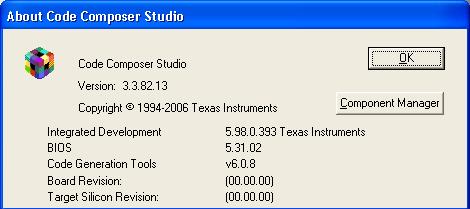
    Also, as a sanity check please do Help -> About in CCS and verify you have version 3.3.82.13 which corresponds to CCS 3.3 SR12.  It's critical that you match up the correct version of CCS to the correct version of the emulator.

    One other test... In the directory where you installed the Blackhawk drivers should be a Utility directory and then a BHProbe.2 directory.  Inside this directory you'll find the files called BHreset_LAN560.bat and BHprobe_LAN560.bat.  Try doing the reset and try doing the probe and see if those work.  That will do a lower-level scan.  Perhaps attach your log back to the forum.

  • Hi Brad and Ki,

    It is a custom board, C6412 is used in our other product line (telecom testset) at the moment, this board is a new product, but the DSP has no difference in terms of clocks, pci, emif and other connections and settings.

    The boot mode pins on the board are now 0b00. Is this the host mode? The ccs acts the same after bootmode change.
    Please find attached help version screen shot and logs for the BHprobe.

    Many thanks,
    Terry


    Logs: BHreset_LAN560.log


    **************************************************
      BHProbe 5.02: Blackhawk LAN560 JTAG Emulator  
    **************************************************
    Tue 09/14/2010-16:55:37.00                                       
                                                       
                                                       
    bin\XDSProbe.exe -v -F BH560ETH.out -p0x0 -r -o log\BHreset_LAN560.log

    -----[Print the reset-command software log-file]-----------------------------

    This utility has selected an XDS560 class product.
    This utility will load the program 'BH560ETH.out'.
    This utility will operate on port address '0'.
    The controller does use a programmable FPGA.
    The old VHDL code has a version number of '1544' (0x0608).
    The new VHDL code has a version number of '1544' (0x0608).
    The emulator program is named 'BH560ETH.out'.
    The emulator program is version '35.24.0.3'.
    The controller has a version number of '4' (0x0004).
    The controller has an insertion length of '0' (0x0000).
    The cable+pod has a version number of '6' (0x0006).
    The cable+pod has a capability number of '8' (0x0008).
    The local memory has a base address of '0' (0x000000).
    The local memory has a word capacity of '32768' (0x008000).
    This utility will now attempt to reset the controller.
    This utility has successfully reset the controller.

    -----[Print the reset-command hardware log-file]-----------------------------

    The scan-path will be reset by toggling the JTAG TRST signal.
    The software is configured to use all Nano-TBC VHDL features.
    The controller type is the Nano-TBC VHDL.
    The connection type is a 560-class revision-D multi-purpose cable.
    The controller will be software reset via its configure register.
    The controller will use rising-edge timing on output pins.
    The controller may use rising edge timing on input pins.
    The controller has a logic ONE on its EMU[0] input pin.
    The controller has a logic ONE on its EMU[1] input pin.
    The scan-path link-delay has been set to exactly '3' (0x0003).
    The support logic has not previously detected a power-loss.
           
    Done.   

    BHprobe_LAN560.log

    Tue 09/14/2010-16:54:34.66
    BHDeviceList:  Device Find Started...
    BHDeviceList:  Searching for Attached PnP Devices
    BHDeviceList:  No PnP Devices found attached to the system.
    BHDeviceList:  Completed Search for Attached PnP Devices
    BHDeviceList:  Searching for Installed PnP Devices
             1.) Blackhawk LAN560 JTAG Emulator (S/N:HG12142L)
    BHDeviceList:  Found [1] device(s) installed on this system.
    BHDeviceList:  Completed Search for Installed PnP Devices
    BHDeviceList:  Device Find Completed.
    ****************************************************************************************************
    TEST 1 - RESET
    ****************************************************************************************************
    **************************************************
      BHProbe 5.02: Blackhawk LAN560 JTAG Emulator  
    **************************************************
    Tue 09/14/2010-16:54:34.83                                       
                                                       
                                                       
    bin\XDSProbe.exe -v -F BH560ETH.out -p0x0 -r -o log\BHprobe_LAN560.log

    -----[Print the reset-command software log-file]-----------------------------

    This utility has selected an XDS560 class product.
    This utility will load the program 'BH560ETH.out'.
    This utility will operate on port address '0'.
    The controller does use a programmable FPGA.
    The old VHDL code has a version number of '1544' (0x0608).
    The new VHDL code has a version number of '1544' (0x0608).
    The emulator program is named 'BH560ETH.out'.
    The emulator program is version '35.24.0.3'.
    The controller has a version number of '4' (0x0004).
    The controller has an insertion length of '0' (0x0000).
    The cable+pod has a version number of '6' (0x0006).
    The cable+pod has a capability number of '8' (0x0008).
    The local memory has a base address of '0' (0x000000).
    The local memory has a word capacity of '32768' (0x008000).
    This utility will now attempt to reset the controller.
    This utility has successfully reset the controller.

    -----[Print the reset-command hardware log-file]-----------------------------

    The scan-path will be reset by toggling the JTAG TRST signal.
    The software is configured to use all Nano-TBC VHDL features.
    The controller type is the Nano-TBC VHDL.
    The connection type is a 560-class revision-D multi-purpose cable.
    The controller will be software reset via its configure register.
    The controller will use rising-edge timing on output pins.
    The controller may use rising edge timing on input pins.
    The controller has a logic ONE on its EMU[0] input pin.
    The controller has a logic ONE on its EMU[1] input pin.
    The scan-path link-delay has been set to exactly '3' (0x0003).
    The support logic has not previously detected a power-loss.
           
    Done.   
           
    ****************************************************************************************************
    TEST 2 - SCAN 
    ****************************************************************************************************
    **************************************************
      BHProbe 5.02: Blackhawk LAN560 JTAG Emulator  
    **************************************************
    Tue 09/14/2010-16:54:39.60                                       
                                                       
                                                       
    bin\XDSProbe.exe -v -F BH560ETH.out -p0x0 -i -o log\BHprobe_LAN560.log

    -----[Print the controller-open software log-file]---------------------------

    This utility has selected an XDS560 class product.
    This utility will load the program 'BH560ETH.out'.
    This utility will operate on port address '0'.
    The controller does use a programmable FPGA.
    The emulator program is named 'BH560ETH.out'.
    The emulator program is version '35.24.0.3'.
    The controller has a version number of '4' (0x0004).
    The controller has an insertion length of '0' (0x0000).
    The cable+pod has a version number of '6' (0x0006).
    The cable+pod has a capability number of '8' (0x0008).
    The local memory has a base address of '0' (0x000000).
    The local memory has a word capacity of '32768' (0x008000).

    -----[Perform the standard path-length test on the JTAG IR and DR]-----------

    This path-length test uses blocks of 512 32-bit words.

    The test for the JTAG IR instruction path-length succeeded.
    The JTAG IR instruction path-length is 38 bits.

    The test for the JTAG DR bypass path-length succeeded.
    The JTAG DR bypass path-length is 1 bits.

    -----[Perform the Integrity scan-test on the JTAG IR]------------------------

    This test will use blocks of 512 32-bit words.
    This test will be applied just once.

    Do a test using 0xFFFFFFFF.
    Scan tests: 1, skipped: 0, failed: 0
    Do a test using 0x00000000.
    Scan tests: 2, skipped: 0, failed: 0
    Do a test using 0xFE03E0E2.
    Scan tests: 3, skipped: 0, failed: 0
    Do a test using 0x01FC1F1D.
    Scan tests: 4, skipped: 0, failed: 0
    Do a test using 0x5533CCAA.
    Scan tests: 5, skipped: 0, failed: 0
    Do a test using 0xAACC3355.
    Scan tests: 6, skipped: 0, failed: 0
    All of the values were scanned correctly.

    The JTAG IR Integrity scan-test has succeeded.

    -----[Perform the Integrity scan-test on the JTAG DR]------------------------

    This test will use blocks of 512 32-bit words.
    This test will be applied just once.

    Do a test using 0xFFFFFFFF.
    Scan tests: 1, skipped: 0, failed: 0
    Do a test using 0x00000000.
    Scan tests: 2, skipped: 0, failed: 0
    Do a test using 0xFE03E0E2.
    Scan tests: 3, skipped: 0, failed: 0
    Do a test using 0x01FC1F1D.
    Scan tests: 4, skipped: 0, failed: 0
    Do a test using 0x5533CCAA.
    Scan tests: 5, skipped: 0, failed: 0
    Do a test using 0xAACC3355.
    Scan tests: 6, skipped: 0, failed: 0
    All of the values were scanned correctly.

    The JTAG DR Integrity scan-test has succeeded.
           
    Done.   
           
    ****************************************************************************************************
    TEST 3 - SCAN2
    ****************************************************************************************************
    **************************************************
      BHProbe 5.02: Blackhawk LAN560 JTAG Emulator  
    **************************************************
    Tue 09/14/2010-16:54:45.63                                       
                                                       
                                                       
    bin\XDSProbe.exe -v -f bin\bh-noscantest.cfg -F BH560ETH.out -p0x0 -i -o log\BHprobe_LAN560.log

    -----[Print the controller-open software log-file]---------------------------

    This utility has selected an XDS560 class product.
    This utility will load the program 'BH560ETH.out'.
    This utility will operate on port address '0'.
    The controller does use a programmable FPGA.
    The emulator program is named 'BH560ETH.out'.
    The emulator program is version '35.24.0.3'.
    The controller has a version number of '4' (0x0004).
    The controller has an insertion length of '0' (0x0000).
    The cable+pod has a version number of '6' (0x0006).
    The cable+pod has a capability number of '8' (0x0008).
    The local memory has a base address of '0' (0x000000).
    The local memory has a word capacity of '32768' (0x008000).

    -----[Perform the standard path-length test on the JTAG IR and DR]-----------

    This path-length test uses blocks of 512 32-bit words.

    The test for the JTAG IR instruction path-length succeeded.
    The JTAG IR instruction path-length is 38 bits.

    The test for the JTAG DR bypass path-length succeeded.
    The JTAG DR bypass path-length is 1 bits.

    -----[Perform the Integrity scan-test on the JTAG IR]------------------------

    This test will use blocks of 512 32-bit words.
    This test will be applied just once.

    Do a test using 0xFFFFFFFF.
    Scan tests: 1, skipped: 0, failed: 0
    Do a test using 0x00000000.
    Scan tests: 2, skipped: 0, failed: 0
    Do a test using 0xFE03E0E2.
    Scan tests: 3, skipped: 0, failed: 0
    Do a test using 0x01FC1F1D.
    Scan tests: 4, skipped: 0, failed: 0
    Do a test using 0x5533CCAA.
    Scan tests: 5, skipped: 0, failed: 0
    Do a test using 0xAACC3355.
    Scan tests: 6, skipped: 0, failed: 0
    All of the values were scanned correctly.

    The JTAG IR Integrity scan-test has succeeded.

    -----[Perform the Integrity scan-test on the JTAG DR]------------------------

    This test will use blocks of 512 32-bit words.
    This test will be applied just once.

    Do a test using 0xFFFFFFFF.
    Scan tests: 1, skipped: 0, failed: 0
    Do a test using 0x00000000.
    Scan tests: 2, skipped: 0, failed: 0
    Do a test using 0xFE03E0E2.
    Scan tests: 3, skipped: 0, failed: 0
    Do a test using 0x01FC1F1D.
    Scan tests: 4, skipped: 0, failed: 0
    Do a test using 0x5533CCAA.
    Scan tests: 5, skipped: 0, failed: 0
    Do a test using 0xAACC3355.
    Scan tests: 6, skipped: 0, failed: 0
    All of the values were scanned correctly.

    The JTAG DR Integrity scan-test has succeeded.
           
    Done.   
           
    ****************************************************************************************************
    TEST 4 - DATA
    ****************************************************************************************************
    **************************************************
      BHProbe 5.02: Blackhawk LAN560 JTAG Emulator  
    **************************************************
    Tue 09/14/2010-16:54:51.53                                       
                                                       
                                                       
    bin\XDSProbe.exe -v -F BH560ETH.out -p0x0 -g -o log\BHprobe_LAN560.log

    -----[Print the controller-open software log-file]---------------------------

    This utility has selected an XDS560 class product.
    This utility will load the program 'BH560ETH.out'.
    This utility will operate on port address '0'.
    The controller does use a programmable FPGA.
    The emulator program is named 'BH560ETH.out'.
    The emulator program is version '35.24.0.3'.
    The controller has a version number of '4' (0x0004).
    The controller has an insertion length of '0' (0x0000).
    The cable+pod has a version number of '6' (0x0006).
    The cable+pod has a capability number of '8' (0x0008).
    The local memory has a base address of '0' (0x000000).
    The local memory has a word capacity of '32768' (0x008000).

    -----[Perform the standard path-length test on the JTAG IR and DR]-----------

    This path-length test uses blocks of 512 32-bit words.

    The test for the JTAG IR instruction path-length succeeded.
    The JTAG IR instruction path-length is 38 bits.

    The test for the JTAG DR bypass path-length succeeded.
    The JTAG DR bypass path-length is 1 bits.

    -----[Perform the Given Data scan-test on the JTAG IR]-----------------------

    This test will use blocks of 512 32-bit words.
    This test will be applied just once.
    It uses the first 1 of the 10 different test-cases.

    Do a test using 0x5533CCAA.
    Scan tests: 1, skipped: 0, failed: 0
    All of the values were scanned correctly.

    The JTAG IR Given Data scan-test has succeeded.

    -----[Perform the Given Data scan-test on the JTAG DR]-----------------------

    This test will use blocks of 512 32-bit words.
    This test will be applied just once.
    It uses the first 1 of the 10 different test-cases.

    Do a test using 0x5533CCAA.
    Scan tests: 1, skipped: 0, failed: 0
    All of the values were scanned correctly.

    The JTAG DR Given Data scan-test has succeeded.
           
    Done.   
           

  • Here's a snippet from page 49 of the data sheet:

    Try bootmode 01.

  • The bootmode was changed to PCI boot; however, the connect issue was still there. I tried to reinstall the CCS, SR12 and emulator drivers and it worked. Not sure why this is the case, I guess maybe the order of installation matters and I happen to be in a situation where the SR/Driver was not applied properly?

    The loading issue was also resolved after I changed GEL file for default EMIF settings for one of the tree example supplied with CCS3.3. Our load still does not load properly but I guess there is more to config from our side. This issue can be closed now. Many thanks to Brad for the excellent support in timely manner!