This thread has been locked.

If you have a related question, please click the "Ask a related question" button in the top right corner. The newly created question will be automatically linked to this question.

Linker error using CSL PCI function calls with C++

Other Parts Discussed in Thread: CCSTUDIO

This is text from an e-mail I sent TI tech support, with a response that I should use the forums to find an answer.  My company purchases many products from TI, and I am a little shocked that there is no support from TI on an issue like this except through a forum.  Please help:

Hi Michael,

Here is the issue:


I’m building two separate things.  One is an infrastructure library (archived to a .lib file) that uses the CSL PCI.  I’ve included the csl_pci.h file in the source code that makes the below PCI calls.  The other is an executable build that includes the .lib file.  I get the following linker error when building the executable:


undefined                        first referenced

 symbol                              in file

---------                        ----------------

PCI_xfrTest()                    T:\\UDB_SW\\dspi\\Source_Code\\build\\scm_build\\Dspi_Jpals.lib

PCI_xfrStart(unsigned int)       T:\\UDB_SW\\dspi\\Source_Code\\build\\scm_build\\Dspi_Jpals.lib

PCI_intEnable(unsigned int)      T:\\UDB_SW\\dspi\\Source_Code\\build\\scm_build\\Dspi_Jpals.lib

PCI_xfrConfig(PCI_ConfigXfr *)   T:\\UDB_SW\\dspi\\Source_Code\\build\\scm_build\\Dspi_Jpals.lib

PCI_dspIntReqSet()               T:\\UDB_SW\\dspi\\Source_Code\\build\\scm_build\\Dspi_Jpals.lib

PCI_eepromEraseAll()             T:\\UDB_SW\\dspi\\Source_Code\\build\\scm_build\\Dspi_Jpals.lib

PCI_intClear(unsigned int)       T:\\UDB_SW\\dspi\\Source_Code\\build\\scm_build\\Dspi_Jpals.lib

PCI_dspIntReqClear()             T:\\UDB_SW\\dspi\\Source_Code\\build\\scm_build\\Dspi_Jpals.lib

>>   error: symbol referencing errors - './Debug/JpalsDsp.out' not built


>> Compilation failure


Build Complete,

  2 Errors, 2 Warnings, 0 Remarks.


Recursive Build Complete,

  Total Count: 2 Errors, 2 Warnings, 0 Remarks.


I am using the C6416 chip, so I believe the PCI_SUPPORT compiler flag should already be defined according to the csl_chiphal.h file.  Other libraries I am including in the build are:

fastrts64x.lib

dsp64x.lib

csl6416.lib


This is a little endian project, and I am using the “C6416 Device Cycle Accurate Simulator” (little endian version) to do the builds.  I am using Code Composer v3.3.


Any help would be appreciated.


Thanks,

Loren

Northrop Grumman, Inc.


  • Loren Caler said:
    This is text from an e-mail I sent TI tech support, with a response that I should use the forums to find an answer.  My company purchases many products from TI, and I am a little shocked that there is no support from TI on an issue like this except through a forum. 

    Loren,

    Sorry to hear you are a bit shocked to be pointed to the forums, but I think once you get accustomed to them you will come to like them!  I won't pretend that it's perfect, but it allows you to talk directly with many experts inside TI or even elsewhere in the industry!  Also, we hope that it will serve as a great wealth of info to you.  In other words, hopefully you will be saved many future emails by finding the answers already exist on the forum!

    Loren Caler said:
    I get the following linker error when building the executable:
     
    undefined                        first referenced
     symbol                              in file
    ---------                        ----------------
    PCI_xfrTest()                    T:\\UDB_SW\\dspi\\Source_Code\\build\\scm_build\\Dspi_Jpals.lib
    PCI_xfrStart(unsigned int)       T:\\UDB_SW\\dspi\\Source_Code\\build\\scm_build\\Dspi_Jpals.lib
    PCI_intEnable(unsigned int)      T:\\UDB_SW\\dspi\\Source_Code\\build\\scm_build\\Dspi_Jpals.lib
    PCI_xfrConfig(PCI_ConfigXfr *)   T:\\UDB_SW\\dspi\\Source_Code\\build\\scm_build\\Dspi_Jpals.lib
    PCI_dspIntReqSet()               T:\\UDB_SW\\dspi\\Source_Code\\build\\scm_build\\Dspi_Jpals.lib
    PCI_eepromEraseAll()             T:\\UDB_SW\\dspi\\Source_Code\\build\\scm_build\\Dspi_Jpals.lib
    PCI_intClear(unsigned int)       T:\\UDB_SW\\dspi\\Source_Code\\build\\scm_build\\Dspi_Jpals.lib
    PCI_dspIntReqClear()             T:\\UDB_SW\\dspi\\Source_Code\\build\\scm_build\\Dspi_Jpals.lib
    >>   error: symbol referencing errors - './Debug/JpalsDsp.out' not built
     
    >> Compilation failure
     
    Build Complete,
      2 Errors, 2 Warnings, 0 Remarks.
     
    Recursive Build Complete,
      Total Count: 2 Errors, 2 Warnings, 0 Remarks.
     
     
    I am using the C6416 chip, so I believe the PCI_SUPPORT compiler flag should already be defined according to the csl_chiphal.h file.  Other libraries I am including in the build are:
    fastrts64x.lib
    dsp64x.lib
    csl6416.lib


    Can you share your linker options?  From what I've read it would seem to me that you are missing the --reread_libs option from the linker.  Here's a screenshot of what I'm talking about taken from CCS 4:


    Thanks for posting on the forum.  I hope you will not hesitate to come here for all your future support needs!  By the way, I find the following page helpful in finding the right forum to post:

    http://e2e.ti.com/support/w/forums/ti-embedded-processors-forums.aspx

    Best regards,
    Brad


  • Here is my entire .pjt file (included the whole thing for sanity sake):

    [Project Settings]

    ProjectName="JpalsDsp"

    ProjectDir="T:\UDB_SW\JPALS\Source_Code\build\dsp\"

    ProjectType=Executable

    CPUFamily=TMS320C64XX

    Tool="Compiler"

    Tool="CustomBuilder"

    Tool="DspBiosBuilder"

    Tool="Linker"

    Config="Debug"

    Config="Release"

    [Project Dependencies]

    Source="..\..\source\dspAlgoBlocks\lib_build\DspAlgoBlocks.pjt"

    Source="..\..\source\dspControl\lib_build\DspControl.pjt"

    Source="..\..\source\dspFunctions\lib_build\DspFunctions.pjt"

    ["..\..\source\dspAlgoBlocks\lib_build\DspAlgoBlocks.pjt" Settings]

    MatchConfigName=true

    ["..\..\source\dspControl\lib_build\DspControl.pjt" Settings]

    MatchConfigName=true

    ["..\..\source\dspFunctions\lib_build\DspFunctions.pjt" Settings]

    MatchConfigName=true

    [Source Files]

    Source="..\..\..\..\dspi\Source_Code\build\scm_build\Dspi_Jpals.lib"

    Source="..\..\source\dspAppl\DspMain.cpp"

    Source="jpalsCnip.tcf"

    Source="jpalsCnipcfg.cmd"

    [Generated Files]

    Source="jpalsCnipcfg.s62"

    Source="jpalsCnipcfg_c.c"

    ["Compiler" Settings: "Debug"]

    Options=-g -pdv -fr".\build\Debug" -i".\" -i"..\..\..\..\common\Source_Code\include\WFC_DSP" -i"..\..\..\..\common\Source_Code\include" -d"_DEBUG" -d"CHIP_6416" -ml3 -mv6400

    ["Compiler" Settings: "Release"]

    Options=-o3 -fr".\build\Release" -i".\" -i"..\..\..\..\common\Source_Code\include\WFC_DSP" -i"..\..\..\..\common\Source_Code\include" -d"CHIP_6416" -me -mt -mh -ml3 -mv6400

    ["DspBiosBuilder" Settings: "Debug"]

    Options=-Dconfig.importPath="C:\CCStudio_v3.3/bios_5_20_05/packages"

    ["DspBiosBuilder" Settings: "Release"]

    Options=-Dconfig.importPath="C:\CCStudio_v3.3/bios_5_20_05/packages"

    ["Linker" Settings: "Debug"]

    Options=-c -heap0x20000 -m".\Debug\JpalsDsp.map" -o".\Debug\JpalsDsp.out" -stack0x20000 -w -x -i"C:\CCStudio_v3.3\fastmath\c6400\mthlib\lib" -i"C:\CCStudio_v3.3\bios_5_20_05\packages\ti\rtdx\lib\c6000" -i"C:\CCStudio_v3.3\c6400\dsplib\lib" -i"C:\CCStudio_v3.3\C6000\csl\lib" -l"fastrts64x.lib" -l"dsp64x.lib" -l"csl6416.lib"

    ["Linker" Settings: "Release"]

    Options=-c -heap0x20000 -m".\Release\JpalsDsp.map" -o".\Release\JpalsDsp.out" -stack0x20000 -w -x -i"C:\CCStudio_v3.3\fastmath\c6400\mthlib\lib" -i"C:\CCStudio_v3.3\bios_5_20_05\packages\ti\rtdx\lib\c6000" -i"C:\CCStudio_v3.3\c6400\dsp64xe\lib" -i"C:\CCStudio_v3.3\C6000\csl\lib" -l"fastrts64xe.lib" -l"dsp64xe.lib" -l"csl6416e.lib"

    ["jpalsCnipcfg.cmd" Settings: "Debug"]

    LinkOrder=1

    ["jpalsCnipcfg.cmd" Settings: "Release"]

    LinkOrder=1

  • Loren Caler said:

    ["Linker" Settings: "Debug"]

    Options=-c -heap0x20000 -m".\Debug\JpalsDsp.map" -o".\Debug\JpalsDsp.out" -stack0x20000 -w -x -i"C:\CCStudio_v3.3\fastmath\c6400\mthlib\lib" -i"C:\CCStudio_v3.3\bios_5_20_05\packages\ti\rtdx\lib\c6000" -i"C:\CCStudio_v3.3\c6400\dsplib\lib" -i"C:\CCStudio_v3.3\C6000\csl\lib" -l"fastrts64x.lib" -l"dsp64x.lib" -l"csl6416.lib"

    It looks like you already have the option I mentioned set.  (The -x option is the same as --reread_libs.)  Can you copy/paste the output from the CCS build window?

  • Here is all the text:


    -------------------------  DspAlgoBlocks.pjt - Debug  -------------------------
    Build Complete,
      0 Errors, 0 Warnings, 0 Remarks.
    ---------------------------  DspControl.pjt - Debug  ---------------------------
    Build Complete,
      0 Errors, 0 Warnings, 0 Remarks.
    --------------------------  DspFunctions.pjt - Debug  --------------------------
    Build Complete,
      0 Errors, 0 Warnings, 0 Remarks.
    ----------------------------  JpalsDsp.pjt - Debug  ----------------------------
    [jpalsCnipcfg.s62] "C:\CCStudio_v3.3\C6000\cgtools\bin\cl6x" -g -pdv -fr"./build/Debug" -i"./" -i"../../../../common/Source_Code/include/WFC_DSP" -i"../../../../common/Source_Code/include" -d"_DEBUG" -d"CHIP_6416" -ml3 -mv6400 -@"Debug.lkf" "jpalsCnipcfg.s62"

    [jpalsCnipcfg_c.c] "C:\CCStudio_v3.3\C6000\cgtools\bin\cl6x" -g -pdv -fr"./build/Debug" -i"./" -i"../../../../common/Source_Code/include/WFC_DSP" -i"../../../../common/Source_Code/include" -d"_DEBUG" -d"CHIP_6416" -ml3 -mv6400 -@"Debug.lkf" "jpalsCnipcfg_c.c"

    [Linking...] "C:\CCStudio_v3.3\C6000\cgtools\bin\cl6x" -@"Debug.lkf"
    <Linking>

    undefined                        first referenced
     symbol                              in file
    ---------                        ----------------
    PCI_xfrTest()                    T:\\UDB_SW\\dspi\\Source_Code\\build\\scm_build\\Dspi_Jpals.lib
    PCI_xfrStart(unsigned int)       T:\\UDB_SW\\dspi\\Source_Code\\build\\scm_build\\Dspi_Jpals.lib
    PCI_intEnable(unsigned int)      T:\\UDB_SW\\dspi\\Source_Code\\build\\scm_build\\Dspi_Jpals.lib
    PCI_xfrConfig(PCI_ConfigXfr *)   T:\\UDB_SW\\dspi\\Source_Code\\build\\scm_build\\Dspi_Jpals.lib
    PCI_dspIntReqSet()               T:\\UDB_SW\\dspi\\Source_Code\\build\\scm_build\\Dspi_Jpals.lib
    PCI_eepromEraseAll()             T:\\UDB_SW\\dspi\\Source_Code\\build\\scm_build\\Dspi_Jpals.lib
    PCI_intClear(unsigned int)       T:\\UDB_SW\\dspi\\Source_Code\\build\\scm_build\\Dspi_Jpals.lib
    PCI_dspIntReqClear()             T:\\UDB_SW\\dspi\\Source_Code\\build\\scm_build\\Dspi_Jpals.lib
    >>   error: symbol referencing errors - './Debug/JpalsDsp.out' not built

    >> Compilation failure

    Build Complete,
      2 Errors, 2 Warnings, 0 Remarks.

    Recursive Build Complete,
      Total Count: 2 Errors, 2 Warnings, 0 Remarks.

  • Doh!  The -@Debug.lkf is reading the contents of the file Debug.lkf so can you please open that file in a text editor and paste the contents here?  Sorry, forgot about that...

  • -z -c -heap0x20000 -m"./Debug/JpalsDsp.map" -o"./Debug/JpalsDsp.out" -stack0x20000 -w -x -i"C:/CCStudio_v3.3/fastmath/c6400/mthlib/lib" -i"C:/CCStudio_v3.3/bios_5_20_05/packages/ti/rtdx/lib/c6000" -i"C:/CCStudio_v3.3/c6400/dsplib/lib" -i"C:/CCStudio_v3.3/C6000/csl/lib" -i"C:/CCStudio_v3.3/C6000/xdais/lib" -i"C:/CCStudio_v3.3/bios_5_20_05/packages/ti/bios/lib" -i"C:/CCStudio_v3.3/C6000/cgtools/lib" -l"fastrts64x.lib" -l"dsp64x.lib" -l"csl6416.lib" "T:\UDB_SW\JPALS\Source_Code\build\dsp\jpalsCnipcfg.cmd" "T:\UDB_SW\JPALS\Source_Code\build\dsp\build\Debug\jpalsCnipcfg.obj" "T:\UDB_SW\JPALS\Source_Code\build\dsp\build\Debug\jpalsCnipcfg_c.obj" "T:\UDB_SW\JPALS\Source_Code\source\dspAppl\build\Debug\DspMain.obj" "T:\UDB_SW\dspi\Source_Code\build\scm_build\Dspi_Jpals.lib" "T:\UDB_SW\JPALS\Source_Code\lib\JpalsDspAlgo.lib" "T:\UDB_SW\JPALS\Source_Code\lib\JpalsDspControl.lib" "T:\UDB_SW\JPALS\Source_Code\lib\JpalsDspFunctions.lib"

  • This shows that csl6416.lib is being passed to the linker prior to Dspi_Jpals.lib which has the references causing the error.  I expected the -x option to take care of that issue by forcing the linker to reread csl6416.lib and resolve the backwards reference.  What version of the code generation tools are you using (Help -> About)?  Another thing to try would be to manually force the order of those 2 libraries on the "link order" tab of your project properties.  Specify Dspi_Jpals.lib to link prior to csl6416.lib and I think that will resolve your issue.

  • Hmm...here is a screenshot of my link order screen.  I see the Dspi_Jpals.lib in there, but not the csl6416.lib:

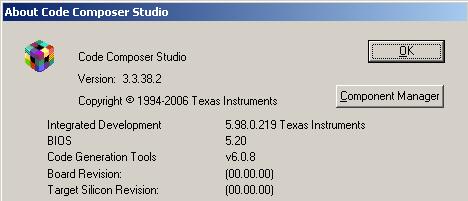
     Code Generation Tool version: 6.0.8


  • Changing the order didn't seem to work either.  Here is my new Debug.lkf:


    -z -c -heap0x20000 -m"./Debug/JpalsDsp.map" -o"./Debug/JpalsDsp.out" -stack0x20000 -w -x -i"C:/CCStudio_v3.3/fastmath/c6400/mthlib/lib" -i"C:/CCStudio_v3.3/bios_5_20_05/packages/ti/rtdx/lib/c6000" -i"C:/CCStudio_v3.3/c6400/dsplib/lib" -i"../../../../dspi/Source_Code/build/scm_build" -i"C:/CCStudio_v3.3/C6000/csl/lib" -i"C:/CCStudio_v3.3/C6000/xdais/lib" -i"C:/CCStudio_v3.3/bios_5_20_05/packages/ti/bios/lib" -i"C:/CCStudio_v3.3/C6000/cgtools/lib" -l"csl6416.lib" -l"fastrts64x.lib" -l"dsp64x.lib" -l"Dspi_Jpals.lib"
    "T:\UDB_SW\JPALS\Source_Code\build\dsp\jpalsCnipcfg.cmd"
    "T:\UDB_SW\JPALS\Source_Code\build\dsp\build\Debug\jpalsCnipcfg.obj"
    "T:\UDB_SW\JPALS\Source_Code\build\dsp\build\Debug\jpalsCnipcfg_c.obj"
    "T:\UDB_SW\JPALS\Source_Code\source\dspAppl\build\Debug\DspMain.obj"
    "T:\UDB_SW\JPALS\Source_Code\lib\JpalsDspAlgo.lib"
    "T:\UDB_SW\JPALS\Source_Code\lib\JpalsDspControl.lib"
    "T:\UDB_SW\JPALS\Source_Code\lib\JpalsDspFunctions.lib"
  • I think you need to remove it from your linker options (i.e. the -lcsl64616.lib) and then do "add files to project" and browse to the csl6416.lib file to add it as a source file.  Then it should show up in that dialog.  (Sorry, that's annoying.)

    Are you "version locked" on this project?  All of the components in your project are extremely old.

    CCS 3.3 -> Upgrade to CCS 3.3 SR12

    BIOS 5.20 -> Upgrade to BIOS 5.41.07

    CGT 6.0.8 -> Upgrade to CGT 6.1.17

    There are a couple good wiki pages that guide you through the download and update process (if you are allowed):

    I don't know if any of these components will provide a silver bullet for this particular issue, but there's a good chance the bug fixes in all these components will save you some time down the road.  FYI, all of the components I recommended are the most stable/robust versions you could use for your environment.  In other words, I'm not trying to put you on the bleeding edge, just trying to get you away from areas where we've already fixed lots of bugs, especially CCS!  As I recall, CCS 3.3 was a little rough around the edges when it first came out.  However, if you move to CCS 3.3 SR12 it should be rock solid.

    Best regards,
    Brad


  • Loren Caler said:

    -z -c -heap0x20000 -m"./Debug/JpalsDsp.map" -o"./Debug/JpalsDsp.out" -stack0x20000 -w -x -i"C:/CCStudio_v3.3/fastmath/c6400/mthlib/lib" -i"C:/CCStudio_v3.3/bios_5_20_05/packages/ti/rtdx/lib/c6000" -i"C:/CCStudio_v3.3/c6400/dsplib/lib" -i"../../../../dspi/Source_Code/build/scm_build" -i"C:/CCStudio_v3.3/C6000/csl/lib" -i"C:/CCStudio_v3.3/C6000/xdais/lib" -i"C:/CCStudio_v3.3/bios_5_20_05/packages/ti/bios/lib" -i"C:/CCStudio_v3.3/C6000/cgtools/lib" -l"csl6416.lib" -l"fastrts64x.lib" -l"dsp64x.lib" -l"Dspi_Jpals.lib"
    "T:\UDB_SW\JPALS\Source_Code\build\dsp\jpalsCnipcfg.cmd"
    "T:\UDB_SW\JPALS\Source_Code\build\dsp\build\Debug\jpalsCnipcfg.obj"
    "T:\UDB_SW\JPALS\Source_Code\build\dsp\build\Debug\jpalsCnipcfg_c.obj"
    "T:\UDB_SW\JPALS\Source_Code\source\dspAppl\build\Debug\DspMain.obj"
    "T:\UDB_SW\JPALS\Source_Code\lib\JpalsDspAlgo.lib"
    "T:\UDB_SW\JPALS\Source_Code\lib\JpalsDspControl.lib"
    "T:\UDB_SW\JPALS\Source_Code\lib\JpalsDspFunctions.lib"

    I like your method better than what I previously suggested!  However, the order is still wrong.  You need to have Dspi_Jpals.lib BEFORE csl6416.lib since it is calling functions that are part of the CSL.

    Brad


  • Boy...obviously I needed my coffee this morning...durp!


    New .lkf, Dspi_Jpals.lib going first, no change :(


    -z -c -heap0x20000 -m"./Debug/JpalsDsp.map" -o"./Debug/JpalsDsp.out" -stack0x20000 -w -x -i"C:/CCStudio_v3.3/c6400/dsp64xe/lib" -i"C:/CCStudio_v3.3/fastmath/c6400/mthlib/lib" -i"C:/CCStudio_v3.3/bios_5_20_05/packages/ti/rtdx/lib/c6000" -i"C:/CCStudio_v3.3/c6400/dsplib/lib" -i"../../../../dspi/Source_Code/build/scm_build" -i"C:/CCStudio_v3.3/C6000/csl/lib" -i"C:/CCStudio_v3.3/C6000/xdais/lib" -i"C:/CCStudio_v3.3/bios_5_20_05/packages/ti/bios/lib" -i"C:/CCStudio_v3.3/C6000/cgtools/lib" -l"Dspi_Jpals.lib" -l"csl6416e.lib" -l"fastrts64xe.lib" -l"dsp64xe.lib"
    "T:\UDB_SW\JPALS\Source_Code\build\dsp\jpalsCnipcfg.cmd"
    "T:\UDB_SW\JPALS\Source_Code\build\dsp\build\Debug\jpalsCnipcfg.obj"
    "T:\UDB_SW\JPALS\Source_Code\build\dsp\build\Debug\jpalsCnipcfg_c.obj"
    "T:\UDB_SW\JPALS\Source_Code\source\dspAppl\build\Debug\DspMain.obj"
    "T:\UDB_SW\JPALS\Source_Code\lib\JpalsDspAlgo.lib"
    "T:\UDB_SW\JPALS\Source_Code\lib\JpalsDspControl.lib"
    "T:\UDB_SW\JPALS\Source_Code\lib\JpalsDspFunctions.lib"
    
    
    I am unfortunately version locked since this is such a large company, and moving versions is not allowed since our software is the size of the empire state building and it would cause everyone to have to switch.
    
    
  • That last post came out lame...why didn't it word wrap? Repeating..

    -z -c -heap0x20000 -m"./Debug/JpalsDsp.map" -o"./Debug/JpalsDsp.out" -stack0x20000

    -w -x -i"C:/CCStudio_v3.3/c6400/dsp64xe/lib"

    -i"C:/CCStudio_v3.3/fastmath/c6400/mthlib/lib" -i"C:/CCStudio_v3.3/bios_5_20_05/packages/ti/rtdx/lib/c6000"

    -i"C:/CCStudio_v3.3/c6400/dsplib/lib" -i"../../../../dspi/Source_Code/build/scm_build"

    -i"C:/CCStudio_v3.3/C6000/csl/lib" -i"C:/CCStudio_v3.3/C6000/xdais/lib"

    -i"C:/CCStudio_v3.3/bios_5_20_05/packages/ti/bios/lib" -i"C:/CCStudio_v3.3/C6000/cgtools/lib"

    -l"Dspi_Jpals.lib" -l"csl6416e.lib" -l"fastrts64xe.lib" -l"dsp64xe.lib"
    "T:\UDB_SW\JPALS\Source_Code\build\dsp\jpalsCnipcfg.cmd"
    "T:\UDB_SW\JPALS\Source_Code\build\dsp\build\Debug\jpalsCnipcfg.obj"
    "T:\UDB_SW\JPALS\Source_Code\build\dsp\build\Debug\jpalsCnipcfg_c.obj"
    "T:\UDB_SW\JPALS\Source_Code\source\dspAppl\build\Debug\DspMain.obj"
    "T:\UDB_SW\JPALS\Source_Code\lib\JpalsDspAlgo.lib"
    "T:\UDB_SW\JPALS\Source_Code\lib\JpalsDspControl.lib"
    "T:\UDB_SW\JPALS\Source_Code\lib\JpalsDspFunctions.lib"


    I am unfortunately version locked since this is such a large company, 
    and moving versions is not allowed since our software is the 
    size of the empire state building and it would cause everyone to have to switch.
  • I see that sometimes you are using big endian versions of the libraries (e.g. csl6416e.lib).  Why is that?  I noticed it earlier but forgot to mention it.  In the Debug config you are using little endian libraries but in the release config you are using big endian libraries.  In that scenario the Release configuration also specified the -me switch meaning that it was compiling for big endian code so that seemed ok (though a little strange!).  Now I see some big endian libraries have made their way into the debug config too!  In this case it's definitely not correct.  I'm surprised you didn't get a warning or error related to endianness.

    I am starting to think that we've been going down the wrong path to resolve this.  I think we must somehow have a fundamental issue with calling these functions.  Please try the following:

    1. Make sure you're using the little endian versions of all the libraries in your debug configuration since it's compiling code for little endian (i.e. no -me switch).
    2. Please add the -pdsw225 option to your project.  This will elevate implicitly declared functions to be warnings.  See if you get a compiler warnings about implicitly declared functions, especially with respect to these PCI functions!!!  (Note: you'll need to do this in your library project for Dspi_Jpals.lib.)
    3. Just "for grins", please try changing one of the function calls in Dspi_Jpals.lib to the PCI functions such that the syntax is definitely wrong, i.e. add a typo.  I want to make SURE that you get a compiler warning for an implicitly declared function in that case, but everything works without a hitch in the normal case.

    I'm doing my own quick test case to try calling one of these functions in my own project right now.


    Brad

  • I've been trying to reproduce your issue without any luck.  I created two projects, one a library that calls the PCI functions from the CSL and the other project an executable that calls my library function.  Everything builds fine.

    Can you check what version of the CSL you're using?  I don't see a very straightforward way of doing it.  I opened up the csl6000.src file in a text editor and did a search for "csl_vers.c" and found the following:

    csl_vers.c/     1152698831  0     0     0       75        `
    #include <csl_version.h>


    VERSION(CSL_C6000_TI, "C6x_2.31.00.16", "C");

    So it seems that I have 2.31.00.16 which appears to be the latest version on TI.com:

    http://focus.ti.com/docs/toolsw/folders/print/sprc090.html

    Brad

  • The closest I could come to reproducing your issue was if I commented out the line that includes csl.h then the call to CSL_init generated a linker error since it's an inline function.  Perhaps you have a similar issue?  If that's the case then adding pdsw225 as I suggested in the prior post and verifying that you do not get any warnings for implicitly declared functions should resolve the issue.


  • Boy, I appreciate you making a good attempt at solving this!


    I need to clarify a bit...I tried going back to big endian for a bit which is the reason you saw the 'e' libraries above.  That didn't work.  I'm back to all little endian now...no worries there.

    I tried adding the -pdsw225 flag to my lib build (and my executable build), and saw no extra warnings come out of the Dspi_Jpals.lib build OR the executable build.

    I tried modifying one of the PCI calls (changed PCI_intClear() to PCI_intClearxxx()) and an error did occur:

    --------------------  SDTR_EMIF_PCI_interface.pjt - Debug  --------------------
    [SDTR_EMIF_PCI_isr.cpp] "C:\CCStudio_v3.3\C6000\cgtools\bin\cl6x" -g -pdsw225 -fr"./lib_build/debug" -i"./" -i"C:/CCStudio_v3.3/C6000/csl/include" -i"../../include/fecInc" -i"../../include" -i"../../../../common/Source_Code/include/WFC_DSP" -i"../../../../common/Source_Code/include/CmnInfra_WF/IBM440GX" -d"_DEBUG" -d"_LIB" -d"CHIP_6416" -ml3 -mv6400 -@"lib_build/Debug.lkf" "SDTR_EMIF_PCI_isr.cpp"
    "SDTR_EMIF_PCI_isr.cpp", line 283: error: identifier "PCI_intClearxxx" is undefined
    "SDTR_EMIF_PCI_isr.cpp", line 692: warning: variable "fifoRead" was set but never used
    1 error detected in the compilation of "SDTR_EMIF_PCI_isr.cpp".

    >> Compilation failure

    My CSL version reads:

    csl_vers.c/     1152698831  0     0     0       75


    It looks to me like csl_pci.h includes all the operation I am calling, and simply including that should give me access to them.  They are defined with an 'extern far', correct?  I haven't used that 'far' modifier before....do I need to do something else in my source code to get the symbols in there somehow?


  • Geez, I thought this was going to be an easy one!  :)

    So did your csl_vers.c file not have a statement like this in it:


    VERSION(CSL_C6000_TI, "C6x_2.31.00.16", "C");


    I am still not sure which version you have.  It may very well be related.

    The other thing that just clicked in my head is the fact that you're using C++.  I did some quick looking in the source code.  I see the header files have some extern C statements in them, so it seems like that was considered, though perhaps we need to look a little more closely.

    Can you take a look at your Jpals library and make a list of ALL the PCI functions being called?  I would like to determine whether you're getting linker errors for every single function being called or if there's some commonality such as only getting errors for inline functions.

    Brad

  • I know...it sure looked easy at first!

    My CSL version stuff:

    VERSION(CSL_C6000_TI, "C6x_2.31.00.16", "C");
    
    
    Here's a list of all PCI calls I see in the source code:
    PCI_RSET()
    PCI_intClear()
    PCI_intEnable()
    PCI_eepromEraseAll()
    PCI_dspIntReqClear()
    PCI_dspIntReqSet()
    PCI_xfrConfig()
    PCI_xfrStart()
    PCI_xfrTest()
    
    
    That PCI_RSET() looks like a Macro defined in csl_pcihal.h (which I DON'T get a symbol error for)....if that means anything!  haha  The rest seem to correlate to my linker errors.


  • I'm running out of ideas!  I tried changing my file types from .c to .cpp to try and reproduce the issue, but if it does have something to do with C++ then I imagine I probably need classes, etc.  Unfortunately I'm not a good enough C++ programmer to try and test that out.

    A shot in the dark would be to try something like this in your Jpals library where you reference those functions:

    extern "C" {
        #include <csl_pci.h>
    }

    In the csl_pci.h file I see the following:

    #ifdef __cplusplus
    #define CSLAPI extern "C" far
    #else
    #define CSLAPI extern far
    #endif

    However, I don't see CSLAPI being used anywhere else in the file!  So I'm making a guess that the file is not handling C++ correctly.  Normally I see something more like this at the beginning of the header file:

    #ifdef __cplusplus
    extern "C" {
    #endif

    And then I see something like this at the end:

    #ifdef __cplusplus
    }
    #endif

    I really hope this is the issue!!!!  :)

    Brad

  • Well go eat your Hero sandwhich, cause you saved the day.  That worked!!

    Putting extern "C" { } around the include seems to do the trick.  So this is an issue with the Code Composer header file itself not handling C++ correctly then...bummer!  At least there is a work around....

    Thanks for all the help again Brad.  Tell your boss to read this post chain if he ever questions your competance!   ;)

    -Loren

  • Terrific!  I'm glad to hear that resolved the issue.  Thank you for verifying the answer on the forum.  Now that answer will bubble up to the top of this thread so that other people having similar issues don't need to read the whole thread to get to the resolution.  I hope this boosts your confidence in using the forums for support.  We have made major investments in man-power to try and answer as many questions as possible and I think it will pay off for both TI and our customers.

    Best regards,
    Brad