This thread has been locked.

If you have a related question, please click the "Ask a related question" button in the top right corner. The newly created question will be automatically linked to this question.

TMDSICE3359: Device Manager doesn't recognize XDS110v2 Debug Probe.

Part Number: TMDSICE3359
Other Parts Discussed in Thread: LAUNCHXL-F28379D, AM3359

Hello everyone :)

I've got some TMDSICE3359 Industrial Communications Engines ( http://www.ti.com/tool/tmdsice3359 ). I connected the first one to supply (+24 V DC) and to the USB in my PC and something strange is happening. In Device Manager I can't see TI Debug Probes and XDS Serial Port.

The picture below shows what I mean:
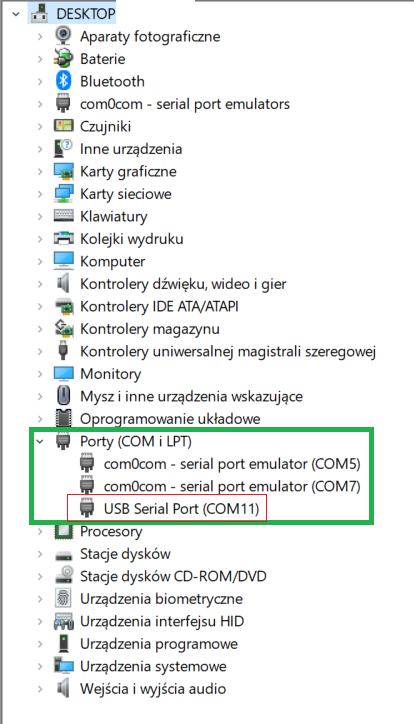
USB Serial Port (COM11) is the only new listing I can see after plug TMDSICE3359 to my computer. When I plug some other launchpad, like LaunchXL-F28379D I can see this:

As you can see when I plug LaunchXL-F28379D I can see XDS 100 Serial Port and new category: Texas Instruments Debug Probes. When I plug TMDSICE3359 I can't see anything like that. I read here: processors.wiki.ti.com/.../Installing_JTAG_Header_on_Industrial_Communications_Engine_(ICE) that "The Industrial Communications Engine (ICE) development board is deployed with an XDS100v2 JTAG emulator using an FTDI device." So I presume that I should have an ability to flash the code in CCS like in any other microcontroller. So what is going on? How to establish a proper connection?

Thank you for your answers,

Dawid.

  • Dawid,

    The difference between the TMDSICE3359 and the LaunchXL-F28379D in how they are presented in the Device Manager is simply due to the VID/PID programmed in the FTDI device.

    At a certain point in history, all AM335x development kits that feature a built-in XDS100v2 were programmed with FTDI's factory-programmed VID/PID but with a device description that indicates it is a XDS100v2.

    This is something explained in this old FAQ:
    processors.wiki.ti.com/.../FAQ_-_CCSv5

    Therefore, if the device is correctly programmed from the factory and you have a recent version of CCS, you should not have trouble connecting to CCS.

    Hope this helps,
    Rafael
  • Hi, thank you for your answer.

    Sure, it resolved problem about name in COM Port list. But still I don't know why I can't see TI Debug Probes in Device Manager.
    In the meantime I found this: processors.wiki.ti.com/.../ICE_AM335x_Hardware_Setup
    and I found out that I need to choose ICE_AM3359 and manually choose xds110v2 configuration. Process of loading code into processor is also different?
  • Dawid,

    Dawid Balcerzak said:
    But still I don't know why I can't see TI Debug Probes in Device Manager.

    Since the FTDI on the ICE board usually uses the factory-configured VID/PID, it is not recognized as a Texas Instruments Debug Probes but instead as a regular USB device, as shown below:

    Dawid Balcerzak said:
    In the meantime I found this: processors.wiki.ti.com/.../ICE_AM335x_Hardware_Setup
    and I found out that I need to choose ICE_AM3359 and manually choose xds110v2 configuration. Process of loading code into processor is also different?

    The configuration shown at the reference seems consistent with your board and XDS100v2 Debug Probe. I am not entirely sure what you mean by your last sentence.

    Regards,

    Rafael