This thread has been locked.

If you have a related question, please click the "Ask a related question" button in the top right corner. The newly created question will be automatically linked to this question.

Compiler/AM5728: Const table error

Part Number: AM5728

Tool/software: TI C/C++ Compiler

Dear TI,

We were compiling some test code and found that it was compiling 2 wrong constant values into the constant table.

So upon startup in main, it tries t initialize the variable, and correctly copies all the values from the constant table, BUT the constant table is wrong compared to the C code list...

ie we have a variable

float var[SIZE] = {values, values, values... };

and 2 of the values in the constant table are not what they are in the initializer list.

TIV8.1.5 is the compiler being used for you C66x on the AM5728.

  • For the source file which contains the problem constant table, please submit a test case as described in the article How to Submit a Compiler Test Case.

    Thanks and regards,

    -George

  • I received a test case through other channels.  Thank you.  I compile it down to assembly code, and inspect that.  The problem array is initialized with 576 values.  I spot checked a few of them, and can find no errors.  Which 2 values are in error?  Exactly how did you determine they are in error?  

    Thanks and regards,

    -George

  • As the data values are a covariance matrix, and a computation is being performed on them, I would just save the memory through code composer, import it into matlab and compare against the matlab model.

    When you say you compile it down to assembly code and inspect that, do you mean the *.out file produced after compiling/linking, and you have verified the const data stored there is indeed correct/ matching the initializer list in the C ocde?

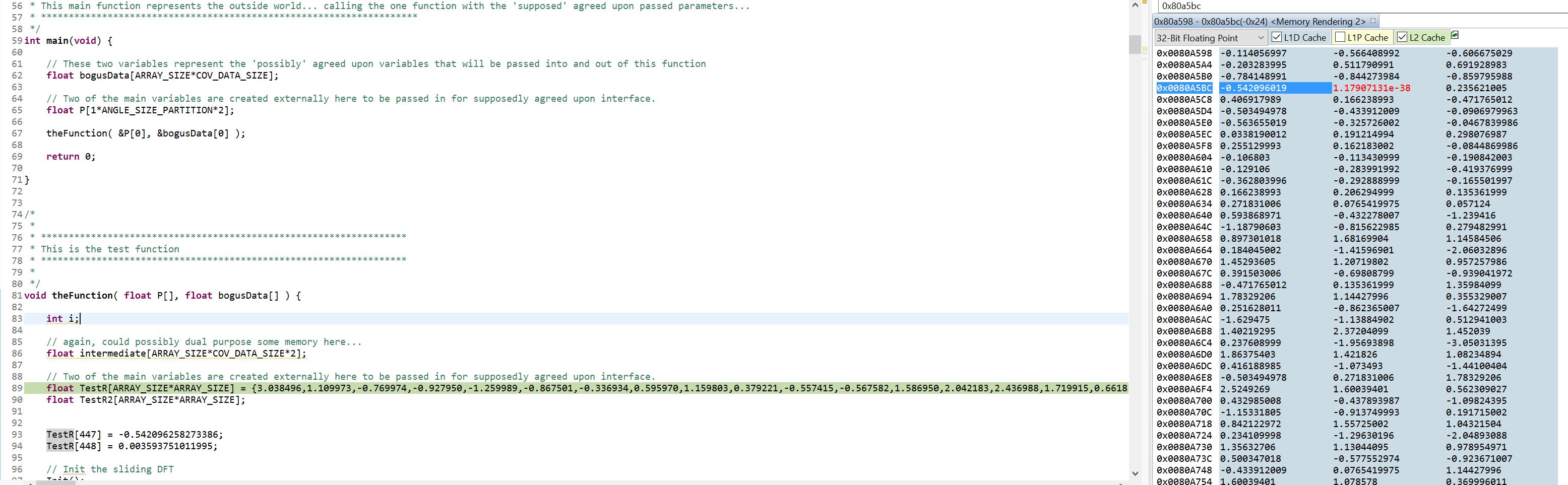
    The two values I found corrupted were 447 and 448 as you will see main calls 'theFunction', which initializes the TestR variable then the next two lines are included below that correct the corrupted memory.

        TestR[447] = -0.542096258273386;
        TestR[448] = 0.003593751011995;

    So after a *.out file is produced I essentially load it into the 5728 with code composer (Ctrl-Alt-L) then it pops up on my screen at the start of main....  When I inspect where the *.map file tells me it put the const data in memory, I find that the above two values are already corrupted and I haven't run any code.

    If the data looks correct in the *.out file, is it possible that when code composer is loading it into the part, it gets corrupted? 

    Please confirm where you checked the const data, and then be sure you tried loading it onto the AM5728 so it goes through whateer process code composer goes through to get it into memory and then see if it's corrupted with no intervention by my user made code.

    Thanks.

  • So I ran it again to be sure.  One mistake in my reporting it to you, but it is still there.

    I have included a screenshot showing the .const section in memory from the *.map file.  the base location is 0x809ec0, and if you add 447*4 for the align by 4 memory, the 447th element appears at 0x80a5bc for the const memory.

    On startup when it gets to main it's not corrupt.  I press F6, and it moves from Main to 'theFunction' call, then I press F5 and it goes into 'theFunction'...  I press F6 and then this screenshot is shown, at that point you can see the corrupedted (red highlighted) .const memory. (the 448th element) So that is when the corruption occurs.

    I ran it again, and took a second screenshot with the disassembly window showing the exact assembly being executed at that point on my system.  (Which should be identical to what I sent you in every way)

    I have all other processors disconnected except the A15_0 but it is suspended.  Is it possible caching? or something else is corrupting it?  To my knowledge nothing else is running, so it's really confusing why I'm seeing this.

    Obviously once it's corrupt, the memcpy works and successfully copies the corrupted const memory, and then the computations fail appropriately.  Also, once I start changing the code and the compiler 'jiggles' everything around, then this particular 'manifestaion' of the problem goes away and I have problems elsewhere (functions fail etc.that would otherwise work now.)  So the thought is whatever is causing this corruption is just 'moving' and corrupting something else...  So I'm using this as a test case to find out what is possibly causing it.

    Let me know if your able to replicate the images above.

    Thanks.

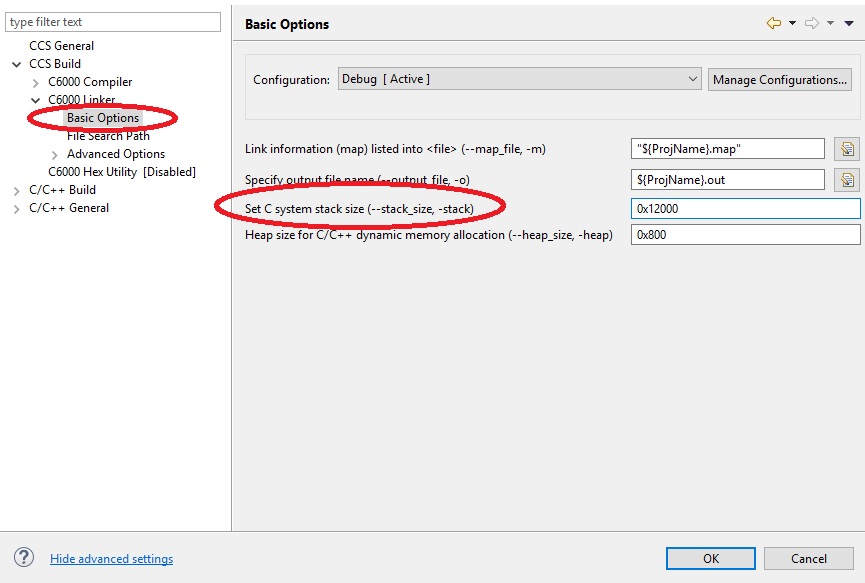
  • You are overflowing the stack.  By a lot.  You allocate 0x800 (2048) bytes for the stack.  But you need at least 0x12000 (73728) bytes.  I compute the amount of stack needed with the utility call_graph from the cg_xml package.  Change the amount of stack used with the project build settings.  Use the screen shot below.

    Thanks and regards,

    -George

  • Thanks for your help.