This thread has been locked.

If you have a related question, please click the "Ask a related question" button in the top right corner. The newly created question will be automatically linked to this question.

CCS/AM5728: Unable to create a new RTSC platform for a device family different from C2800

Part Number: AM5728

Tool/software: Code Composer Studio

Hi,

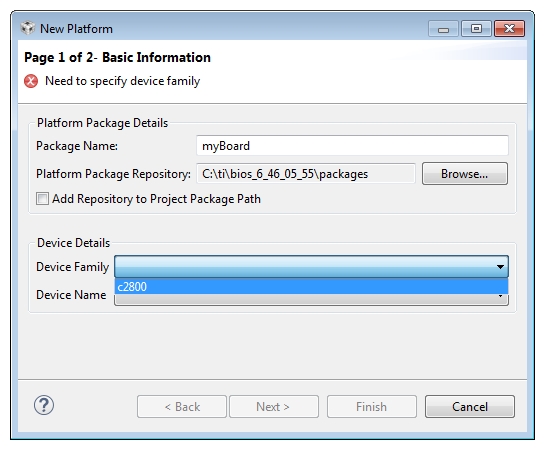
When trying to create a new RTSC platform, the "device family" pull-down list only shows "C2800" option, so I can't create a new platform based on a different processor family. My CCS version is 7.3.0.00019.

Any ideas... ?
  • Hi again,

    Things went worse.

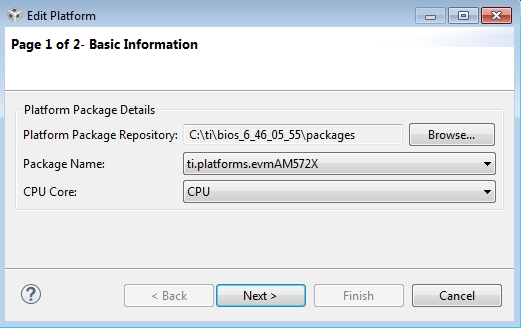
    After editing the "GPP" core of the original platform "ti.platforms.evmAM572X" (just to add a memory segment) I've found that the options "GPP", "DSP" and "M4" of the CPU Core pull-down list dissapeared, and they all were replaced by a unique option named "CPU".

  • Hi Daniel,

    What version of XDCtools are you using?

    Todd
  • Hi Todd,

    I've got the following versions installed: 3.32.01.22 , 3.32.02.25 , and 3.50.03.33 (CCS v7 setup and RTOS processor SDK installed them all) but the active project (an older stuff) is pointing to the version 3.32.01.22
  • Daniel,
    device families are found in products selected in Window->Preferences->Code Composer Studio->Products->RTSC. If you can post a screenshot of that window, it would help me figure out why only c2800 shows up under Device Family.
    There is also a possibility that something went wrong while the Platform Wizard was searching for supported device families. If an error was encountered, there would be an error message in the file .log that you can find in the directory .metadata in your workspace. I would like to see that file too.

    The directory specified under Platform Package Repository is not where the Platform Wizard looks for the device families. That is the location where your new platform will be saved. You probably don't want to save it in your SYS/BIOS installation.

    Also, editing manually created platforms in the Platform Wizard is usually not a good idea. These platforms contains more complicated code that the Platform Wizard can't process.

    So, to summarize your choices, you can either
    a) create a new platform with the Platform Wizard, and for that we need to figure out why you are not seeing all device families, or
    b) if you think you can get the platform content that you need by editing evmAM572X, you should make the changes in a text editor and then rebuild the platform on the command line by running the xdc command in the platform's directory.
  • I reinstalled ccs and processor sdk rtos, so the missing device families are available again.

    I'll try to manually edit the platform

    Thanks!

    Daniel

  • Hi Sasha,

    I was finally able to create the new platform based on a previous one with some modifications. Is it possible to move the new platform to another folder than the default repository (C:\ti\bios_6_46_05_55\packages\ti\platforms) ?. It seems that CCS doen't "see" the new platform if placed in other folder.

    Thanks in advance,

    Daniel

  • You can move platform packages, but you have to make sure that the package name in package.xdc corresponds to the directory path in the new location. If a platform package's name is for example pkgs.myPlatform then that platform must reside in
    <repository name>/pkgs/myPlatform.
    <repository name> can be any directory.

    When you say that CCS can't find the platform, which CCS component are you talking about? The Platform Wizard has its own algorithm for searching for platforms, which I described in my previous post. When you are building a project, the selected platform is found along the package path, which is defined on per-project basis and can be different from the path that the Platform Wizard is using.