This thread has been locked.

If you have a related question, please click the "Ask a related question" button in the top right corner. The newly created question will be automatically linked to this question.

CCS/AM4377: Debug configuration setting

Part Number: AM4377


Tool/software: Code Composer Studio

Hi,

There is a problem that run-> debug, cortex A 9 connect, program load, etc. can not be done by the following selection in Debug configuration setting.

device:AM 4377
CCS:CCSv 7.1.0

Synchronize the properties for all complicated CPUs

selected
[run-> debug, connect, load] :possible
Unselected
[run-> debug, connect, load] :impossible (An error has occured)

Please tell me details of this option.
Does any one of the compatible cores have something to do with it?
What is the property of this description?

Best Regards,
Shigehiro tsuda 

  • Tsuda-san

    shigehiro tsuda said:
    [run-> debug, connect, load] :impossible (An error has occured)

    Can you provide more details on the error? Is there any more description provided in the error message?

    Perhaps a screenshot will help explain

    Also please note that it is holiday season here, with many out of the office on holiday (including myself), hence I apologize in advance for slower than usual responses on the forum

    Thank you

    ki

  • Hi Ki,

    Thank you for quick reply.

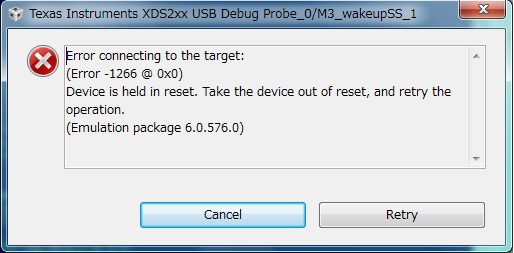
    Error of executing Run->debug is as follows.
    An error has occurred while connecting for cortexM3.
    I think that cortexM3 is not enabled in PRCM setting.

    Do the following options enable the cortexM3 core?

    Synchronize the properties for all complicated CPUs

    Best Regards,
    Shigehiro Tsuda

  • Tsuda-san,

    My apologies for the delay.

    When doing a run->debug, it is trying to connect to the M3. But the M3 is being held in reset.

    Can you provide screenshots of what you describe below:

    shigehiro tsuda said:
    selected
    [run-> debug, connect, load] :possible
    Unselected
    [run-> debug, connect, load] :impossible (An error has occured)

    Thanks

    ki

  • Hello,
    I haven’t heard back from you, I’m assuming you were able to resolve your issue. If not, please post a reply with an update below (or create a new thread).

    thanks,
    ki