This thread has been locked.

If you have a related question, please click the "Ask a related question" button in the top right corner. The newly created question will be automatically linked to this question.

CCS: C2000WARE download error from the cloud

Other Parts Discussed in Thread: C2000WARE

Tool/software: Code Composer Studio

I was trying to install C2000WARE latest version (C2000Ware - v: 1.00.03.00) from the resource explorer but it gave error message: "This package is not supported on win32"
I am using CCS7.4.0.00015 . Is it related to the issue of C2000WARE windows link was actually a link to 64-bit linux version ?


  • I hit the same issue and reported it to the responsible folks last week. It appears that the way the software was packaged for Resource Explorer was incorrect.
    We will address this as soon as possible but in the meantime, you can download and install the software from ti.com.

  • Is there a possibility to add C2000WARE downloaded from the web manually to resource explorer? I tried but the downloaded content seems to lack the metadata folder which links it to GUI. Also it seem that if I don't have the package installed, I cannot build projects using driverlib. Would appreciate some sort of workaround to keep the development going.
  • Siim Pille said:
    Also it seem that if I don't have the package installed, I cannot build projects using driverlib.

    Can you let me know what error you get when building the driverlib projects? A screenshot of the error and a copy of the build log in the CCS console would be helpful to see.

  • I can't reproduce this error when I import and build empty_bitfield_driverlib_project (I tried the example for a couple of devices). The build completes successfully.

    Like you, I too installed the 1.0.3.00 version of C2000Ware from the TI website. But I previously had a 1.0.2.00 that I had installed from Resource Explorer, and that was automatically added to the list of discovered products by CCS. I have since uninstalled that version but I'm not sure if there is some residual effect that is allowing this build to succeed.

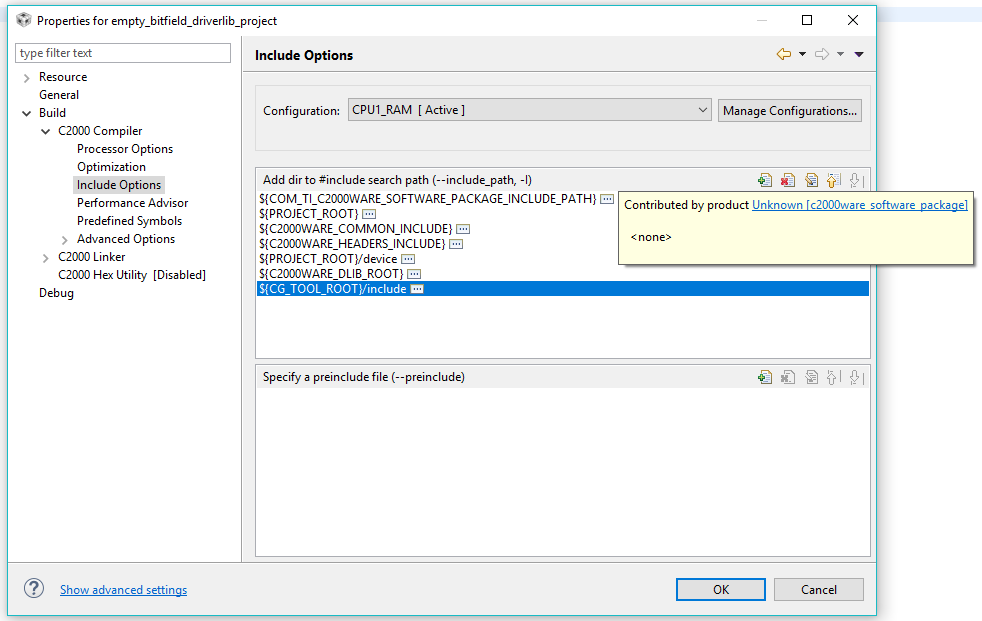
    Did you import the project using menu Project->Import CCS Project? What is the exact path to the project you imported? It looks like some of your paths may not be set correctly. What do your Compiler Include options and Variables look like for the project, in comparison to mine shown below?

  • Yes, some paths were incorrect. I made a new empty project with correct paths to the C2000WARE on the disk and I can access the driverlib now. The problem is that using this method, the driverlib is kind of hardcoded. I think that you might have some residual effect with the paths. For me, it says in the example project that the paths are provided by the software package which is not installed to CCS IDE. I can develop on the hardcoded lib also, but it would be nice to add it as a software package so the updating is not a complete disaster. Have you got any estimate on the fix for resource explorer C2000WARE download?

  • Siim Pille said:
    For me, it says in the example project that the paths are provided by the software package which is not installed to CCS IDE.

    Currently, if you download the C2000Ware package through Resource Explorer it automatically adds it as a product to CCS (ie under Project Properties->General->Products tab, C2000Ware is added as a product), while if you download from TI web, it does not. This causes a conflict if a project that is imported/built once on a CCS with the C2000Ware product added is then imported into a CCS that does not have the product added. There should be no build issues if you directly import an example project from 1.00.03.00 using menu Project->Import CCS Project and browsing to the example directory. Could you confirm if this is accurate in your environment?

    One workaround here could be to download C2000Ware version 1.00.02.00 using Resource Explorer so the product gets added to CCS. Then your project should build. However you would still need to adjust the variable COM_TI_C2000WARE_SOFTWARE_PACKAGE_INSTALL_DIR to the 1.00.03.00 version if you want to use the header files, libraries etc from the new version.

    I will file a bug report so we can address this incompatibility. 

    As for the updated C2000Ware package on Resource Explorer I don't have an estimate of when this will be ready, but I will post an update when I have one.

    Sorry about all the inconvenience, and thank you for your patience.

  • Happy new year!

    I've faced the same problem, and I've tried per your instructions to download the 1.00.02 version, but it throws the same error (same for all versions).
    I think I might have another temporary work-around: in the ccs install directory, inside the "install_info" folder are properties files for (I assume) all the packages downloaded through the Resource Explorer. While I could take a guess on its structure, would you mind sharing yours with us?

    Thank you in advance!

    Εdit: The bug is present in linux installations too.

  • Hi Siim Pille, drm,

    It looks like you are still importing the project from Resource Explorer.  I've just installed C2000ware v1.0.3.0 directly from the web, and I can import and build the project without issues.

    Try this:

    1. Delete your version of C2000ware from C:/TI/ directory.
    2. Download and install C2000ware directly from the web.
    3. Import the project into CCS using the File > Import... > CCS > CCS Projects wizard.

    Thanks,

    - Baltasar

  • Hello

    As Aarti mentioned, there is currently a difference between the version downloaded from TIREX vs ti.com

    For your installations from ti.com, copy the ".metadata" folder (I attached versions for 1.00.02.00 and 1.00.03.00) to root folder of C2000Ware (ex: ~/ti/c2000/C2000Ware_1_02_00_00). This will have this version identified as a product and resolve the difference.

    Example may have to be re-imported (and CCS workspace closed then reopened)

    Best regards

    Chris

    /cfs-file/__key/communityserver-discussions-components-files/81/C2000Ware_5F00_1_5F00_00_5F00_02_5F00_00.zip

    /cfs-file/__key/communityserver-discussions-components-files/81/C2000Ware_5F00_1_5F00_00_5F00_03_5F00_00.zip

  • Thank you, Chris, this was exactly what I needed!