This thread has been locked.

If you have a related question, please click the "Ask a related question" button in the top right corner. The newly created question will be automatically linked to this question.

CCS: Add folder to project without adding all its contents

Other Parts Discussed in Thread: EK-TM4C129EXL

Tool/software: Code Composer Studio

I am using CCS Version: 7.2.0.00013.

If I add a folder to a project, all the contents of that folder become part of that project recursively. Often this is NOT desired.

If I open some TI example programs, for example the TivaWare example program C:\ti\TivaWare_C_Series-2.1.4.178\examples\boards\ek-tm4c129exl\usb_stick_demo, its project contains folders without the extraneous content. See the screenshot:
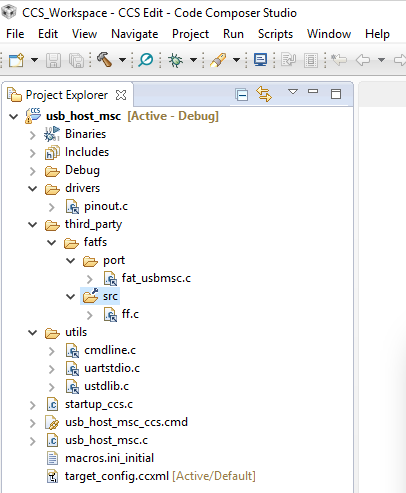
The folder third_party shows only fatfs. The folder fatfs only shows port and src. Each of those only show one file. In reality, many more files are present on the disk in the third_party and fatfs folders. They are not showing up here, and that is exactly what I would like to achieve in my own projects. The question is, how?

I have tried using virtual folders. However in the usb_host_msc example above, third_party is not a virtual folder. Right-clicking and looking at its properties shows that it is a regular folder. Furthermore there is no icon overlay on the third_party icon.

How is this achieved?

  • Hello,

    If you add a folder to the project, then all files in the folder will be added to the project. You can explicitly exclude files from the build using the "Exclude from build" option when you right-click on a file. But they will be added first.

    twelve12pm said:
    The folder third_party shows only fatfs. The folder fatfs only shows port and src. Each of those only show one file. In reality, many more files are present on the disk in the third_party and fatfs folders. They are not showing up here, and that is exactly what I would like to achieve in my own projects. The question is, how?

    This is the because the TivaWare example project shown has been imported into your workspace and the folders shown are subfolders of the project folder that is in your workspace and NOT the folder of the same name in the TivaWare directory. If you browse to your workspace and go to the project folder, you will see empty folders for drivers and third_party (and subfolders in there). Just folders, no files. The project then has linked files to those folder so the files are in the original tivaware directory, but the folders shown in the project are in the workspace.

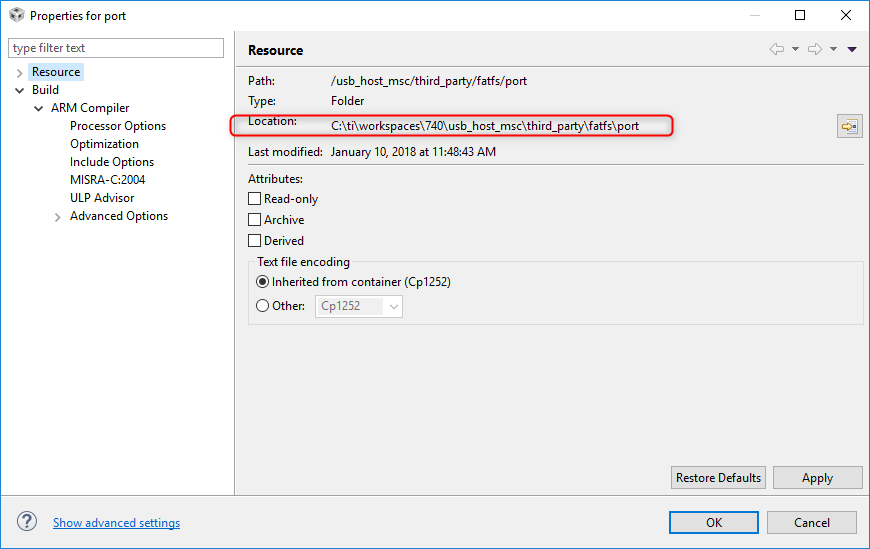
    You can check the location of files and folder via right-clicking on the item and selecting properties. The first screenshot below shows that the "port" folder is in my workspace folder:

    While the "fat_usbmsc.c" file is a linked file from the original location in TivaWare:

    Thanks

    ki 

  • Thank you for the very detailed answer with screenshots. That does indeed answer what happened. It is confusing until you know what happened and why. Thanks again