This thread has been locked.

If you have a related question, please click the "Ask a related question" button in the top right corner. The newly created question will be automatically linked to this question.

CCS/TMS320F28377S: CCS

Part Number: TMS320F28377S
Other Parts Discussed in Thread: C2000WARE

Tool/software: Code Composer Studio

Hello,

I am using CCS V7 on windows 10

I have created one library and it works perfect. but when i link that library to main source file, i am getting error #1965: cannot open source file.


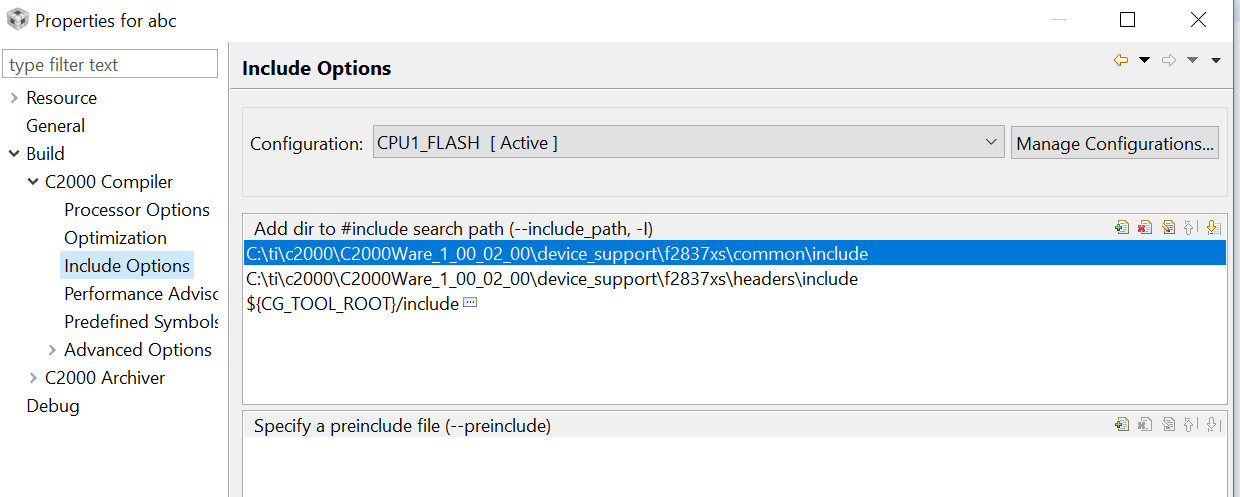
In compiler option i added path of that header file but not working.

(I have created library in C++).

 following are some  screenshots.
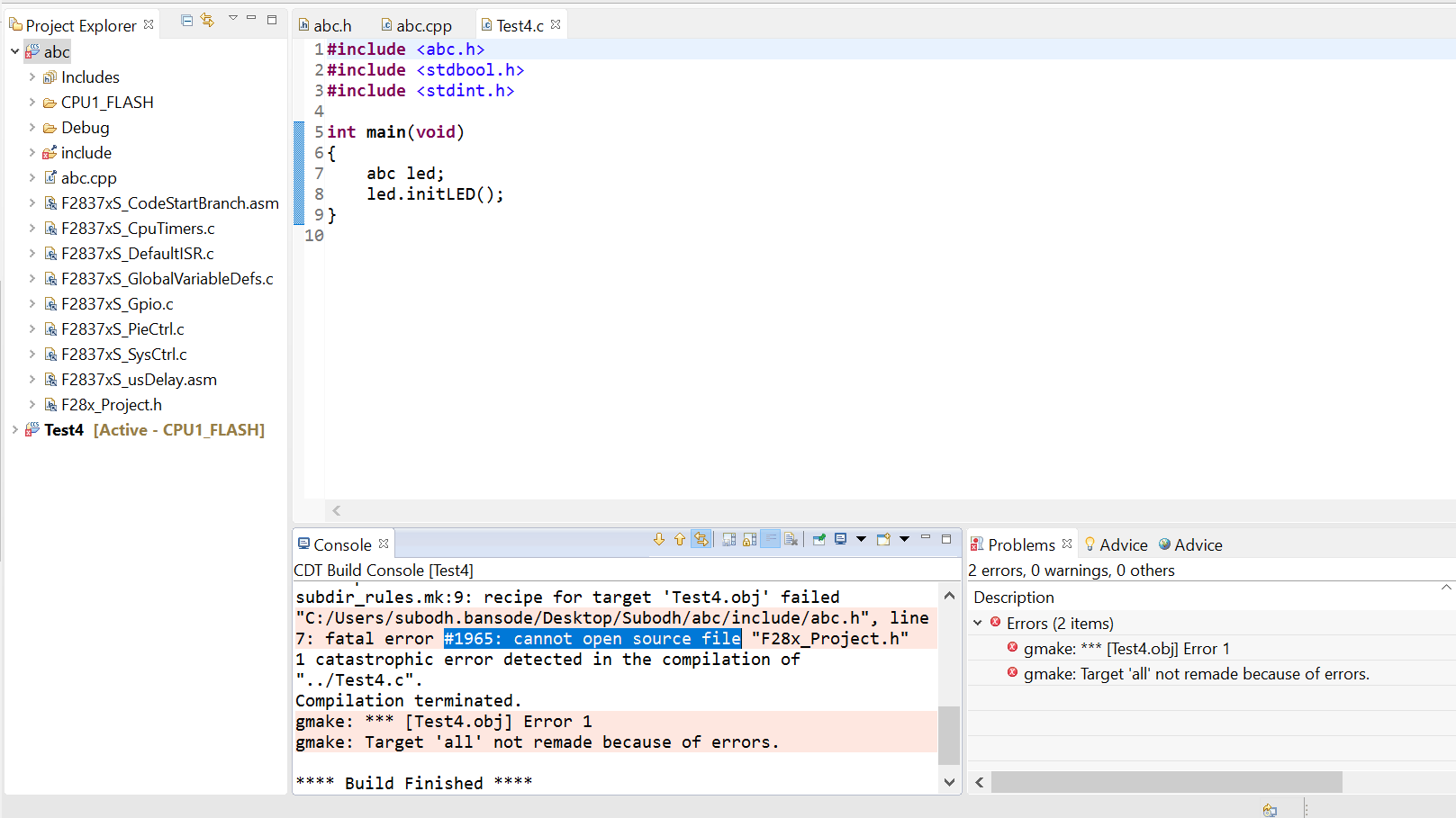
  • Following is error details:


    **** Build of configuration CPU1_FLASH for project Test4 ****

    "C:\\ti\\ccsv7\\utils\\bin\\gmake" -k -j 4 all -O
    'Building file: ../Test4.c'
    'Invoking: C2000 Compiler'
    "C:/ti/ccsv7/tools/compiler/ti-cgt-c2000_16.9.4.LTS/bin/cl2000" -v28 -ml -mt --cla_support=cla1 --float_support=fpu32 --tmu_support=tmu0 --vcu_support=vcu2 -O2 --include_path="C:/Users/subodh.bansode/Desktop/Subodh/Test4" --include_path="C:/Users/subodh.bansode/Desktop/Subodh/abc/include" --include_path="C:/ti/ccsv7/tools/compiler/ti-cgt-c2000_16.9.4.LTS/include" --cpp_default --diag_warning=225 --diag_wrap=off --display_error_number --preproc_with_compile --preproc_dependency="Test4.d_raw" "../Test4.c"

    >> Compilation failure
    subdir_rules.mk:9: recipe for target 'Test4.obj' failed
    "C:/Users/subodh.bansode/Desktop/Subodh/abc/include/abc.h", line 7: fatal error #1965: cannot open source file "F28x_Project.h"
    1 catastrophic error detected in the compilation of "../Test4.c".
    Compilation terminated.
    gmake: *** [Test4.obj] Error 1
    gmake: Target 'all' not remade because of errors.

    **** Build Finished ****
  • Take a look at you second screenshot, specifically the include search path that you added:

    C:\ti\c2000\C2000Ware_1_00_02_00\device_support\f2837xs\common\include

    This is correct. That is where F28_Project.h is.

    Now look at the build output in your console:

    Subodh Bansode said:
    **** Build of configuration CPU1_FLASH for project Test4 ****

    "C:\\ti\\ccsv7\\utils\\bin\\gmake" -k -j 4 all -O
    'Building file: ../Test4.c'
    'Invoking: C2000 Compiler'
    "C:/ti/ccsv7/tools/compiler/ti-cgt-c2000_16.9.4.LTS/bin/cl2000" -v28 -ml -mt --cla_support=cla1 --float_support=fpu32 --tmu_support=tmu0 --vcu_support=vcu2 -O2 --include_path="C:/Users/subodh.bansode/Desktop/Subodh/Test4" --include_path="C:/Users/subodh.bansode/Desktop/Subodh/abc/include" --include_path="C:/ti/ccsv7/tools/compiler/ti-cgt-c2000_16.9.4.LTS/include" --cpp_default --diag_warning=225 --diag_wrap=off --display_error_number --preproc_with_compile --preproc_dependency="Test4.d_raw" "../Test4.c"

    >> Compilation failure
    subdir_rules.mk:9: recipe for target 'Test4.obj' failed
    "C:/Users/subodh.bansode/Desktop/Subodh/abc/include/abc.h", line 7: fatal error #1965: cannot open source file "F28x_Project.h"
    1 catastrophic error detected in the compilation of "../Test4.c".
    Compilation terminated.
    gmake: *** [Test4.obj] Error 1
    gmake: Target 'all' not remade because of errors.

    **** Build Finished ****

    Notice how none of the include search paths passed to the compiler are the one you added in the dialog.

    Note sure what went wrong but I do see that you are using file specific options for some of your files/folders. This could explain the discrepancy. 

    Thanks

    ki

  • Oh wait, I noticed something else. The build properties you showed was for the "abc" project but the project you are building is the "Test4" project. Do you have the same paths for Test4?
  • Yes both has same path....
  • Check the file specific options. The build output clearly shows that those paths are not getting passed to the compiler
  • I want to ask you one question :
    If i am using header file from other folder and i include path of that header files. Suppose included header files has again one more header files, so in that case how to add path of second header files.
    Is it same way or different ?
    ( main.c ---->main.h--->main1.h-->main2.h )
  • That is correct. You would need to add the path to that second header file so the the compiler can find it.