This thread has been locked.

If you have a related question, please click the "Ask a related question" button in the top right corner. The newly created question will be automatically linked to this question.

CCS: Make not found for ccs 7.1


Tool/software: Code Composer Studio

I have installed CCS 7.1.0 and i am importing a program which was build in CCS 3.3. The program imports . But while building, it says :make not found in path" . i have tried to change the CCS workspace but that did not help. i have also tried to change the Project> properties> CCS build "use default build command". But thie default build command option cannot be checked. in previous threads i read that the "make not found" problem was supposed to be resolved in CCS 5.5 onwards. i am using CCS 7.1 please suggest some help

  • Rupak,

    Here is a reference with some initial things to check:

    http://processors.wiki.ti.com/index.php/Build_Errors_in_CCS#CCS_gmake_errors

    In a previous post, you had posted that a similar error was resolved after changing permission on project files. Could that be the case here as well?

    Do you see this issue only when importing the CCS 3.3 project into CCSv7 and not with other example projects or new projects created with CCSv7? If so, it may have something to do with either the way the CCS 3.3 project is set up or with the project import process, in which case the best solution may be create the project from scratch in CCSv7.

  • AARTI G 

    thank you for replying.. i am trying to import the same program about which i posted a similar question earlier. at that time, changing the status of project files resolved the issue. Bt the make not found is coming up again now. the project files are already taken care of. im posting the exact issue. could you provide some more help without the option of writing the same program again in CCS 7.4 ?

    14:12:57 **** Build of configuration Debug for project sincos ****
    all
    Cannot run program "": Launching failed

    Error: Program "" not found in PATH
    PATH=[C:/ti/CCS 7.4/ccsv7/eclipse/jre/bin/client;C:/ti/CCS 7.4/ccsv7/eclipse/jre/bin;C:/ti/CCS 7.4/ccsv7/eclipse/jre/lib/i386;C:\WINDOWS\system32;C:\WINDOWS;C:\WINDOWS\System32\Wbem;C:\WINDOWS\System32\WindowsPowerShell\v1.0\;C:\Program Files\MATLAB\MATLAB Production Server\R2015a\runtime\win64;C:\Program Files\MATLAB\MATLAB Production Server\R2015a\bin;C:\Program Files\MATLAB\MATLAB Production Server\R2015a\polyspace\bin;C:\Program Files (x86)\Skype\Phone\;C:\Program Files\MATLAB\R2009a\bin;C:\Program Files\MATLAB\R2009a\bin\win64;C:\Users\Admin\AppData\Local\Microsoft\WindowsApps;;C:\ti\CCS 7.4\ccsv7\eclipse;]

    14:12:57 Build Finished (took 136ms)

  • Rupak,

    Could you first confirm if you are able to successfully build other TI provided example projects or new projects created in CCSv7.4?
    That will help isolate if the issue is project specific or more systemic. Btw, which target device are you working with?

    Have you tried the suggestion mentioned in this post already?

    Finally if the above suggestions do not help, we would need to see your project so we can try to reproduce the issue. We might need the CCS 3.3 project as well.
    Would you be able to zip up and attach both projects here? 

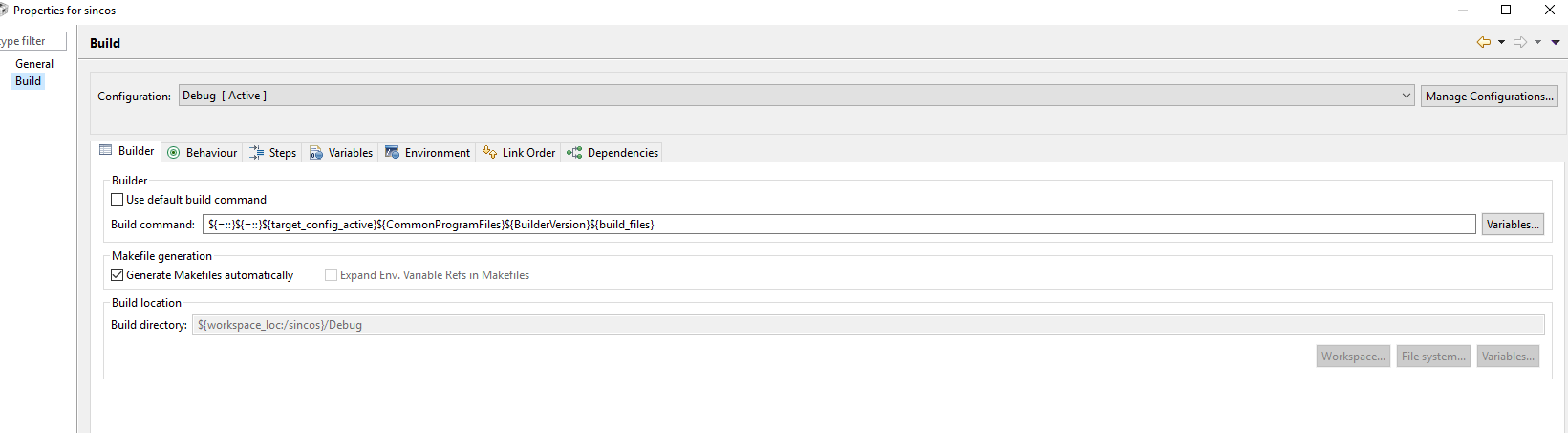
  • thanks a ton AartiG for the help. i have completely uninstalled CCS 7.4 and have freshly installed CCS 6.2  After installing the C2000 compiler i am trying to build the same previous program with the following build settings

    And the while building the project i am getting the following error : 

    rror: Program "::${=::}C:\Program Files (x86)\Common Files0.0.4" not found in PATH
    PATH=[C:/ti/ccsv6/eclipse/jre/bin/client;C:/ti/ccsv6/eclipse/jre/bin;C:/ti/ccsv6/eclipse/jre/lib/i386;C:\WINDOWS\system32;C:\WINDOWS;C:\WINDOWS\System32\Wbem;C:\WINDOWS\System32\WindowsPowerShell\v1.0\;C:\Program Files\MATLAB\MATLAB Production Server\R2015a\runtime\win64;C:\Program Files\MATLAB\MATLAB Production Server\R2015a\bin;C:\Program Files\MATLAB\MATLAB Production Server\R2015a\polyspace\bin;C:\Program Files (x86)\Skype\Phone\;C:\Program Files\MATLAB\R2009a\bin;C:\Program Files\MATLAB\R2009a\bin\win64;C:\Users\Admin\AppData\Local\Microsoft\WindowsApps;;C:\ti\ccsv6\eclipse;]

    23:38:09 Build Finished (took 63ms)


    **** Build of configuration Debug for project sincos ****

    Nothing to build for project sincos

    Can you please suggest some help ?

  • You have a custom build command rather than the default build command that is typically used for most CCS managed make projects. 

    Your custom build command is not familiar to me, so I cannot tell you what it should be. You would need to check into what that command is intended to do
    and what it needs to look like for this project. 

    Some background information on managed make projects and the default build command can be found in the Projects handbook here, in case that is helpful.

  • Rupak,

    You may wish to contact MathWorks Technical Support for assistance with this.

    -Brian

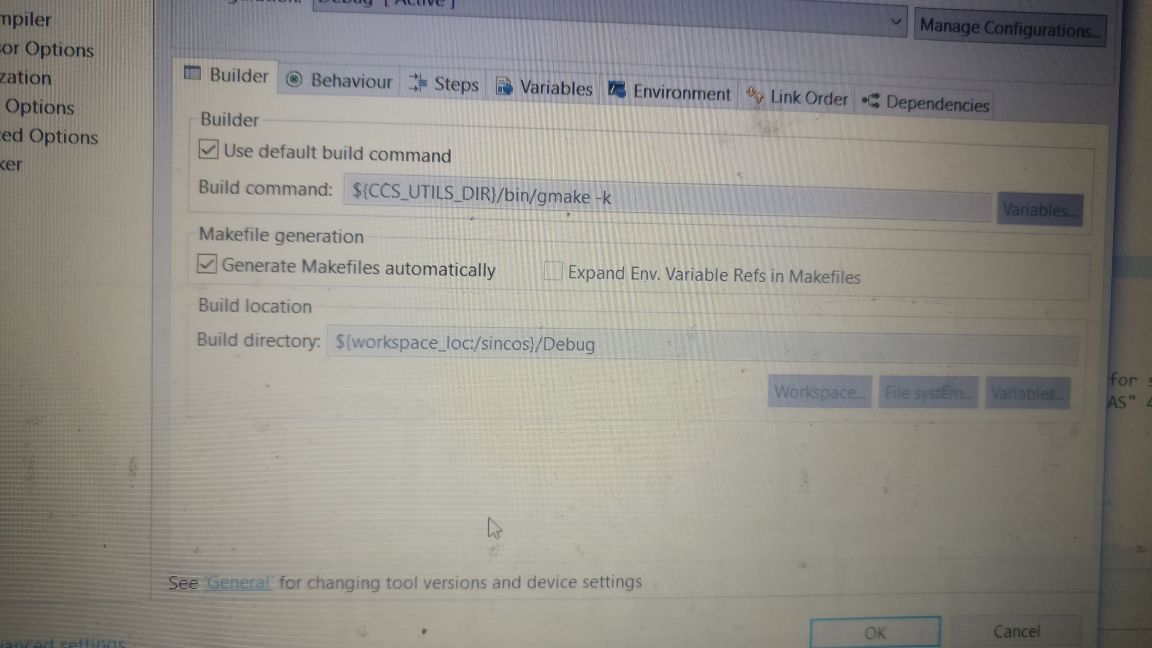
  • Aarti Thank you for your constant support. it seems i am stuck with the same problem. i tried to run the same program in another system. the program runs fine with the default build settings as in the screenshot. 

    But in my system, this "use default build command" cannot be checked. i have tried the variables option but the BIN option is not available there. any idea on how to check this default build setting option ?

  • Rupak Chakraborty said:
    But in my system, this "use default build command" cannot be checked.

    Is that option grayed out, thereby not allowing you to check it? There must be something different about your environment/installation if the same project works on another system, however I unfortunately cannot point to any one specific root cause.