This thread has been locked.

If you have a related question, please click the "Ask a related question" button in the top right corner. The newly created question will be automatically linked to this question.

CCS: CCS7 import controsuite issue


Tool/software: Code Composer Studio

hi

I use last CCS7 .  but when I import contrsuit 's HVkits program ,I find  one component need install ,but I don't know what it is , and how install it .
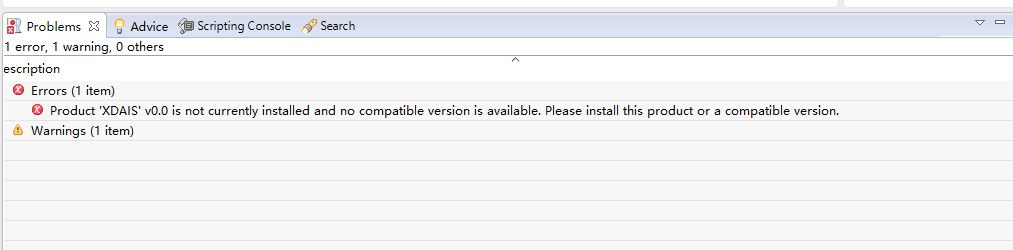
please help !

best regard ,

hunk

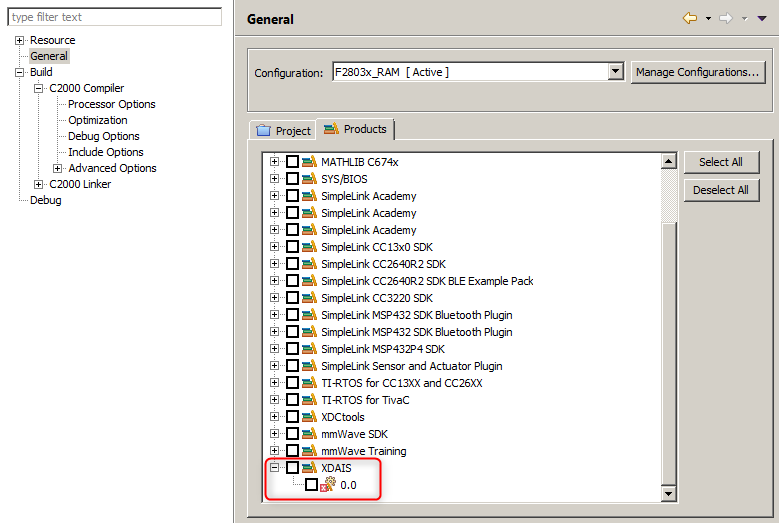
  • This product is actually not required for the project to build and run successfully, so you can simply disable it. Go into the Project Properties->General->Products tab and uncheck the XDAIS entry. Then your project should build fine.

  • thank you AartiG:

    but ,when I resolved that error .   next step , I meet two warning:

    you know , I use ccs7 now ,   but controsuit 's hvkits program has ccs4 or ccs5. I know ,  

    how will i do these warnings?

  • The first warning about "build attribute vendor section" is described in this link. You can either ignore the warning or suppress it as indicated in the article.

    The second warning is just informing you that the project was created with a compiler version that you currently do not have installed, hence it is going to use another (newer) version of the compiler during build. If the build itself completes without issues, this warning can also be ignored. In some cases, it may be necessary to install the older compiler version in order to be able to import and build the project. But that is not the case here, as it is just a warning and not an error.